





- Sku:
- Vendor: SecurityAustralia
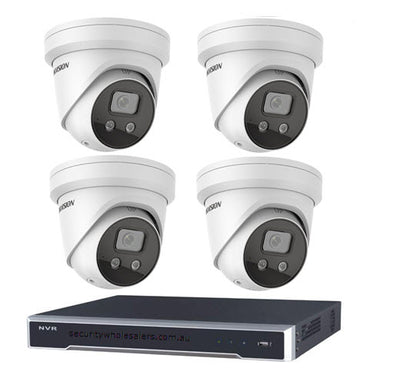
Build Your Own Hikvision Kit
The Build Your Own Hikvision Kit delivers complete flexibility for buyers who want a tailored surveillance system without committing to a pre-packaged bundle. Choose your own cameras, recorder, and accessories to match your exact site requirements and budget. Mix and match from the full Hikvision range to build a system that fits - no compromise on spec or channel count.
Why This Model
- Full component control: Select exactly the cameras, recorder, and channel count you need rather than paying for equipment your site doesn't require.
- Hikvision ecosystem compatibility: Every component is sourced from the same manufacturer, ensuring seamless integration between cameras, NVRs, and smart features like AcuSense and ColorVu.
- Scalable from day one: Build a small 4-camera setup now and expand later by adding cameras or upgrading to a higher-channel recorder without replacing your existing hardware.
All IP cameras and recording devices (NVR’s/DVR’s) are covered by a 3 year back-to-base manufacturer warranty.
Our warranty is limited to the replacement of faulty items or parts and does not include damage due to incorrect fitting of parts or accessories, or damage due to mishandling the equipment once out of the box. All faults are sent to the manufacturer for inspection and diagnosis before a replacement is sent out.
Read more about the Terms & Conditions here – https://www.securityaustralia.com.au/terms-and-conditions/
*Just spend over $200 to activate Fast Free Shipping!
Despatch Times: Products are despatched on the same day if the order was placed before 11am on any weekday, Monday - Friday. All other orders are processed and despatched within 24 hours or next business day.
Order Confirmation: Once you place an order, you will receive a confirmation email. This indicates that your order has been received in our system and is now being processed for dispatch. If your item is back-ordered or unavailable, we will notify you via email, and if we do not receive a response, we will attempt to contact you by phone as soon as possible. We value your time and strive to be prompt. If your item(s) are available for immediate shipment (within 2 days), we will process the charges and prepare the order for shipping.
Shipping Times: General shipping times for StarTrack, TNT and Allied couriers are between 1-3 working days from despatch. Longer delivery times may be caused by your package being held at your local courier depot that is beyond our control. Please contact us or the local post depot for confirmation.
Tracking Numbers: all tracking numbers will be emailed to you by our warehouse processing team within the day, after your order is despatched to our local courier.
Have a question?

Build Your Own Hikvision Kit
Model: Build Your Own Hikvision Kit
Who This Is For
When matching the right camera to every location - rather than compromising with a fixed bundle - is the priority, the Build Your Own Hikvision Kit is the right starting point. This page is built for buyers who already know their site has mixed requirements: a loading dock that needs long-range IR coverage, a reception area that suits a discreet dome, and a car park entry that calls for a turret with wide-angle optics. Pre-packaged kits force one camera type across every position. This configurator lets you select exactly the cameras your layout demands, pair them with a correctly sized NVR, and avoid paying for channels or hardware you will never use. It suits installers quoting a specific job, small business owners planning their first system, and property managers specifying an upgrade without locking into a format that does not fit their building.
What This System Actually Does
Mix Camera Types by Location
Different positions on any site have different demands. This configurator lets you select a dome for indoor areas, a bullet for long outdoor approaches, and a turret for eaves and soffits - all in a single order, all within the same Hikvision ecosystem so they record to one NVR without compatibility issues.
Right-Size Your NVR
A pre-built kit assigns a fixed NVR channel count whether it fits your plan or not. Here you choose the recorder to match the number of cameras you actually need - 4, 8, 16, or more channels - and select storage capacity based on your retention requirements, not a manufacturer default.
Hikvision Ecosystem Compatibility
Every camera and NVR you select comes from the Hikvision range, so network setup, remote viewing through Hik-Connect, and firmware updates all work through a single platform. There is no cross-brand integration to troubleshoot and no feature gaps caused by mixing manufacturers.
PoE Simplicity
Pairing a PoE-capable Hikvision NVR with PoE cameras means a single Cat5e or Cat6 cable carries both power and data to each camera. No separate power supplies at each mounting point, which simplifies the cable run and reduces installation time on new builds and retrofits alike.
Expand Without Starting Over
Selecting an NVR with spare channels from the start means adding cameras later is straightforward - run a cable, connect, and the recorder is already configured to accept it. Choosing the right channel count now avoids replacing the entire NVR when requirements change in 12 or 24 months.
Who Buys This Model
- Installers quoting mixed-use sites: A job with both indoor and outdoor positions rarely suits a single camera type. This configurator allows line-item selection so the quote matches the site plan exactly.
- Small business owners upgrading piecemeal systems: Businesses replacing a mix of analogue and IP cameras use this page to consolidate onto a single Hikvision NVR and select only the camera models that suit each remaining position.
- Property managers specifying multi-tenancy buildings: Strata and commercial property managers who need consistent brand and warranty across a site, but different camera formats for car parks, lobbies, and perimeter fencing, use the configurator to build a coherent system without fixed bundle constraints.
- IT managers planning staged rollouts: Organisations deploying cameras in stages select an NVR with headroom now and return to this page to add cameras as budget and construction phases allow - all confirmed compatible before purchase.
Honest Assessment
The build-your-own approach genuinely suits sites where no single pre-packaged kit covers the camera mix required. Staying within the Hikvision ecosystem means every camera you select will work with the NVR without firmware conflicts, and remote viewing, motion alerts, and AI features function as Hikvision intends. Channel planning is also straightforward when you are choosing the NVR yourself - you are not inheriting a 4-channel recorder when your site needs 6 positions.
Where this approach takes more effort is in the planning stage. You need to know your camera count, cable run distances, IR range requirements, and resolution needs before selecting. Buyers who are uncertain about those variables may find it worth reviewing the pre-configured kit options also available through Security Australia, which pair cameras and NVRs with less upfront planning required.
Before You Buy
Channel Planning Note: Count your camera positions first, then select an NVR with at least 2 spare channels beyond your current count. A site with 6 cameras today should use an 8-channel NVR, not a 6-channel, so expansion does not require replacing the recorder. Also confirm whether your selected NVR is a PoE model - if it is, your cameras must be PoE IP cameras, not analogue or HDTVI types.
Storage Note: NVR storage is determined by the hard drive you install, not the recorder itself. Factor in your camera count, resolution, frame rate, and required retention period (commonly 30 days minimum for commercial sites) before selecting drive capacity. Higher-resolution cameras and continuous recording will fill storage faster than motion-triggered recording at 2MP.
Quick Fit Check
- Good match if: Your site has 3 or more positions with different camera requirements - for example, outdoor bullet coverage on a driveway, dome cameras in a reception area, and a turret on a side gate - and a fixed bundle does not cover that mix.
- Good match if: You are an installer or technically confident buyer who knows your camera count, cable types, and NVR channel requirements and want to select each component individually without paying for hardware that does not fit the job.
- You may need a different model if: You are new to IP surveillance and unsure which camera types suit which positions - a pre-configured Hikvision kit with matched components may be a better starting point, as it removes the selection decisions and arrives ready to install.
Key Features & Technical Specifications
Real-World Scenarios
How It Compares
- Choose this if: Your site requires more than one camera type and a fixed pre-configured bundle would result in the wrong cameras for at least some positions.
- You may need a different model if: You are installing a straightforward single-camera-type system and want everything matched and ready to go - a pre-configured Hikvision kit with a set number of cameras and a paired NVR will be faster to order and simpler to set up.
- Pairs well with: A Hikvision PoE NVR with spare channel capacity, Cat6 cabling, and a correctly sized surveillance-grade hard drive selected to match your camera count and resolution requirements.
Common Questions
-
Will all the cameras I select work with the Hikvision NVR I choose?
Yes, provided you select IP network cameras from the Hikvision range and pair them with a compatible Hikvision NVR. Every camera and recorder listed in this configurator is from the Hikvision ecosystem, which means they share the same network protocol, are managed through the same interface, and are confirmed compatible before you add them to cart. If you are mixing older analogue cameras with a new NVR, check the individual NVR listing to confirm whether it supports analogue inputs as well as IP channels. -
Does the NVR come with a hard drive included?
No, not automatically. NVRs in this range are typically sold without a pre-installed hard drive unless the listing specifically states otherwise. You need to add a surveillance-grade HDD separately, sized to match your camera count, resolution, and how many days of footage you need to retain. A rough guide: a 4-camera system recording at 4MP with 30-day retention at motion-triggered recording typically needs a 2TB to 4TB drive. -
How many channels do I actually need on the NVR?
Select an NVR with at least 2 channels more than your current camera count. If you have 6 camera positions today, choose an 8-channel NVR. NVRs cannot be upgraded to add channels later - the channel count is fixed in the hardware. Buying a slightly larger recorder now is considerably cheaper than replacing the entire unit when you add 1 or 2 cameras in the future. -
Will this system work with PoE, or do the cameras need separate power supplies?
It depends on the NVR you select. PoE NVRs supply power to cameras through the same Cat5e or Cat6 cable that carries the video signal - no separate power adaptor at each camera location. Non-PoE NVRs require cameras to be powered independently, either from a nearby 12V DC adaptor or a centralised power supply. Check the NVR listing for the PoE specification before selecting your cameras, and confirm each camera you choose is also PoE-capable if you are going the PoE route. -
Can I view the cameras remotely on my phone?
Yes. Hikvision NVRs support remote viewing through the Hik-Connect app on both iOS and Android. Once the NVR is registered to a Hik-Connect account and connected to your network, you can view live footage, play back recordings, and receive motion alerts from your phone. Each camera does not need its own separate app account - everything routes through the NVR. -
Do I need to be a licensed installer to buy and build this kit?
No. The Build Your Own Hikvision Kit available through Security Australia is open to both trade buyers and end users. That said, if your installation involves running cables through walls or ceilings in a commercial building, or connecting to an alarm system, checking the relevant state licensing requirements for low-voltage installation work in your jurisdiction is advisable before starting. -
What if I can't find a specific Hikvision model in the configurator?
Use the search bar at the top of the page and enter a partial model number or product name. The Hikvision range is broad, and not every model is listed in the category navigation. If you type in the first part of a SKU - for example "DS-2CD" for a specific IP camera series - matching results will appear and can be added to cart directly.
Downloads & Resources
No downloads available for this product.