





- Sku: DS-KM8301
- Vendor: SecurityAustralia
Hikvision DS-KM8301 Concierge Master Station, 7 inch TFT Display, Camera
Why This Model
- Remote door control: Concierge staff can unlock doors and manage access directly from the terminal, removing the need to physically attend entry points across a building.
- Live view across the site: The ability to pull live feeds from multiple door stations and IP cameras means the concierge has a single point of visual oversight without switching systems.
- Noise suppression and echo cancellation: Built-in audio processing ensures clear two-way communication even in busy lobby environments where background noise would otherwise degrade calls.
Downloads & Resources
User Manual - DS-KM8301 Datasheet - DS-KM8301 Quick Start Guide - DS-KM8301All IP cameras and recording devices (NVR’s/DVR’s) are covered by a 3 year back-to-base manufacturer warranty.
Our warranty is limited to the replacement of faulty items or parts and does not include damage due to incorrect fitting of parts or accessories, or damage due to mishandling the equipment once out of the box. All faults are sent to the manufacturer for inspection and diagnosis before a replacement is sent out.
Read more about the Terms & Conditions here – https://www.securityaustralia.com.au/terms-and-conditions/
*Just spend over $200 to activate Fast Free Shipping!
Despatch Times: Products are despatched on the same day if the order was placed before 11am on any weekday, Monday - Friday. All other orders are processed and despatched within 24 hours or next business day.
Order Confirmation: Once you place an order, you will receive a confirmation email. This indicates that your order has been received in our system and is now being processed for dispatch. If your item is back-ordered or unavailable, we will notify you via email, and if we do not receive a response, we will attempt to contact you by phone as soon as possible. We value your time and strive to be prompt. If your item(s) are available for immediate shipment (within 2 days), we will process the charges and prepare the order for shipping.
Shipping Times: General shipping times for StarTrack, TNT and Allied couriers are between 1-3 working days from despatch. Longer delivery times may be caused by your package being held at your local courier depot that is beyond our control. Please contact us or the local post depot for confirmation.
Tracking Numbers: all tracking numbers will be emailed to you by our warehouse processing team within the day, after your order is despatched to our local courier.
Have a question?
Hikvision DS-KM8301 Concierge Master Station, 7 inch TFT Display, Camera
Model: DS-KM8301
Who This Is For
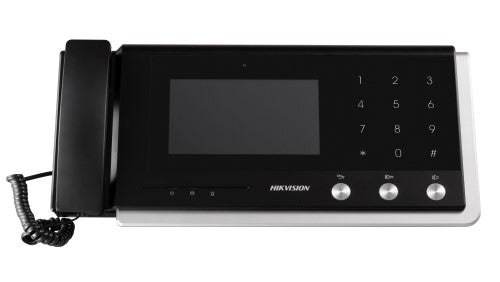
When managing visitor access across a multi-storey residential or commercial building is the priority, the Hikvision DS-KM8301 Concierge Master Station gives building managers and concierge staff a central point of control. Installed at the front desk or building manager's office, this unit ties together door stations, room stations, and IP cameras on a single network-based interface. Staff can see live video from entry points, answer calls from residents or visitors, and release door locks - all from the 7-inch TFT touchscreen without leaving the desk. It suits strata-managed apartment buildings, serviced offices with a staffed reception, and residential towers where a concierge is responsible for managing access and responding to intercom calls across multiple floors or entry points. The combination of built-in microphone, loudspeaker, and CMOS camera also means the master station itself can be used for face-to-face video communication with visiting technicians or management.
What This Camera Actually Does
7-Inch TFT Touchscreen
The 7-inch colour TFT LCD at 1024 x 600 resolution gives concierge staff a clear, easy-to-read display for monitoring door stations and IP cameras. The capacitive touch interface, combined with touch keys and physical buttons, keeps operation straightforward under busy front-desk conditions.
Remote Door Release
Staff can unlock doors directly from the master station without needing a separate access control terminal. The unit supports remote unlocking via its relay and on-off outputs, allowing the concierge to grant entry after verifying a visitor on screen.
Live View of Door Stations and IP Cameras
Beyond intercom calls, the DS-KM8301 supports live monitoring of connected door stations and networked IP cameras. This lets concierge staff keep an eye on entries and common areas between calls, not just when someone presses a door station button.
Two-Way Audio with Noise Suppression
A built-in omnidirectional microphone and loudspeaker handle two-way audio in handsfree mode. Noise suppression and echo cancellation keep conversations clear in busy lobby environments. An external handset port is also available for situations where privacy or a quieter call is needed.
Alarm Processing
The unit includes alarm processing capability with 4 on-off inputs and 2 on-off outputs alongside 2 relay outputs. This allows integration with door sensors, emergency buttons, or other alarm devices, centralising security event handling at the concierge desk.
Gigabit Network Integration
A single RJ-45 Gigabit Ethernet port connects the DS-KM8301 to the building network, carrying video, audio, and control data over one cable. TCP/IP and RTSP protocol support keeps it compatible with standard IP intercom and camera infrastructure.
Who Buys This Model
- Strata Building Managers: Residential towers and apartment complexes using Hikvision video intercom systems, where a central desk unit is needed to manage calls from multiple door stations and room stations across floors.
- Serviced Office and Commercial Building Operators: Staffed reception environments that need to verify visitors on camera, speak with them via intercom, and release entry doors - all from a single desk-mounted unit.
- Security Integrators Specifying Multi-Tenant Systems: Installers building out Hikvision IP intercom systems across larger sites who need a master station with RS-485 ports and I/O terminals for integration with third-party access control or alarm devices.
- Aged Care and Healthcare Facility Managers: Sites requiring a central point to manage resident room calls and monitor entry points, where the handsfree audio and live camera view simplify day-to-day access management for front-desk staff.
Honest Assessment
The DS-KM8301 does its core job well: it gives building concierge and management staff a clear, single-screen interface for handling intercom calls, viewing door station feeds, and releasing locks without needing a separate workstation. The 7-inch touchscreen is a practical size for desk use, and the combination of two-way audio with noise suppression and echo cancellation means call quality holds up in noisy lobby environments. The RS-485 ports and I/O terminals also give integrators room to connect third-party hardware without workarounds.
Where it has limits: the built-in camera is 0.3 MP CMOS, which is functional for face-to-face desk communication but not suitable as a room surveillance camera. This unit also requires 12 VDC power supply - it does not support PoE, so a separate power run to the desk position is needed. For sites needing a software-based management client rather than a physical master station, a different product type from the Security Australia range would be more appropriate.
Before You Buy
Power Supply Note: The DS-KM8301 runs on 12 VDC (not PoE), consuming up to 10 W. A dedicated 12 V DC power supply must be run to the installation point - plan for this during rough-in, particularly if the concierge desk or building manager's office is not already near a 240 V outlet suitable for a 12 V adapter. The unit will not power from the same PoE switch feeding your door stations.
System Compatibility: The DS-KM8301 is designed for use within Hikvision's baseline video intercom system. Confirm that your door stations and room stations are from the compatible Hikvision intercom product range before specifying this unit. Mixed-brand intercom systems will require additional integration work and are not guaranteed to function with all features.
Quick Fit Check
- Good match if: You are building out a Hikvision IP video intercom system in a multi-tenant residential or commercial building and need a physical concierge desk unit with a touchscreen, two-way audio, live camera view, and remote door release in one device.
- Good match if: Your installation requires I/O integration - the 4 on-off inputs, 2 on-off outputs, and 2 relay outputs allow alarm devices, emergency buttons, or door sensors to feed into the master station, which suits more complex building security setups.
- You may need a different model if: Your site does not have a staffed concierge position and instead requires software-based management from a PC or server - a video intercom management platform product type would be more suitable for unmanned or remote monitoring scenarios.
Key Features & Technical Specifications
Real-World Scenarios
How It Compares
- Choose this if: You need a physical desk-mounted master station with a large touchscreen, built-in camera, two-way audio, and direct I/O connections for a staffed concierge or building management position in a Hikvision intercom system.
- You may need a different model if: Your site requires software-based intercom management from a PC workstation rather than a dedicated hardware terminal - a video intercom management software platform product type handles that use case without a physical master station.
- Pairs well with: Hikvision IP video door station units at building entry points, and Hikvision room station units in individual tenancy spaces - together forming a complete networked video intercom system.
Common Questions
-
Does the DS-KM8301 work with PoE switches, or does it need a separate power supply?
No - the DS-KM8301 requires a 12 VDC power supply and does not support PoE. A separate power run to the installation point is required. The unit draws up to 10 W, so a standard 12 V DC adapter with sufficient current rating is needed. Plan for a 240 V power point near the desk or cable a 12 V supply back to a central power distribution point during rough-in. -
Will this master station work with non-Hikvision door stations or third-party intercom hardware?
Not natively. The DS-KM8301 is designed for use within the Hikvision baseline video intercom system. It uses TCP/IP and RTSP protocols over a Gigabit Ethernet network, so while IP camera live view may extend to compatible streams, full intercom functionality - including call handling, door release, and room station communication - is designed for Hikvision intercom components. Third-party integration would require custom development and is not supported out of the box. -
Can concierge staff use this unit to monitor IP cameras, not just door stations?
Yes. The DS-KM8301 supports live view of both connected door stations and networked IP cameras. This means concierge staff can monitor common areas, lift lobbies, or car park entries from the same 7-inch screen used for intercom calls, without a separate monitor or NVR display. Camera compatibility within the Hikvision ecosystem should be confirmed during system design. -
What are the I/O capabilities, and what can they be used for?
The DS-KM8301 provides 4 on-off inputs, 2 on-off outputs, and 2 relay outputs. The inputs can accept signals from door sensors, emergency call buttons, or alarm devices. The relay outputs can trigger door strikes, electric locks, or external alert devices. The on-off outputs provide additional switching capability. This makes the unit suitable for sites needing alarm event handling and door control beyond basic intercom call management, available through Security Australia for building system integration projects. -
Does the master station support handsfree operation, or does it require a handset to make calls?
Both options are available. The DS-KM8301 supports handsfree mode using its built-in omnidirectional microphone and loudspeaker. For environments where privacy is preferred or background noise is a factor, an external handset can also be connected. Noise suppression and echo cancellation are active regardless of mode, helping to maintain call clarity in busy front-desk settings. -
What video resolution does the DS-KM8301 transmit from its built-in camera?
The built-in CMOS camera captures at up to 1280 x 720 (HD 720p) at 25 fps, or 704 x 576 at 12.5 fps. Video is compressed using H.264. This is adequate for face-to-face desk communication during intercom calls but is not intended as a surveillance camera for room recording. For dedicated room coverage at the concierge desk, a separate IP camera would be required. -
What are the RS-485 ports used for on this unit?
The 2 RS-485 half-duplex ports allow connection to RS-485-compatible devices such as access control panels, card readers, or third-party security hardware. This gives integrators a pathway to extend the master station's control beyond IP-native devices and into installations where RS-485 infrastructure is already in place or preferred.
Cabling Considerations
- Network Cable: Cat5e or Cat6 to the RJ-45 Gigabit Ethernet port - carries all video, audio, and control data between the master station and the network switch.
- Power Cable: 12 VDC supply required - run a dedicated low-voltage cable from a 12 V DC power supply or central power distribution board to the desk position. PoE is not supported.
- RS-485 Wiring: 2 x RS-485 half-duplex ports accept twisted-pair cable to compatible access control or alarm devices - use shielded cable in environments with electrical interference and keep runs within the recommended RS-485 distance limits.
- I/O Wiring: The 4 on-off inputs, 2 on-off outputs, and 2 relay outputs use standard low-voltage wiring to alarm inputs, door strikes, or alert devices - confirm contact ratings of connected devices before wiring relay outputs.