





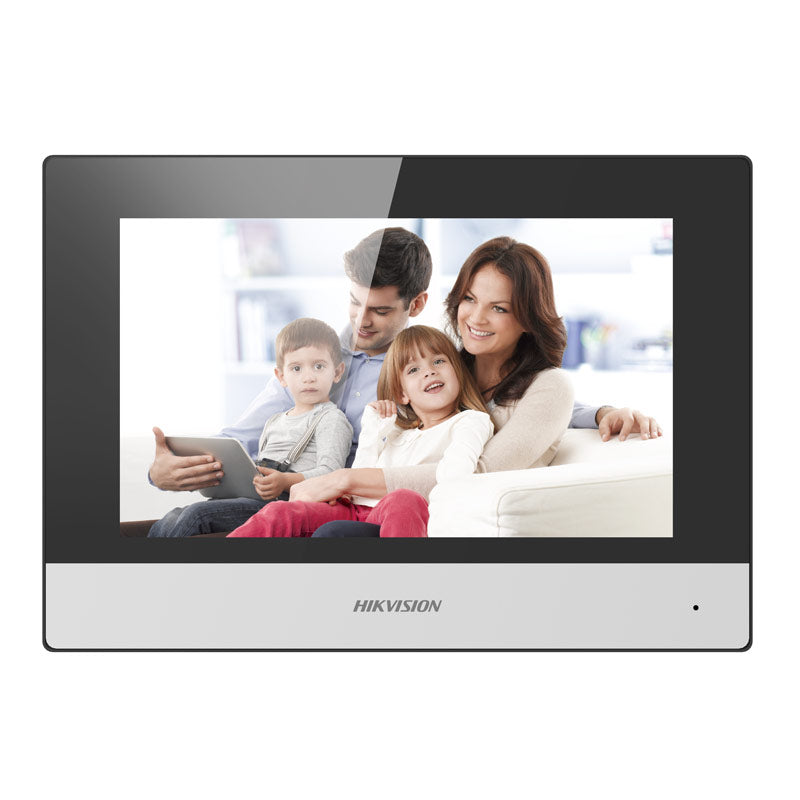
Hikvision DS-KH6320-TE1 Gen2 Video Intercom 7-Inch Touch Screen Indoor Room Station
Why This Model
- Mobile remote unlocking: Residents can release the door directly from a smartphone app or desktop client, adding flexibility beyond the indoor station itself.
- Live view of external cameras: The station can display feeds from connected door stations and external cameras, giving occupants a broader picture before granting access.
- Standard PoE powered: A single Ethernet cable carries both data and power to the unit, keeping wall penetrations and cabling to a minimum during installation.
Downloads & Resources
User Manual Datasheet Operation GuideNeed help choosing?
Click to ask a question - same day response (~2 hours during business hours)
Product Overview
Model: DS-KH6320-TE1
Who This Is For
For integrators and property managers who need a clean, wall-mounted indoor answer point for a Hikvision Gen2 video intercom system, the DS-KH6320-TE1 is the room station that handles the resident-side of the conversation. It suits apartments, townhouses, gated residential estates, and small commercial tenancies where occupants need to see who is at the door, speak back, and release an entry point without leaving the room. The 7-inch IPS touch screen gives a large, readable display even in well-lit interiors, and standard PoE means a single Cat5e or Cat6 cable from a compatible PoE switch or NVR handles both power and data - no separate power adapter required at each room. It also doubles as a live view monitor for connected door stations and external cameras, making it a practical monitoring point within a larger Hikvision intercom deployment.
What This Intercom Actually Does
7-Inch IPS Touch Display
The capacitive IPS touch screen runs at 1024 x 600 resolution, giving a sharp, wide-angle view of whoever is at the door. IPS panel technology keeps colours accurate and the image readable from off-axis viewing angles - useful when the station is mounted at standard door-height in a hallway.
Standard PoE Power
Runs on IEEE 802.3af standard PoE, so a single Cat5e or Cat6 cable delivers both power and network connectivity. This simplifies installation significantly - no local 12 VDC adapter is needed at the room station, though 12 VDC input is also supported where PoE is not available.
Remote Unlocking
Occupants can release the door directly from the indoor station touchscreen, or remotely via the Hik-Connect mobile app or client software. This means someone away from the property can admit a known visitor or delivery without the indoor station needing to ring at all.
Snapshot Capture During Calls
The station can capture a still image from the door station feed during an active video call. Images are stored to a locally inserted TF card (up to 32 GB), providing a local record of visitor activity without requiring a separate NVR or cloud storage subscription.
Live View of Door Stations and Cameras
Beyond answering calls, the DS-KH6320-TE1 can display live video from connected door stations and external IP cameras. This makes it a usable monitoring point within the room - occupants can check entry points on demand without needing a separate monitor or mobile device.
Gen2 UI V2.0 Interface
The Gen2 platform brings Hikvision's updated UI V2.0 to the indoor station - a cleaner menu layout designed to reduce the steps needed for common tasks like answering a call or switching to camera view. For multi-unit installations, consistent UI across all stations reduces end-user support calls.
Who Buys This Model
- Residential Intercom Installers: Specifying a room station for apartment or townhouse Hikvision Gen2 deployments where PoE infrastructure is already in place from the NVR or managed switch.
- Strata and Property Managers: Replacing an ageing indoor handset in an existing Hikvision Gen2 system - the DS-KH6320-TE1 drops in as a like-for-like upgrade with the benefit of the larger IPS display.
- Small Commercial Tenancy Fitouts: Offices or consulting suites where a single room station at reception needs to answer a door station, view external cameras, and allow staff to remotely release entry without leaving their desk.
- Multi-Room Residential Installations: Homeowners running a main indoor station with up to 5 sub-indoor stations distributed through the property - this model supports that sub-station role within the Gen2 architecture.
Honest Assessment
The DS-KH6320-TE1 does the core job of an indoor intercom station well. The 7-inch IPS screen is larger than most competitor room stations at this price point, the PoE power delivery keeps cabling tidy, and the ability to view external cameras from the same interface adds genuine value in residential and small commercial settings. Local TF card snapshot storage is a practical inclusion that does not depend on cloud connectivity. What this station will not do is operate as a standalone device - it requires a compatible Hikvision Gen2 door station and correctly configured network infrastructure to function. It is also bound by the Gen2 architecture: a single call button on the door station maps to one main indoor station only, and each main station supports a maximum of 5 sub-stations. Buyers needing larger distributed intercom networks should review the broader Hikvision intercom range available through Security Australia to confirm the right architecture before ordering room stations.
Before You Buy
Installer Note: The DS-KH6320-TE1 draws standard PoE (IEEE 802.3af) - confirm your switch or NVR PoE output meets this standard before running cable. If powering via 12 VDC instead, ensure the supply is stable and rated for the device. Also note the Gen2 button-assignment limitation before quoting multi-button door station setups: one call button on the door station calls one main indoor station only - it cannot simultaneously ring both a master station and an indoor station from a single button press.
TF Card: A TF card is not included in the box. If local snapshot storage during video calls is required, purchase and insert a TF card (Class 10 or above recommended) up to 32 GB before commissioning. Without it, captures will not be saved locally.
Quick Fit Check
- Good match if: You are installing or expanding a Hikvision Gen2 intercom system and need a PoE-powered room station with a large touch screen that can also display live feeds from connected cameras.
- Good match if: The installation requires local visitor snapshot capture without cloud storage - the TF card slot (up to 32 GB) handles this on-device.
- You may need a different model if: Your project requires a room station with a built-in proximity or PIN reader for combined access control and intercom at the door - a dedicated access control indoor terminal would be more suitable for that application.
Key Features & Technical Specifications
Real-World Scenarios
How It Compares
- Choose this if: You need a PoE-powered Gen2 indoor station with a large 7-inch IPS touch display, local TF card snapshot storage, and the ability to view live feeds from both door stations and external cameras from one screen.
- You may need a different model if: Your installation requires a room station with a smaller form factor or a flush-panel profile - a compact indoor station type would be better suited to installations where wall space or aesthetic requirements limit a 7-inch device.
- Pairs well with: A Hikvision Gen2 PoE door station, a managed PoE switch sized to the number of indoor stations on the project, and a compatible Hikvision IP camera for extended live view coverage from the indoor station screen.
Common Questions
-
Does the DS-KH6320-TE1 work with a standard PoE switch?
Yes. The DS-KH6320-TE1 draws standard IEEE 802.3af PoE, which is supported by the vast majority of managed and unmanaged PoE switches on the market. A single Cat5e or Cat6 cable from any 802.3af-capable port delivers both power and network data. If your switch only supplies PoE+ (802.3at), that will also power this station without issue - PoE+ is backward compatible. -
Will this indoor station work with older Hikvision Gen1 intercom door stations?
No. The DS-KH6320-TE1 is a Gen2 device and is designed to operate within the Hikvision Gen2 video intercom platform. It is not cross-compatible with Gen1 door stations or Gen1 indoor stations. Confirm your door station model is also Gen2 before purchasing this room station. -
Can I press one button on the door station and ring multiple indoor stations at once?
No, not simultaneously. One call button on a Gen2 door station can be assigned to call either a master station or one main indoor station - it cannot ring both from a single button press. If you need to call different apartments or rooms separately, each requires its own button mapped to its respective main indoor station. -
How many sub-stations can I connect to this indoor station?
Up to 5 sub-indoor stations can be connected to each main DS-KH6320-TE1. If additional rooms beyond 5 need coverage, those extra stations must each be configured as separate main indoor stations rather than sub-stations. The door station button assignment architecture then applies to each main station individually. Security Australia stocks a range of compatible Gen2 indoor station models if different screen sizes or form factors are needed across the same installation. -
Does the snapshot capture feature require an internet connection or cloud storage?
No. Snapshots captured during video calls are saved locally to a TF card inserted into the indoor station. No internet connection and no cloud storage account is required for this feature. A TF card up to 32 GB is supported - Class 10 or faster is recommended. Note that no TF card is included in the box. -
Can this indoor station display live video from external IP cameras, not just the door station?
Yes. The DS-KH6320-TE1 supports live view of both connected door stations and external IP cameras from the same 7-inch touch screen. This allows the indoor station to act as a spot-check monitor for cameras installed elsewhere on the property, without a separate NVR display screen being required in the same room. -
Can remote unlocking be done from a mobile phone when I'm away from home?
Yes. Remote unlocking is supported via the Hik-Connect mobile app and Hikvision client software. When a visitor presses the door station, a notification is pushed to the registered mobile device. The user can view the live feed, speak through the door station, and release the entry point from anywhere with a data connection.
Cabling Considerations
- Cable Type: Cat5e minimum, Cat6 recommended for all runs between the PoE switch and each indoor station.
- Max Cable Run: Standard Ethernet limit of 100 m per segment from PoE switch to indoor station. Use a PoE extender or intermediate switch for longer distances.
- PoE Notes: Standard IEEE 802.3af PoE is required at the switch port. If no PoE switch is available, a 12 VDC supply can power the station directly - confirm polarity before connecting.
- Wiring Tips: Run a single Cat6 from the nearest PoE switch port to each indoor station location. Avoid routing data cable parallel to 240 V mains for extended distances - maintain at least 150 mm separation or use screened cable where separation is not achievable. Label each port at the switch with the room location during rough-in to simplify commissioning.
Product Video Samples
Downloads & Resources
What This Product Does
Why This Model
- Mobile remote unlocking: Residents can release the door directly from a smartphone app or desktop client, adding flexibility beyond the indoor station itself.
- Live view of external cameras: The station can display feeds from connected door stations and external cameras, giving occupants a broader picture before granting access.
- Standard PoE powered: A single Ethernet cable carries both data and power to the unit, keeping wall penetrations and cabling to a minimum during installation.
Downloads & Resources
User Manual Datasheet Operation GuideNot sure if this suits your site?
Ask our team before ordering. We can help confirm lens choice, recorder compatibility, mounting accessories and project quantities.
Specifications
Specifications
| System Parameters | ||
|---|---|---|
| Operation System: | Embedded Linux Operation System | |
| Flash: | 32MB | |
| Memory: | 128MB | |
| Display Parameters | ||
|---|---|---|
| Display Screen: | 7-Inch Colorful TFT LCD | |
| Display Resolution: | 1024 × 600 | |
| Operation Method: | Capacitive touch screen | |
| Audio Parameters | ||
|---|---|---|
| Audio Input: | Built-in Omnidirectional Microphone | |
| Audio Output: | Built-in Loudspeaker | |
| Audio Compression Standard: | G.711 U | |
| Audio Compression Rate: | 64 Kbps | |
| Audio Quality: | Noise Suppression and Echo Cancellation | |
| Network Parameters | ||
|---|---|---|
| Wired network: | 10/100 Mbps self-adaptive network | |
| Network Protocol: | TCP/IP, SIP, RTSP | |
| Network interface: | 1 RJ-45 10/100 Mbps self-adaptive | |
| Device Interfaces | ||
|---|---|---|
| Alarm Input: | 8-ch alarm inputs | |
| TF Card (micro SD card): | Max to 32 G, SD 2.0 or lower version | |
| General | ||
|---|---|---|
| Power Supply: | IEEE802.3af standard PoE, 12 VDC/1A | |
| Power Consumption: | ≤6W | |
| Working Humidity: | 10% to 90% | |
| Working Temperature: | -10° C to + 55° C (14° F to 131° F) | |
| Dimensions(L × W × H): | 200 mm × 140 mm × 15.1 mm (7.9" ×5.5" × 0.6") | |
Videos
Get Product Help
Ask our team before ordering. We can help confirm lens choice, recorder compatibility, mounting accessories and project quantities.
Shipping & Warranty
3 Years Manufacturer Warranty
All IP cameras and recording devices (NVR’s/DVR’s) are covered by a 3 year back-to-base manufacturer warranty.
Our warranty is limited to the replacement of faulty items or parts and does not include damage due to incorrect fitting of parts or accessories, or damage due to mishandling the equipment once out of the box. All faults are sent to the manufacturer for inspection and diagnosis before a replacement is sent out.
Read more about the Terms & Conditions here – https://www.securityaustralia.com.au/terms-and-conditions/
Free Delivery* & Despatch Time
*Just spend over $200 to activate Fast Free Shipping!
Despatch Times: Products are despatched on the same day if the order was placed before 11am on any weekday, Monday - Friday. All other orders are processed and despatched within 24 hours or next business day.
Order Confirmation: Once you place an order, you will receive a confirmation email. This indicates that your order has been received in our system and is now being processed for dispatch. If your item is back-ordered or unavailable, we will notify you via email, and if we do not receive a response, we will attempt to contact you by phone as soon as possible. We value your time and strive to be prompt. If your item(s) are available for immediate shipment (within 2 days), we will process the charges and prepare the order for shipping.
Shipping Times: General shipping times for StarTrack, TNT and Allied couriers are between 1-3 working days from despatch. Longer delivery times may be caused by your package being held at your local courier depot that is beyond our control. Please contact us or the local post depot for confirmation.
Tracking Numbers: all tracking numbers will be emailed to you by our warehouse processing team within the day, after your order is despatched to our local courier.

Get expert advice
Tell us what you need help with and our team will send practical product advice straight to your inbox.
Hikvision DS-KH6320-TE1 Gen2 Video Intercom 7-Inch Touch Screen Indoor Room Station