





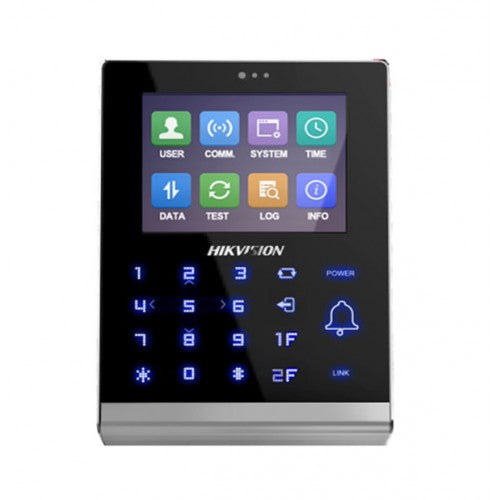
Hikvision DS-K1T105AM Single Door Stand Alone Access Control Terminal
The DS-K1T105AM delivers standalone single-door access control for small businesses and office entrances that need a self-contained, networkable solution without a dedicated controller. A 2.8-inch LCD display, 2MP camera logging every access attempt, and a 100,000-card capacity make it a capable standalone unit. Supports both TCP/IP and Wi-Fi connectivity, and can be programmed directly from the keypad or managed remotely via iVMS-4200.
Why This Model
- Built-in 2MP camera: Every access attempt is photographed and logged, giving you a visual audit trail without needing a separate camera at the door.
- TCP/IP and Wi-Fi dual connectivity: Install where running cable isn't practical - Wi-Fi support means the terminal can connect to your network without a dedicated data run.
- Keypad or software programming: Configure the unit on-site directly from the touchpad, or manage multiple doors centrally through iVMS-4200 - no specialist tools required.
Need help choosing?
Click to ask a question - same day response (~2 hours during business hours)
Product Overview
Model: DS-K1T105M-CN
Who This Is For
When a single-door access control solution needs to run independently - without a dedicated server or always-on PC - the Hikvision DS-K1T105AM is the terminal most installers reach for. It is designed for small commercial premises, strata buildings, gyms, childcare centres, and office suites where one controlled entry point is the brief. The terminal operates fully standalone, manages up to 100,000 card holders and stores up to 300,000 access events locally, and connects via wired TCP/IP or Wi-Fi for optional integration with iVMS-4200 software. The built-in 2MP camera logs an image against every access attempt, giving site managers a visual audit trail without adding a separate camera to the door position. Its 2.8-inch LCD display, touch keypad with blue backlight, and support for card-only or card-plus-PIN modes make it straightforward to configure directly at the terminal or remotely through software.
What This Terminal Actually Does
Standalone Operation
The terminal runs fully offline once programmed. Cards, PINs, and access schedules are stored on-device, so a network outage or software server going down does not lock anyone out. Offline events are captured locally and uploaded when connectivity is restored, avoiding event loss.
Large Card & Event Capacity
Up to 100,000 valid cards and 300,000 access control events can be stored on the device. For a single-door terminal, that capacity covers years of activity logs and large cardholder populations - well beyond what most small commercial sites will ever need.
2MP Image Capture on Every Event
The built-in 2MP camera photographs the person presenting their card at the moment of each access attempt. These images are logged against the event record, giving site managers a visual audit trail for verifying who badged in without needing a separate door camera.
Wired & Wi-Fi Network Support
TCP/IP and Wi-Fi are both supported, which gives installers flexibility at doors where running a data cable is difficult. ISUP5.0 protocol support enables communication over public networks, so the terminal can be managed remotely without a VPN in many configurations.
Multiple Authentication Modes
The terminal supports card only, card plus PIN, and exit button release modes. For sites needing a higher security threshold on a single entry point, requiring both a valid Mifare card and a PIN significantly reduces the risk of tailgating or lost-card misuse.
External Reader & Controller Integration
RS-485 and Wiegand 26/34 interfaces allow the terminal to connect to an external card reader on the exit side, or to pass credentials upstream to a separate access controller. This means the terminal can sit inside a larger access control architecture without replacing existing infrastructure.
Who Buys This Model
- Small business owners: Managing a single staff entry or stockroom door with card-only access and a local event log, where installing and maintaining a full server-based access control system is not justified.
- Strata and building managers: Controlling a single common entry point - gym, plant room, or rooftop access - using Mifare cards already issued to residents, with the terminal operating independently of any building management system.
- Childcare and healthcare operators: Requiring card-plus-PIN dual authentication on a staff-only entry, with image capture at each access event for compliance and incident review.
- Electrical and security installers: Specifying a cost-effective standalone terminal for single-door briefs that still need Wi-Fi flexibility and iVMS-4200 compatibility for clients who want software management later.
- IT managers in small offices: Deploying a networked access terminal that integrates with an existing Hikvision platform via TCP/IP or Wi-Fi without needing additional hardware between the terminal and the management software.
Honest Assessment
The DS-K1T105AM does the single-door standalone brief well. The combination of a 100,000-card capacity, built-in image capture, dual network options, and full offline operation gives installers a capable and flexible terminal for straightforward access control projects. Programming directly from the keypad keeps commissioning time low on simple deployments, and iVMS-4200 compatibility means clients can scale to software-managed control later without replacing the hardware. The M1 card encryption and IP address conflict alarm are practical additions often missing at this price point, and the product is available through Security Australia with local support.
This terminal is a single-door device. If the project involves 2 or more controlled doors, a multi-door access controller with panel-based architecture will be a more appropriate and cost-effective solution. The DS-K1T105AM also does not support face recognition or fingerprint authentication - if biometric verification is a site requirement, a different terminal in the Hikvision range should be specified instead.
Before You Buy
Installer Note: The DS-K1T105AM controls one door but supports both Wiegand 26/34 and RS-485 interfaces for an external reader on the secure side. If the door requires card-out as well as card-in, plan for a second reader wired back to the terminal's Wiegand or RS-485 port - this is not a two-reader panel by default, so confirm the wiring topology with your client before ordering. Also confirm whether the door lock is NO or NC and that the relay output spec matches the lock being installed.
Wi-Fi Note: Wi-Fi connectivity is supported, but for access control applications a wired TCP/IP connection is always preferable where a cable run is feasible. Wi-Fi introduces a dependency on network stability for real-time event upload and remote management - the terminal will continue to operate offline if Wi-Fi drops, but live monitoring through iVMS-4200 will be interrupted until the connection is restored.
Quick Fit Check
- Good match if: You need standalone access control for a single door with a large cardholder database - up to 100,000 cards - and want image logging of every access attempt built into the terminal itself.
- Good match if: The install location makes running a data cable difficult and Wi-Fi network access is reliable, as the terminal's built-in Wi-Fi support removes the need for a wired data run to the door position.
- You may need a different model if: The project covers 2 or more doors - a multi-door access control panel or networked controller will manage multiple entry points more efficiently and at lower per-door cost than multiple standalone terminals.
Key Features & Technical Specifications
Real-World Scenarios
How It Compares
- Choose this if: The brief is a single controlled door with card or card-plus-PIN access, a large cardholder capacity, and the option to operate entirely offline - without committing to a server-based access control platform.
- You may need a different model if: The project involves 2 or more doors - a multi-door access control panel will manage those entry points more efficiently, with centralised credential management and lower per-door hardware cost.
- Pairs well with: A PoE-powered IP door lock or electric strike on the secure side, and an exit reader connected via Wiegand or RS-485 for card-out logging on the interior.
Common Questions
-
Does this terminal work without being connected to a PC or server?
Yes. The DS-K1T105AM is a fully standalone terminal. All cards, access schedules, and PINs are stored on-device, and the terminal continues to grant or deny access during a network outage. Events are logged locally and uploaded to iVMS-4200 automatically when the connection is restored, so no event data is lost. -
Will this terminal work with the Mifare cards we already have?
Yes, provided they are standard Mifare (M1) cards. The terminal supports Mifare card reading and M1 card encryption. If your existing cards use a different technology such as HID Prox or DESFire, they will not be compatible and you would need to re-issue cards or specify a different reader model. -
Can I connect a second card reader on the exit side of the door?
Yes. The terminal has both RS-485 and Wiegand 26/34 interfaces, which allow an external card reader to be connected for exit-side credential verification. This is commonly used when the brief requires card-in and card-out logging for attendance or mustering purposes. The external reader connects back to the terminal rather than to a separate controller. -
How many staff cards can this terminal hold?
Up to 100,000 valid cards. For a single-door terminal this is a very large capacity - most small to medium commercial deployments carry a few hundred to a few thousand active cardholders. The 300,000 event storage capacity means years of access logs can be retained on-device before older records are overwritten. -
Does the terminal support face recognition or fingerprint authentication?
No. The DS-K1T105AM supports card-only and card-plus-PIN authentication modes. The built-in 2MP camera is used for image capture and event logging only - it does not perform facial recognition. If biometric authentication is a site requirement, a Hikvision terminal with fingerprint or face recognition capability should be specified instead. -
Can this terminal be managed remotely without being on the same local network?
Yes. The ISUP5.0 protocol enables communication over public networks, which means iVMS-4200 can connect to the terminal across the internet without requiring a VPN in many configurations. This is useful for multi-site operators or installers managing terminals on behalf of clients from a central location. Security Australia stocks this model and can assist with setup guidance for remote management configurations. -
Can this terminal be used for time and attendance, not just access control?
Yes, in a basic sense. The terminal's event log records each card presentation with a timestamp and a 2MP image, and these records can be reviewed and exported via iVMS-4200. It is not a dedicated time and attendance system with payroll integration, but for small businesses needing a simple clock-in record it functions adequately. The YouTube setup guide linked below covers time and attendance configuration.
Cabling Considerations
- Network Cable: Cat5e or Cat6 for TCP/IP wired connection to network switch or router. Standard RJ45 termination.
- RS-485 Wiring: Use shielded twisted pair (STP) cable for RS-485 runs to external readers or upstream controllers. Keep runs as short as practical and terminate correctly to avoid communication errors.
- Wiegand Wiring: Wiegand 26/34 is supported for both external reader input and controller output. Use a dedicated cable with separate data lines (D0/D1) - do not share cable with power runs.
- Door Lock Wiring: Confirm lock relay output voltage and current rating against the electric lock or strike being installed before wiring. NO and NC configurations should be verified at the terminal before commissioning.
- Wi-Fi Option: If using Wi-Fi instead of a wired data run, ensure the access point signal is stable at the door position before finalising the install. A wired TCP/IP connection is always the preferred option for access control reliability.
Product Video Samples
Downloads & Resources
No downloads available for this product.
What This Product Does
The DS-K1T105AM delivers standalone single-door access control for small businesses and office entrances that need a self-contained, networkable solution without a dedicated controller. A 2.8-inch LCD display, 2MP camera logging every access attempt, and a 100,000-card capacity make it a capable standalone unit. Supports both TCP/IP and Wi-Fi connectivity, and can be programmed directly from the keypad or managed remotely via iVMS-4200.
Why This Model
- Built-in 2MP camera: Every access attempt is photographed and logged, giving you a visual audit trail without needing a separate camera at the door.
- TCP/IP and Wi-Fi dual connectivity: Install where running cable isn't practical - Wi-Fi support means the terminal can connect to your network without a dedicated data run.
- Keypad or software programming: Configure the unit on-site directly from the touchpad, or manage multiple doors centrally through iVMS-4200 - no specialist tools required.
Not sure if this suits your site?
Ask our team before ordering. We can help confirm lens choice, recorder compatibility, mounting accessories and project quantities.
Specifications
Specifications
| System Parameters | ||
|---|---|---|
| Card Reading Frequency: | Mifare Card (DS-K1T105M/M-C): 13.56MHz | |
| Valid Card/ Swiping Record: | 100,000 Cards and 300,000 Swiping Card Records | |
| Operation System: | Linux | |
| Storage: | 256M Storage | |
| Card Reading Mode: | Supports Mifare card reading, including card No. reading & writing function (DS-K1T105M/M-C) | |
| Built-in Micro SD Card: | Max.32G | |
| Camera: | 2MP | |
| Processor: | ≥1GHz, 32 Bit High-performance Processor | |
| Device Interfaces | ||
|---|---|---|
| Accessible Card Reader: | Card Reader | |
| Communication Mode: | TCP/IP, Wi-Fi, RS-485, and Wigand 26/34 (under the card reader mode only) | |
| Output Interface: | Lock Relay × 1, Alarm Relay × 1 | |
| Transmission Rate: | TCP/IP, WIFI: 10/100Mbps Self-adaptive,RS-485: 19200 bps-N-8-1 | |
| Input Interface: | Tamper Alarm × 1, Exit Button × 1, Door Sensor × 1, Alarm Input × 2 | |
| General | ||
|---|---|---|
| LCD Screen: | 320×240 LCD-TFT Display Screen | |
| Working Current: | 500mA ( without Locks) | |
| Key Board: | Keyboard (Back light) | |
| Power Supply: | 12VDC | |
| Audio: | Loudspeaker | |
| LED Indicator: | Power/Status | |
| Certification: | CE, FCC | |
| Working Humidity: | 10% to 90% (Non-Condensing) | |
| Working Temperature : | -20°C to +65°C (-4°F to +149°F) | |
| Dimensions (L×W×H): | 122mm × 82mm × 23mm (4.8'' × 3.2'' × 0.9") | |
| Weight: | 280g (9.88lb) | |
Downloads
Videos
Get Product Help
Ask our team before ordering. We can help confirm lens choice, recorder compatibility, mounting accessories and project quantities.
Shipping & Warranty
3 Years Manufacturer Warranty
All IP cameras and recording devices (NVR’s/DVR’s) are covered by a 3 year back-to-base manufacturer warranty.
Our warranty is limited to the replacement of faulty items or parts and does not include damage due to incorrect fitting of parts or accessories, or damage due to mishandling the equipment once out of the box. All faults are sent to the manufacturer for inspection and diagnosis before a replacement is sent out.
Read more about the Terms & Conditions here – https://www.securityaustralia.com.au/terms-and-conditions/
Free Delivery* & Despatch Time
*Just spend over $200 to activate Fast Free Shipping!
Despatch Times: Products are despatched on the same day if the order was placed before 11am on any weekday, Monday - Friday. All other orders are processed and despatched within 24 hours or next business day.
Order Confirmation: Once you place an order, you will receive a confirmation email. This indicates that your order has been received in our system and is now being processed for dispatch. If your item is back-ordered or unavailable, we will notify you via email, and if we do not receive a response, we will attempt to contact you by phone as soon as possible. We value your time and strive to be prompt. If your item(s) are available for immediate shipment (within 2 days), we will process the charges and prepare the order for shipping.
Shipping Times: General shipping times for StarTrack, TNT and Allied couriers are between 1-3 working days from despatch. Longer delivery times may be caused by your package being held at your local courier depot that is beyond our control. Please contact us or the local post depot for confirmation.
Tracking Numbers: all tracking numbers will be emailed to you by our warehouse processing team within the day, after your order is despatched to our local courier.

Get expert advice
Tell us what you need help with and our team will send practical product advice straight to your inbox.
Hikvision DS-K1T105AM Single Door Stand Alone Access Control Terminal