





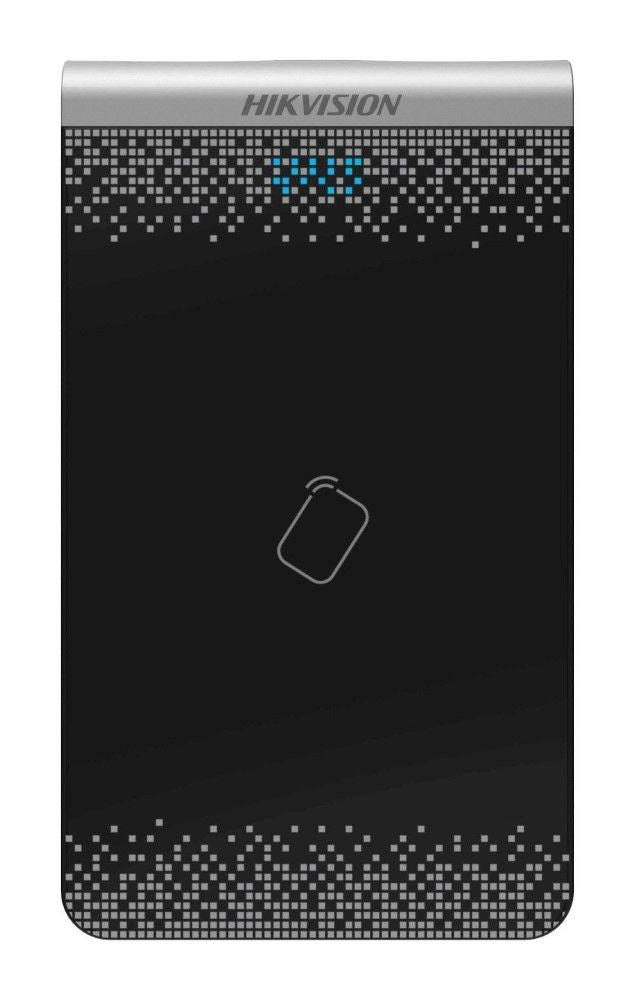
Hikvision DS-K1F100-D8E MiFare Card Video Intercom Card Enrollment Station
Why This Model
- Dedicated card enrolment: Registering MiFare cards via the DS-K1F100-D8E at a desk or PC is far faster and more accurate than enrolling cards one-by-one at the door panel, reducing installer time on large projects.
- Hikvision ecosystem compatibility: Designed specifically for Hikvision video intercom and access control platforms, ensuring seamless card recognition across compatible readers and door stations without compatibility guesswork.
- USB connectivity: Connects directly to a PC or laptop via USB, meaning no additional power supply or software dongles are needed - just plug in and manage cards through Hikvision's configuration software.
Downloads & Resources
DS-K1F100-D8E DatasheetNeed help choosing?
Click to ask a question - same day response (~2 hours during business hours)
Product Overview
Model: DS-K1F100-D8E
Who This Is For
For installers and system administrators who need to enrol MiFare cards into Hikvision video intercom and access control systems without doing it card-by-card at each door station. The DS-K1F100-D8E is a USB-connected desktop enrollment reader that works with Hikvision's iVMS-4200 and access control management software, letting you sit at a PC and batch-issue cards before deployment. This is the tool that makes commissioning a multi-resident apartment building or a multi-door commercial site practical rather than painful. If your project involves issuing ten or more MiFare credentials, this device belongs on the bench before installation begins. It is also the right choice for ongoing card management - adding new residents, revoking lost cards, or re-issuing credentials after a tenancy change - without needing physical access to the door hardware itself.
What This Device Actually Does
USB Card Enrollment
Plugs directly into a Windows PC via USB. When a MiFare card is placed on the reader, the card's unique ID is read and passed to the Hikvision management software. No drivers to hunt down - the device is recognised by iVMS-4200 automatically during the enrollment workflow.
MiFare Card Compatibility
Designed for MiFare (13.56 MHz) cards, which are the credential type used across Hikvision's video intercom door stations and access control readers. Ensures the cards you enrol on the desktop match what the installed readers will accept at the door.
Batch Commissioning
Eliminates the need to walk to each door station to enrol credentials one at a time. Stack your cards at the desk, swipe them through in sequence, assign them to residents or staff in the software, then push the configuration to the system. Cuts commissioning time significantly on larger sites.
Ongoing Credential Management
Useful well beyond initial setup. Property managers and system administrators can use the DS-K1F100-D8E to re-issue cards after a tenancy change, add new staff credentials, or read a card's ID when diagnosing an access fault - without touching the installed hardware.
Software Integration
Works within Hikvision's iVMS-4200 platform and compatible Hikvision access control management software. Card data is captured directly into the software's personnel database, reducing manual data entry errors during large-scale resident or staff enrollments.
Who Buys This Model
- Security Installers Commissioning Apartment Buildings: Multi-resident intercom installs require every resident's MiFare card to be enrolled before handover. Using the DS-K1F100-D8E at the bench rather than at each door station makes this practical on sites with 20, 50, or 200 residents.
- Access Control Integrators: Integrators running Hikvision access control across multi-door commercial premises need a reliable desktop reader to build out the personnel database before the system goes live. This device fits directly into the iVMS-4200 enrollment workflow.
- Property Managers and Building Managers: Sites where tenant turnover is ongoing need a simple way to issue and revoke MiFare credentials without calling an installer each time. The USB desktop form factor makes this a practical tool for an office environment.
- IT and Facilities Teams in Commercial Premises: Organisations managing staff access across a Hikvision access control system can handle day-to-day credential administration in-house using this reader connected to the management PC.
Honest Assessment
The DS-K1F100-D8E does one thing and does it well: it reads MiFare card IDs into Hikvision software from a desktop, removing the single biggest time drain in Hikvision intercom and access control commissioning. For any install involving more than a handful of cards, it pays for itself in saved labour before the first job is done. It is a low-cost, dedicated tool - not a universal enrollment device. It will not enrol EM (125 kHz) format cards, and it is not compatible with non-Hikvision access control platforms. If your project uses a mix of credential types or a different manufacturer's software, this is not the right reader. For Hikvision-based projects, it is available through Security Australia alongside the compatible door stations, intercom kits, and access control hardware it supports.
Before You Buy
Compatibility Note: The DS-K1F100-D8E is a MiFare (13.56 MHz) reader and will only enrol MiFare-format cards. Confirm that the Hikvision door stations or access control readers installed on your site are configured for MiFare credentials before purchasing this enrollment device. If your site uses EM card readers (125 kHz), you will need the appropriate EM enrollment reader instead.
Software Requirement: This device requires Hikvision's iVMS-4200 or a compatible Hikvision access control management application installed on a Windows PC. The reader is not a standalone programmer - it functions as an input device within the software's person/card enrollment screen. Ensure your management PC has the correct version of iVMS-4200 installed and that you have device management privileges before starting enrollment.
Quick Fit Check
- Good match if: You are commissioning a Hikvision video intercom or access control system that uses MiFare cards and need to enrol multiple credentials efficiently from a PC running iVMS-4200.
- Good match if: You manage an existing Hikvision site with ongoing resident or staff turnover and need a desktop tool for day-to-day MiFare card issuance and revocation without visiting the door hardware.
- You may need a different model if: Your installed Hikvision readers use EM (125 kHz) cards rather than MiFare, or if your access control system is from a different manufacturer - in either case, check the enrollment reader range at securityaustralia.com.au for the correct card-format match.
Key Features & Technical Specifications
Real-World Scenarios
How It Compares
- Choose this if: Your Hikvision intercom or access control system uses MiFare cards and you need an efficient desktop enrollment workflow via iVMS-4200 rather than enrolling cards individually at each installed reader.
- You may need a different model if: Your site uses EM (125 kHz) format cards - a different card-type enrollment reader will be required, and the Hikvision enrollment reader range at securityaustralia.com.au covers both formats.
- Pairs well with: Hikvision MiFare-compatible video intercom door stations, Hikvision access control card readers, and Hikvision PoE NVRs or management servers running iVMS-4200.
Common Questions
-
Will this work with any Hikvision access control or video intercom system?
Yes, provided the system uses MiFare (13.56 MHz) cards. The DS-K1F100-D8E is designed specifically for Hikvision's access control and video intercom ecosystem. It integrates with iVMS-4200 and compatible Hikvision access control software, and any Hikvision door station or reader that accepts MiFare credentials will recognise the cards enrolled through this device. -
Does this device work with EM (125 kHz) cards?
No. The DS-K1F100-D8E is a MiFare (13.56 MHz) enrollment reader only. It will not read or enrol EM-format cards. If your installed Hikvision readers are configured for EM credentials, you will need the appropriate EM card enrollment reader. Check your door reader model's datasheet to confirm which card frequency it supports before purchasing an enrollment device. -
Do I need to install any drivers to use the DS-K1F100-D8E?
No separate driver installation is required. The device connects via USB and is recognised directly by Hikvision's iVMS-4200 software during the card enrollment process. You do need iVMS-4200 (or compatible Hikvision access control management software) installed on your Windows PC and appropriate administrator-level access to the personnel and card management functions within the software. -
Can a property manager use this device without an installer being present?
Yes, for routine card management tasks. Once iVMS-4200 is set up and configured by the installer, a property manager or facilities administrator with software access can use the DS-K1F100-D8E to enrol new cards, re-issue replacements, or read a card's ID for diagnostic purposes. Initial system configuration and network setup should still be handled by a qualified installer. The team at Security Australia can advise on what is appropriate for self-managed versus installer-managed workflows. -
Will this work on a Mac or is it Windows only?
iVMS-4200 - the software that drives the enrollment workflow for this device - is a Windows application. For Mac-based management environments, confirm compatibility with your specific Hikvision management software version before purchasing. In most professional installation contexts, a dedicated Windows management PC or server is the standard configuration for Hikvision access control systems. -
How many cards can I enrol using this device?
The DS-K1F100-D8E itself has no card storage limit - it is a reader that passes card IDs to the software. The number of cards you can manage is determined by the capacity of the Hikvision access control system or intercom controller it is connected to, not by the enrollment reader. Check your door controller or intercom system's specifications for its maximum card capacity.
Cabling Considerations
- Connection Type: USB - connects directly to any available USB port on the management PC. No network cabling required for the enrollment reader itself.
- Power: Bus-powered via USB. No separate power supply needed.
- PC Requirements: Windows PC with iVMS-4200 or compatible Hikvision access control software installed. Ensure the PC has network access to the Hikvision system for pushing enrolled card data to door controllers or intercom servers.
- No Field Wiring Required: The DS-K1F100-D8E is a desktop device used at a management workstation, not installed in the field. All cabling considerations for door stations, readers, and controllers are separate from this device.
Product Video Samples
Downloads & Resources
What This Product Does
Why This Model
- Dedicated card enrolment: Registering MiFare cards via the DS-K1F100-D8E at a desk or PC is far faster and more accurate than enrolling cards one-by-one at the door panel, reducing installer time on large projects.
- Hikvision ecosystem compatibility: Designed specifically for Hikvision video intercom and access control platforms, ensuring seamless card recognition across compatible readers and door stations without compatibility guesswork.
- USB connectivity: Connects directly to a PC or laptop via USB, meaning no additional power supply or software dongles are needed - just plug in and manage cards through Hikvision's configuration software.
Downloads & Resources
DS-K1F100-D8E DatasheetNot sure if this suits your site?
Ask our team before ordering. We can help confirm lens choice, recorder compatibility, mounting accessories and project quantities.
Downloads
Videos
Get Product Help
Ask our team before ordering. We can help confirm lens choice, recorder compatibility, mounting accessories and project quantities.
Shipping & Warranty
3 Years Manufacturer Warranty
All IP cameras and recording devices (NVR’s/DVR’s) are covered by a 3 year back-to-base manufacturer warranty.
Our warranty is limited to the replacement of faulty items or parts and does not include damage due to incorrect fitting of parts or accessories, or damage due to mishandling the equipment once out of the box. All faults are sent to the manufacturer for inspection and diagnosis before a replacement is sent out.
Read more about the Terms & Conditions here – https://www.securityaustralia.com.au/terms-and-conditions/
Free Delivery* & Despatch Time
*Just spend over $100 to activate Fast Free Shipping!
Despatch Times: Products are despatched on the same day if the order was placed before 11am on any weekday, Monday - Friday. All other orders are processed and despatched within 24 hours or next business day.
Order Confirmation: Once you place an order, you will receive a confirmation email. This indicates that your order has been received in our system and is now being processed for dispatch. If your item is back-ordered or unavailable, we will notify you via email, and if we do not receive a response, we will attempt to contact you by phone as soon as possible. We value your time and strive to be prompt. If your item(s) are available for immediate shipment (within 2 days), we will process the charges and prepare the order for shipping.
Shipping Times: General shipping times for StarTrack, TNT and Allied couriers are between 1-3 working days from despatch. Longer delivery times may be caused by your package being held at your local courier depot that is beyond our control. Please contact us or the local post depot for confirmation.
Tracking Numbers: all tracking numbers will be emailed to you by our warehouse processing team within the day, after your order is despatched to our local courier.

Get expert advice
Tell us what you need help with and our team will send practical product advice straight to your inbox.
Hikvision DS-K1F100-D8E MiFare Card Video Intercom Card Enrollment Station