




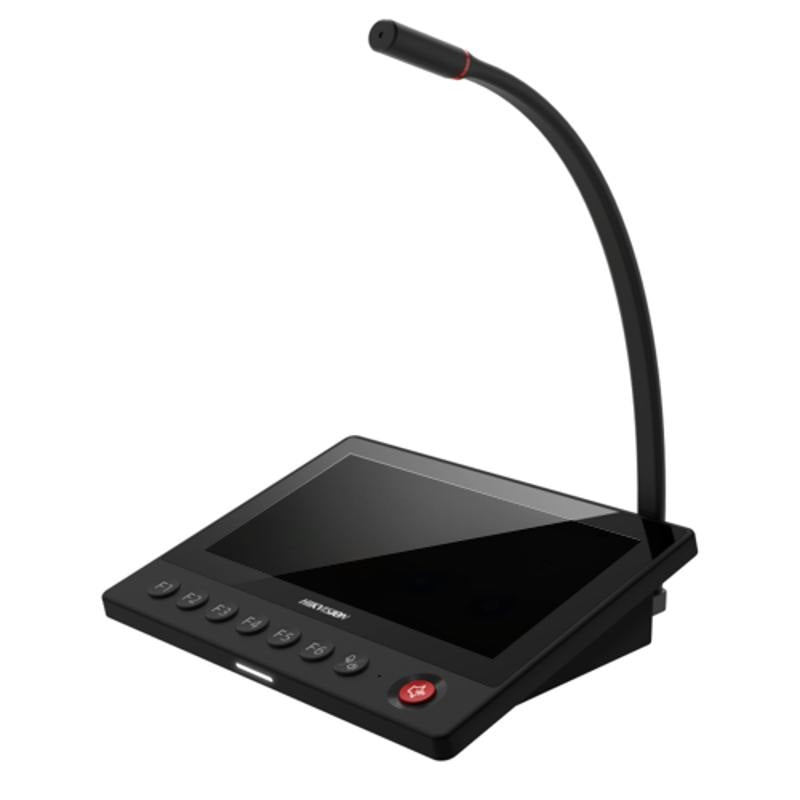
Hikvision DS-QAZ1MP7G1 7-Inch Network Paging Microphone with Live, Schedule & Emergency Broadcast
The DS-QAZ1MP7G1 delivers flexible broadcast control for facilities, retail sites, and commercial premises that need scheduled, live, and emergency paging from a single 7-inch network microphone station. Built on Hikvision's IP audio platform, it supports live announcements, timed schedule broadcasts, and priority emergency override from one intuitive unit. A network connection is required for system integration.
Why This Model
- Three broadcast modes in 1 unit: Live, scheduled, and emergency broadcasting are all handled from a single station, reducing the need for separate controllers or software interfaces on-site.
- Emergency broadcast priority: The dedicated emergency mode overrides scheduled or live broadcasts instantly, making it a practical choice for sites with evacuation or safety announcement requirements.
- 7-inch touchscreen interface: The large display simplifies day-to-day operation for staff who aren't technical users, allowing schedule management and live paging without specialist training.
Need help choosing?
Click to ask a question - same day response (~2 hours during business hours)
Product Overview
Model: DS-QAZ1MP7G1
Who This Is For
Property managers specifying networked public address systems for schools, hospitals, aged care facilities, or commercial buildings will find the Hikvision DS-QAZ1MP7G1 a purpose-built control point for IP-based audio distribution. The 7-inch interface gives operators direct access to live paging, pre-scheduled broadcast routines, and priority emergency announcements - all managed over an existing network infrastructure without a separate analogue PA amplifier. It suits environments where timed bell schedules, zone-based paging, and rapid emergency alerts need to coexist on a single platform. Facilities coordinators who currently manage separate systems for routine announcements and emergency messaging will recognise the operational advantage of consolidating those functions into one network-connected device with a clear touchscreen interface.
What This Device Actually Does
Live Paging
Operators can initiate a live voice broadcast to connected zones or the full facility immediately from the 7-inch touchscreen. No telephone handset or separate intercom unit is required - the built-in microphone captures and transmits speech directly to networked speakers across designated areas.
Scheduled Broadcast
Pre-programmed announcements and bell tones can be scheduled to play automatically at set times throughout the day. This removes the need for manual triggering of routine events like class changes, shift notifications, or opening and closing announcements.
Emergency Broadcast
A dedicated emergency broadcast mode allows operators to immediately override scheduled or live content and push priority audio to all zones simultaneously. This is the critical function for lockdown, evacuation, or emergency alert scenarios where speed and reach matter most.
7-Inch Touchscreen Interface
The integrated 7-inch display gives facility staff a clear, accessible control panel without requiring a dedicated PC or separate controller. Operators can switch between broadcast modes, select zones, and confirm active sessions from the screen directly mounted at the paging station.
Network-Based Architecture
Audio distribution runs over IP rather than traditional analogue wiring, meaning the DS-QAZ1MP7G1 integrates into an existing Cat5e or Cat6 network. This simplifies cabling in new builds and allows the paging system to scale by adding network speakers or additional paging stations without rewiring.
Who Buys This Model
- School Facilities Managers: Specifying a networked bell and announcement system that handles timetabled class changes automatically while retaining a one-touch emergency broadcast capability for lockdown or evacuation events.
- Hospital and Aged Care IT Teams: Deploying IP audio infrastructure across multiple wards or wings where zone-based paging and emergency override broadcasts need to run on the same managed network as other facility systems.
- Commercial Building Managers: Replacing legacy analogue PA equipment with a network-based paging station that can address individual floors or tenant zones independently without additional amplifier hardware at each location.
- Hikvision System Integrators: Adding a front-end paging control point to a Hikvision audio or security installation where a purpose-built network microphone with a display interface is preferable to a software-only client.
Honest Assessment
The DS-QAZ1MP7G1 does three things well: it consolidates live paging, timed schedule management, and emergency broadcast into a single IP-connected device with a proper touchscreen interface rather than a basic push-to-talk handset. For facilities that already run structured Cat5e or Cat6 cabling, the network-based architecture avoids the cost and complexity of laying dedicated analogue PA wiring. The 7-inch screen makes it operable by non-technical staff without training on a separate software client. Where this unit has limits: it is a paging controller, not a standalone PA system. It requires compatible network speakers and a supporting Hikvision audio server or NVR infrastructure to function - it will not drive passive speaker loads directly. Facilities needing a fully self-contained analogue PA solution or a system outside the Hikvision ecosystem should evaluate other product types. The DS-QAZ1MP7G1 is available through Security Australia for integrators specifying Hikvision-based audio distribution projects.
Before You Buy
System Compatibility Note: The DS-QAZ1MP7G1 operates as part of the Hikvision networked audio ecosystem. Confirm your installation includes a compatible Hikvision audio server or supported NVR before ordering - this unit requires backend infrastructure to manage zones, schedules, and broadcast routing. It will not function as a standalone paging device without the corresponding server component on the same network.
Mounting Location: Plan placement at a staffed control point - reception, administration, or a security desk - where the 7-inch touchscreen interface is accessible to authorised personnel. Emergency broadcast functionality is only as useful as the physical accessibility of the device during an incident, so avoid locating it in locked server rooms or unattended areas.
Quick Fit Check
- Good match if: Your facility already runs Cat5e or Cat6 infrastructure and you are deploying Hikvision network speakers - this device slots in as the operator control point for live, scheduled, and emergency broadcasts without additional analogue cabling.
- Good match if: You need non-technical staff to manage routine timetabled announcements and retain immediate emergency override capability from the same interface - the 7-inch touchscreen makes both accessible without a PC or specialist software client.
- You may need a different model if: Your site requires a fully self-contained analogue PA solution with direct speaker drive capability, or you are working outside the Hikvision audio ecosystem - a traditional analogue paging amplifier or a different manufacturer's IP audio platform may be more suitable for your infrastructure.
Key Features & Technical Specifications
Real-World Scenarios
How It Compares
- Choose this if: You are building or extending a Hikvision IP audio network and need a dedicated operator-facing paging station with a touchscreen interface that handles live, scheduled, and emergency broadcast modes without a separate PC client.
- You may need a different model if: Your site runs an analogue PA infrastructure or a non-Hikvision IP audio platform - a standalone analogue paging amplifier or a different manufacturer's network microphone will be a more compatible fit for those environments.
- Pairs well with: Hikvision network ceiling speakers, horn speakers, or amplified speaker stations distributed across facility zones, managed through a compatible Hikvision audio server.
Common Questions
-
Does the DS-QAZ1MP7G1 work as a standalone paging system without additional hardware?
No. The DS-QAZ1MP7G1 is a network paging microphone - it is the operator control point within a larger Hikvision IP audio system. It requires a compatible Hikvision audio server or supported NVR on the same network to manage zones, schedule routines, and route audio to connected network speakers. It will not drive passive speaker loads directly or operate independently without that backend infrastructure. -
Will this device work with non-Hikvision IP speakers or existing analogue PA equipment?
No. The DS-QAZ1MP7G1 is designed to operate within the Hikvision networked audio ecosystem. It is not compatible with third-party IP audio platforms or analogue PA infrastructure without an appropriate interface device. Facilities with existing analogue speaker wiring should verify compatibility with their Hikvision audio server before assuming the existing cabling can be retained. -
Can non-technical staff operate the emergency broadcast function quickly during an incident?
Yes. The 7-inch touchscreen interface is designed for direct operator use without specialist software knowledge. Emergency broadcast is a dedicated mode accessible from the main screen, allowing authorised staff at the paging station to initiate a facility-wide alert without navigating complex menus. This makes it appropriate for reception, administration, and security desk deployment where trained AV technicians are not always present. -
Does the scheduled broadcast mode require manual triggering each day?
No. Scheduled broadcasts are pre-programmed and run automatically at the configured times. Once timetables or daily announcement schedules are set through the system, the DS-QAZ1MP7G1 will trigger those broadcasts without operator input. This is the core function for schools managing class change bells or facilities running consistent daily announcement routines. Changes to schedules are made through the interface or the connected server platform. -
Does the emergency broadcast override active scheduled or live broadcasts?
Yes. Emergency broadcast mode is a priority function designed to interrupt and override any currently active audio, including scheduled tones or live paging sessions. This ensures that an emergency alert reaches all configured zones immediately, regardless of what the system was doing at the time of the alert being triggered. This override behaviour is a standard requirement for compliant emergency notification in schools and healthcare facilities. -
Where can I get technical support or confirm system compatibility for this product?
The DS-QAZ1MP7G1 is stocked by Security Australia, where the team can assist with confirming compatibility with your existing or planned Hikvision audio infrastructure before purchase. For complex multi-zone deployments, it is worth confirming the specific Hikvision audio server model required for your channel and zone count with a qualified integrator prior to ordering.
Downloads & Resources
No downloads available for this product.
What This Product Does
The DS-QAZ1MP7G1 delivers flexible broadcast control for facilities, retail sites, and commercial premises that need scheduled, live, and emergency paging from a single 7-inch network microphone station. Built on Hikvision's IP audio platform, it supports live announcements, timed schedule broadcasts, and priority emergency override from one intuitive unit. A network connection is required for system integration.
Why This Model
- Three broadcast modes in 1 unit: Live, scheduled, and emergency broadcasting are all handled from a single station, reducing the need for separate controllers or software interfaces on-site.
- Emergency broadcast priority: The dedicated emergency mode overrides scheduled or live broadcasts instantly, making it a practical choice for sites with evacuation or safety announcement requirements.
- 7-inch touchscreen interface: The large display simplifies day-to-day operation for staff who aren't technical users, allowing schedule management and live paging without specialist training.
Not sure if this suits your site?
Ask our team before ordering. We can help confirm lens choice, recorder compatibility, mounting accessories and project quantities.
Downloads
Get Product Help
Ask our team before ordering. We can help confirm lens choice, recorder compatibility, mounting accessories and project quantities.
Shipping & Warranty
3 Years Manufacturer Warranty
All IP cameras and recording devices (NVR’s/DVR’s) are covered by a 3 year back-to-base manufacturer warranty.
Our warranty is limited to the replacement of faulty items or parts and does not include damage due to incorrect fitting of parts or accessories, or damage due to mishandling the equipment once out of the box. All faults are sent to the manufacturer for inspection and diagnosis before a replacement is sent out.
Read more about the Terms & Conditions here – https://www.securityaustralia.com.au/terms-and-conditions/
Free Delivery* & Despatch Time
*Just spend over $200 to activate Fast Free Shipping!
Despatch Times: Products are despatched on the same day if the order was placed before 11am on any weekday, Monday - Friday. All other orders are processed and despatched within 24 hours or next business day.
Order Confirmation: Once you place an order, you will receive a confirmation email. This indicates that your order has been received in our system and is now being processed for dispatch. If your item is back-ordered or unavailable, we will notify you via email, and if we do not receive a response, we will attempt to contact you by phone as soon as possible. We value your time and strive to be prompt. If your item(s) are available for immediate shipment (within 2 days), we will process the charges and prepare the order for shipping.
Shipping Times: General shipping times for StarTrack, TNT and Allied couriers are between 1-3 working days from despatch. Longer delivery times may be caused by your package being held at your local courier depot that is beyond our control. Please contact us or the local post depot for confirmation.
Tracking Numbers: all tracking numbers will be emailed to you by our warehouse processing team within the day, after your order is despatched to our local courier.

Get expert advice
Tell us what you need help with and our team will send practical product advice straight to your inbox.
Hikvision DS-QAZ1MP7G1 7-Inch Network Paging Microphone with Live, Schedule & Emergency Broadcast