





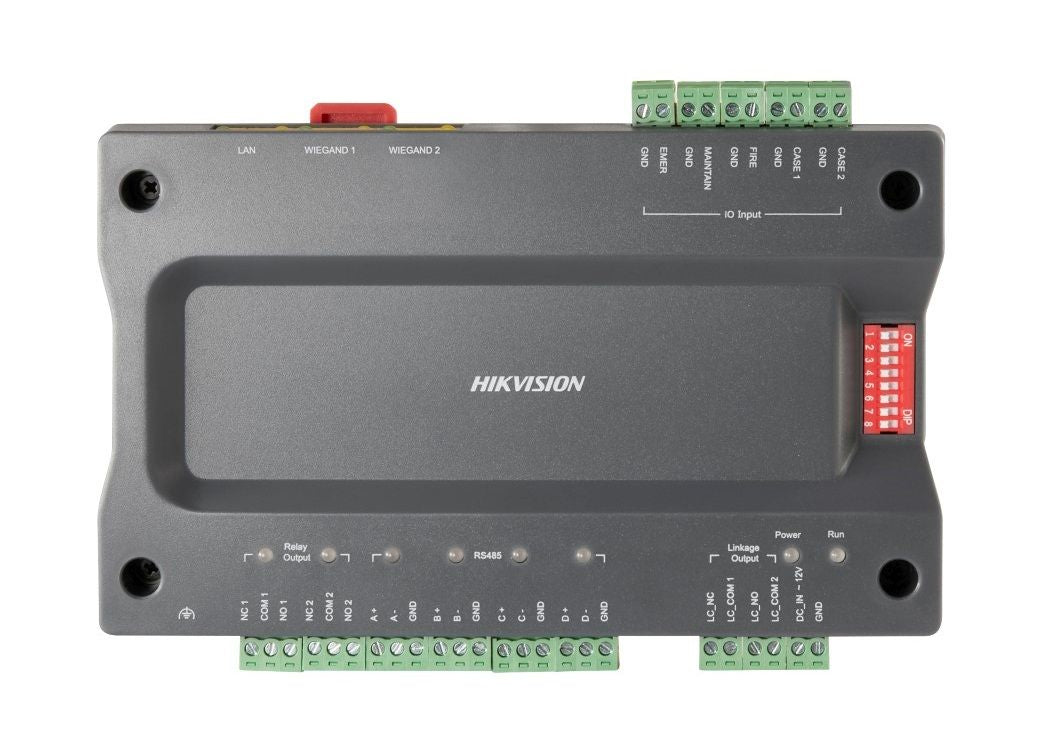
Hikvision DS-K2210 Master elevator controller
Why This Model
- Dedicated safety inputs: Separate panic, fire alarm, and maintenance button inputs mean the controller can respond to building emergencies independently, without relying on software commands.
- Flexible reader support: Accepting both RS-485 and Wiegand card readers keeps your choice of credential hardware open and simplifies integration with existing site infrastructure.
- Onboard event storage: With 50,000 events stored locally, access logs are retained even during a network outage - critical for lift access audit trails in commercial buildings.
Need help choosing?
Click to ask a question - same day response (~2 hours during business hours)
Product Overview
Model: DS-K2210
Who This Is For
For integrators and building managers who need floor-by-floor access control inside a lift car, the Hikvision DS-K2210 Master Elevator Controller is the central unit that ties credential readers to relay-controlled floor outputs. It connects to up to 2 RS-485 or 2 Wiegand card readers inside the lift cab, then uses its 5 relay outputs to enable or restrict access to specific floors based on the cardholder's permissions. The DS-K2210 stores up to 20,000 cards and 50,000 events onboard, so access logs are retained even when network connectivity drops. Dedicated inputs for panic, fire alarm, and maintenance functions make it suitable for commercial buildings, strata towers, and mixed-use developments where different tenants or staff levels require controlled floor access. It communicates over TCP/IP for integration with a broader access control management platform, and installs on a guide rail inside the lift control cabinet.
What This Controller Actually Does
Floor-Level Relay Control
5 relay outputs allow the DS-K2210 to selectively enable floor buttons in the lift car based on the presenting cardholder's permissions. Unauthorised floors remain inactive until a valid credential is presented, preventing free movement between tenancies or restricted areas.
Dual Reader Support
Connects to up to 2 RS-485 card readers or 2 Wiegand card readers, giving flexibility to match whichever reader protocol your card technology or existing infrastructure requires. Both reader types are supported natively - no protocol converters needed.
Onboard Storage
Stores 20,000 card records and 50,000 access events locally. If the network connection to the management server drops, the controller continues to grant and deny access based on stored permissions and logs every transaction for later upload.
Safety Input Integration
Dedicated inputs for a panic button, fire alarm, and maintenance mode allow the DS-K2210 to respond appropriately in emergencies - unlocking floor restrictions during a fire event or placing the lift into maintenance mode without overriding safety systems manually.
Network Integration via TCP/IP
TCP/IP connectivity enables the DS-K2210 to sit inside a wider access control system - card enrolments, permission changes, and event reporting all managed centrally. Real-time status indicators on the unit confirm network connection, relay state, and serial port communication at a glance.
Wide Operating Temperature
Rated -40°C to +70°C, the DS-K2210 handles the temperature extremes found inside lift machine rooms and control cabinets without requiring additional climate control. Guide rail installation keeps it secure inside a standard DIN-style cabinet.
Who Buys This Model
- Commercial building integrators: Installing floor-access restrictions in strata towers or mixed-use commercial buildings where different tenants require access only to their designated floors, using the 5 relay outputs mapped to individual floor buttons.
- Security consultants on hotel projects: Specifying lift access control where guests should only reach their booked floor level, with card reader integration and onboard card storage providing operation even during network outages.
- Healthcare facility managers: Restricting sensitive floors such as pharmacy, ICU, or records storage within a hospital tower, using the fire alarm input to ensure the lift opens fully during evacuation events.
- Access control system designers expanding Hikvision platforms: Adding elevator control to an existing TCP/IP-networked Hikvision access installation, where centralised card management covers both doors and lift floors from a single platform.
Honest Assessment
The DS-K2210 does its core job well: it puts credential-based floor restrictions into a lift car using a compact, guide-rail-mounted controller that integrates cleanly into Hikvision's broader access control ecosystem. The onboard storage for 20,000 cards and 50,000 events means the unit is not dependent on constant server connectivity, which matters in buildings with unreliable network infrastructure in lift shafts. The dedicated panic, fire alarm, and maintenance inputs show it is designed for real building environments, not just basic retrofit installs. Where it has limits: 5 relay outputs caps this unit at 5 controlled floors per controller - buildings with more floors will require additional slave controllers or a different configuration. It also supports only 2 readers, so installations requiring more simultaneous reader inputs in the cab will need to plan accordingly. The DS-K2210 is supplied by Security Australia and is best suited to projects already specifying Hikvision access control, where it slots into an existing management platform rather than operating as a standalone system.
Before You Buy
Installer Note: The DS-K2210 is the master controller - if your building has more than 5 floors requiring individual relay-controlled access, confirm whether your project scope includes slave elevator controllers to expand floor outputs. Also verify your card reader protocol (RS-485 or Wiegand) before ordering, as this unit does not mix both types simultaneously. Power supply must be regulated 12 VDC within the ±15% tolerance - install a quality DIN-rail PSU in the same cabinet rather than relying on shared lift cab power rails that may fluctuate.
Compliance Note: The fire alarm input is designed to override floor restrictions during an emergency, but integration with your building's fire indication panel must be coordinated with your lift contractor and fire systems specialist. Confirm the input trigger logic (NO or NC) matches your FIP output before wiring.
Quick Fit Check
- Good match if: You need to restrict access to up to 5 floors from a single lift car using RS-485 or Wiegand card readers, and your project runs on a Hikvision TCP/IP access control platform.
- Good match if: The installation requires emergency input integration - the dedicated fire alarm, panic, and maintenance button inputs mean you can wire directly from building safety systems without external relays.
- You may need a different model if: Your building requires more than 5 independently controlled floors from a single lift controller - look at the broader Hikvision elevator control range for multi-floor expansion options with additional relay capacity.
Key Features & Technical Specifications
Real-World Scenarios
How It Compares
- Choose this if: Your project requires a dedicated elevator controller that integrates with an existing Hikvision TCP/IP access control platform, supports up to 5 relay-controlled floors, and needs built-in emergency inputs for fire, panic, and maintenance.
- You may need a different model if: Your building has more than 5 floors requiring independent relay control from a single lift - a multi-output elevator controller with expanded relay capacity or a master-plus-slave controller configuration will better suit high-rise projects.
- Pairs well with: A Hikvision TCP/IP door access controller for managing building entry and floor access from a single management platform, and a Wiegand or RS-485 card reader suited to the lift car environment.
Common Questions
-
How many floors can the DS-K2210 control?
Up to 5 floors independently, using its 5 relay outputs. Each relay output is wired to a floor button in the lift car. When a cardholder presents a valid credential, only the relay outputs corresponding to their permitted floors activate. For buildings requiring more than 5 controlled floors, additional slave controllers are needed to expand capacity beyond this unit. -
Does this work with both RS-485 and Wiegand readers?
Yes, but not simultaneously. The DS-K2210 supports up to 2 RS-485 card readers or up to 2 Wiegand card readers - one protocol per installation. Confirm your reader's output protocol before ordering. Most modern Hikvision card readers output RS-485, while many legacy readers use Wiegand, so knowing your reader type upfront avoids a mismatch. -
Will this controller keep working if the network goes down?
Yes. The DS-K2210 stores 20,000 card records and 50,000 events onboard. During a network outage, it continues granting and denying access based on the permissions downloaded from the management server, and logs all transactions locally. Events are uploaded to the server once connectivity is restored, so no access history is lost. -
What happens during a fire alarm?
The dedicated fire alarm input can be wired directly to a fire indication panel output. When triggered, it overrides floor access restrictions - the lift responds according to the programmed emergency behaviour, typically releasing all floor buttons to allow evacuation. This input operates independently of the access control logic, so it functions even if the management server is offline. Confirm the required input trigger state (NO or NC) with your fire systems contractor before wiring. -
Does this unit require a separate power supply?
Yes. The DS-K2210 requires a regulated 12 VDC supply within ±15% tolerance - it does not power itself from the network connection. A dedicated DIN-rail mounted power supply installed in the same lift control cabinet is the standard approach. Do not share power rails with lift motor or control panel circuits that may introduce voltage fluctuation outside the ±15% range. -
Does the DS-K2210 integrate with Hikvision's access control management software?
Yes. TCP/IP connectivity allows the DS-K2210 to register with Hikvision's access control management platform, where cards are enrolled, floor permissions are assigned, and event logs are reviewed centrally. This makes it straightforward to manage elevator access alongside door controllers across a site from a single interface. The unit is available through Security Australia as part of the broader Hikvision access control range. -
What does the maintenance button input do?
It places the controller into a maintenance mode that allows lift technicians to operate the car without requiring a cardholder credential. This is a dedicated hardwired input - a physical button is wired to it inside or near the lift cab, so technicians do not need to log into the access management platform or carry an access card to service the lift. Confirm with your lift contractor how this input should interact with the overall lift control logic.
Downloads & Resources
No downloads available for this product.
What This Product Does
Why This Model
- Dedicated safety inputs: Separate panic, fire alarm, and maintenance button inputs mean the controller can respond to building emergencies independently, without relying on software commands.
- Flexible reader support: Accepting both RS-485 and Wiegand card readers keeps your choice of credential hardware open and simplifies integration with existing site infrastructure.
- Onboard event storage: With 50,000 events stored locally, access logs are retained even during a network outage - critical for lift access audit trails in commercial buildings.
Not sure if this suits your site?
Ask our team before ordering. We can help confirm lens choice, recorder compatibility, mounting accessories and project quantities.
Downloads
Get Product Help
Ask our team before ordering. We can help confirm lens choice, recorder compatibility, mounting accessories and project quantities.
Shipping & Warranty
3 Years Manufacturer Warranty
All IP cameras and recording devices (NVR’s/DVR’s) are covered by a 3 year back-to-base manufacturer warranty.
Our warranty is limited to the replacement of faulty items or parts and does not include damage due to incorrect fitting of parts or accessories, or damage due to mishandling the equipment once out of the box. All faults are sent to the manufacturer for inspection and diagnosis before a replacement is sent out.
Read more about the Terms & Conditions here – https://www.securityaustralia.com.au/terms-and-conditions/
Free Delivery* & Despatch Time
*Just spend over $200 to activate Fast Free Shipping!
Despatch Times: Products are despatched on the same day if the order was placed before 11am on any weekday, Monday - Friday. All other orders are processed and despatched within 24 hours or next business day.
Order Confirmation: Once you place an order, you will receive a confirmation email. This indicates that your order has been received in our system and is now being processed for dispatch. If your item is back-ordered or unavailable, we will notify you via email, and if we do not receive a response, we will attempt to contact you by phone as soon as possible. We value your time and strive to be prompt. If your item(s) are available for immediate shipment (within 2 days), we will process the charges and prepare the order for shipping.
Shipping Times: General shipping times for StarTrack, TNT and Allied couriers are between 1-3 working days from despatch. Longer delivery times may be caused by your package being held at your local courier depot that is beyond our control. Please contact us or the local post depot for confirmation.
Tracking Numbers: all tracking numbers will be emailed to you by our warehouse processing team within the day, after your order is despatched to our local courier.

Get expert advice
Tell us what you need help with and our team will send practical product advice straight to your inbox.
Hikvision DS-K2210 Master elevator controller