





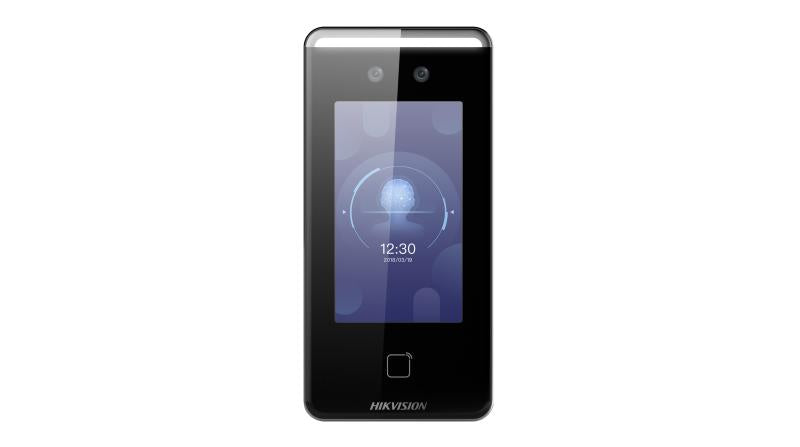
Hikvision DS-K1T341CMW – Value Series Face Recognition Terminal
Built as a face recognition terminal for access control applications, the DS-K1T341CMW from Hikvision's Value Series delivers biometric entry management for businesses seeking a reliable, cost-effective alternative to card or PIN-based systems. It supports face recognition as the primary credential method, making it suited to offices, warehouses, and commercial premises where contactless access is a priority.
Why This Model
- Face recognition entry: Contactless biometric authentication removes the risk of lost cards or shared PINs, giving administrators tighter control over who enters and when.
- Value Series positioning: Delivers Hikvision's core face recognition capability at an accessible price point, making biometric access practical for small to mid-sized installations without enterprise-level budgets.
- Wall-mount terminal design: A self-contained unit that integrates with door controllers and electric locks, keeping installation straightforward for standard commercial door applications.
Need help choosing?
Click to ask a question - same day response (~2 hours during business hours)
Product Overview
Model: DS-K1T341CMW
Who This Is For
For facility managers and security integrators who need contactless entry control without the cost of enterprise-grade terminals, the Hikvision DS-K1T341CMW Value Series Face Recognition Terminal sits at the practical midpoint between basic card readers and full biometric systems. It suits commercial offices, small medical practices, childcare centres, and light industrial sites where managing who enters which door matters - but where a simplified, cost-conscious solution is the brief. The DS-K1T341CMW combines face recognition with Mifare card reading and PIN entry, giving administrators multiple credential options in a single wall-mount device. Its built-in Wi-Fi connectivity removes the requirement for a dedicated network cable run to every door controller, making retrofits in existing buildings considerably more straightforward than wired-only alternatives.
What This Terminal Actually Does
Face Recognition Entry
Staff approach the terminal and the camera verifies their enrolled face, releasing the door without any physical contact. This eliminates the need to carry cards or remember PINs, and removes the risk of credential sharing between staff members.
Mifare Card Reading
The built-in Mifare card reader provides a fallback credential method and supports sites that already issue Mifare access cards. Administrators can configure face-only, card-only, or combined verification depending on the door's security requirement.
Wi-Fi Connectivity
The integrated Wi-Fi module connects the terminal to the site network without requiring a data cable to the door. This is particularly useful for retrofit installations where running new cabling to every door position is disruptive or cost-prohibitive.
PIN Entry Backup
A keypad allows PIN-based access as a third credential option. Sites can require PIN plus face for higher-security doors, or use PIN alone for temporary visitors or situations where face enrolment is not practical for every user.
Wiegand & RS-485 Output
Standard Wiegand and RS-485 output ports allow the DS-K1T341CMW to integrate into existing third-party access control panels. Sites upgrading credentials without replacing their entire door controller infrastructure can retain their existing hardware investment.
Who Buys This Model
- Office Building Managers: Replacing swipe card readers at staff entry points with face recognition to stop card sharing between employees and reduce the cost of replacing lost cards.
- Childcare and Education Operators: Controlling staff-only access to back-of-house areas where contactless, hands-free entry matters for hygiene and operational flow.
- Security Integrators Retrofitting Existing Sites: Using the Wi-Fi connectivity to add face recognition capability to buildings where cutting new cable runs in ceilings or walls would add significant cost to the job.
- Small Medical and Allied Health Practices: Restricting dispensary, records, or treatment room access to verified staff only, with an audit trail of every entry event tied to a named individual rather than a shared code.
Honest Assessment
The DS-K1T341CMW does its core job well: it brings face recognition access control to a price point where smaller sites can justify the technology, and the Wi-Fi option genuinely simplifies installs where cable routing is awkward. The combination of face, card, and PIN in one unit also gives administrators real flexibility in how they configure individual doors. As a Value Series product, it is not positioned to compete with Hikvision's professional-grade terminals on face recognition capacity, processing speed under high-traffic conditions, or advanced features such as mask detection or temperature screening. Sites with large enrolled user bases, high door throughput in peak periods, or specific enterprise integrations should evaluate whether a higher-tier terminal is a better fit. For straightforward commercial applications where those requirements do not apply, the DS-K1T341CMW available through Security Australia represents a practical, no-overcapitalisation answer to controlled entry.
Before You Buy
Installer Note: While Wi-Fi connectivity reduces the need for a data cable, the terminal still requires a power supply and door strike or magnetic lock wiring at the door frame. Confirm your 2.4 GHz Wi-Fi signal is reliable and stable at the installation point before committing to a wireless network connection - weak or intermittent Wi-Fi at a door controller is a service call waiting to happen. A direct Cat5e or Cat6 run remains the more dependable option where it is physically achievable.
Enrolment Planning: Face recognition terminals require each user to be enrolled with a clear face image before they can gain access. Budget time for the enrolment process during commissioning, particularly if the site has a large number of users. Plan for a supervised enrolment session rather than expecting users to self-enrol remotely if access is time-sensitive from day one.
Quick Fit Check
- Good match if: You are retrofitting face recognition to an existing site and want to avoid new data cable runs - the built-in Wi-Fi handles network connectivity without rewiring.
- Good match if: Your site already uses Mifare cards and you want to add face recognition without replacing every card or issuing new credentials - both methods work simultaneously on the DS-K1T341CMW.
- You may need a different model if: You are managing a high-volume entry point with large numbers of staff arriving simultaneously - a higher-capacity professional-series face recognition terminal will process credentials faster and reduce queue formation at peak times.
Key Features & Technical Specifications
Real-World Scenarios
How It Compares
- Choose this if: You need face recognition at a practical price point with Wi-Fi connectivity for retrofit installs, and the site does not have demanding throughput requirements or large enrolled user counts.
- You may need a different model if: Your site has high staff numbers passing through a single entry point in a short window - a professional-series face recognition terminal with higher processing capacity will reduce wait times and is a better fit for that application.
- Pairs well with: A compatible Hikvision access control panel or NVR with access control integration, electric strike or magnetic lock hardware, and a structured Mifare card issuance system for sites that want a mixed credential deployment.
Common Questions
-
Does the DS-K1T341CMW work without a network cable at the door?
Yes. The built-in Wi-Fi module allows the terminal to connect to the site network over a 2.4 GHz wireless connection, removing the requirement for a dedicated data cable run to the door position. A power supply cable is still required at the door, along with lock output wiring, but the network connection itself can be handled entirely over Wi-Fi where signal strength is adequate. -
Will this terminal work with our existing Mifare access cards?
Yes, in most cases. The DS-K1T341CMW reads 13.56 MHz Mifare cards. If your existing cards operate on that frequency and your site management software supports enrolment via the Hikvision platform, your current cards should be compatible. Confirm your existing card specification with your installer before assuming compatibility with proprietary or encrypted Mifare variants. -
Can the DS-K1T341CMW connect to a third-party access control panel?
Yes. The terminal includes Wiegand output and RS-485 communication, which are standard interfaces supported by the majority of third-party access control panels. The terminal handles face recognition and credential verification locally, then passes the access decision to the existing panel via Wiegand, allowing sites to retain their current door controllers and lock hardware. -
Does this terminal require face enrolment before staff can use it?
Yes. Every user who will access a door via face recognition must have their face enrolled in the system before the terminal will grant them entry. Enrolment is typically completed through the Hikvision access control management software or directly on the terminal. Plan a dedicated enrolment session during commissioning - attempting to enrol large numbers of users on the day of go-live without preparation commonly causes delays. -
Is the DS-K1T341CMW suitable for outdoor installation?
No. This is an indoor-rated terminal and is not designed for direct exposure to weather. It should be installed inside a building, at an internal door, lobby, or covered entry vestibule where it is protected from rain, direct sunlight, and temperature extremes. For external entry points, a weatherproof-rated outdoor face recognition terminal is the appropriate product type. -
Can the terminal require both a face and a card to grant access?
Yes. Multi-factor verification modes allow administrators to configure specific doors to require 2 credentials - for example, face recognition plus Mifare card - before the door is released. This is useful for higher-security areas such as server rooms, dispensaries, or cash handling areas where a single credential is not considered sufficient. Single-factor modes remain available for standard doors. Confirm the specific verification mode options with Security Australia or your installer during system design.
Cabling Considerations
- Power Cable: The terminal requires a 12V DC power supply - run a suitable power cable to the door position regardless of whether Wi-Fi or wired network is used for data.
- Network Cable (Optional): If using wired network rather than Wi-Fi, run Cat5e or Cat6 to the terminal. A wired connection is the more stable option and is recommended where new cable runs are achievable.
- Lock Output Wiring: A 2-core cable is required between the terminal's relay output and the electric strike or magnetic lock. Confirm lock voltage and current draw against the terminal's relay rating before wiring.
- Wiegand / RS-485: If integrating with a third-party panel, run a Wiegand or RS-485 cable between the terminal and the panel's reader input port. Keep Wiegand runs within the manufacturer's recommended maximum distance to avoid signal degradation.
- Wi-Fi Notes: Verify 2.4 GHz signal strength at the intended installation point before committing to wireless. A site survey at the door position - not just in the general area - is recommended. Thick concrete walls and metal door frames can significantly attenuate Wi-Fi signal.
Downloads & Resources
No downloads available for this product.
What This Product Does
Built as a face recognition terminal for access control applications, the DS-K1T341CMW from Hikvision's Value Series delivers biometric entry management for businesses seeking a reliable, cost-effective alternative to card or PIN-based systems. It supports face recognition as the primary credential method, making it suited to offices, warehouses, and commercial premises where contactless access is a priority.
Why This Model
- Face recognition entry: Contactless biometric authentication removes the risk of lost cards or shared PINs, giving administrators tighter control over who enters and when.
- Value Series positioning: Delivers Hikvision's core face recognition capability at an accessible price point, making biometric access practical for small to mid-sized installations without enterprise-level budgets.
- Wall-mount terminal design: A self-contained unit that integrates with door controllers and electric locks, keeping installation straightforward for standard commercial door applications.
Not sure if this suits your site?
Ask our team before ordering. We can help confirm lens choice, recorder compatibility, mounting accessories and project quantities.
Get Product Help
Ask our team before ordering. We can help confirm lens choice, recorder compatibility, mounting accessories and project quantities.
Shipping & Warranty
3 Years Manufacturer Warranty
All IP cameras and recording devices (NVR’s/DVR’s) are covered by a 3 year back-to-base manufacturer warranty.
Our warranty is limited to the replacement of faulty items or parts and does not include damage due to incorrect fitting of parts or accessories, or damage due to mishandling the equipment once out of the box. All faults are sent to the manufacturer for inspection and diagnosis before a replacement is sent out.
Read more about the Terms & Conditions here – https://www.securityaustralia.com.au/terms-and-conditions/
Free Delivery* & Despatch Time
*Just spend over $200 to activate Fast Free Shipping!
Despatch Times: Products are despatched on the same day if the order was placed before 11am on any weekday, Monday - Friday. All other orders are processed and despatched within 24 hours or next business day.
Order Confirmation: Once you place an order, you will receive a confirmation email. This indicates that your order has been received in our system and is now being processed for dispatch. If your item is back-ordered or unavailable, we will notify you via email, and if we do not receive a response, we will attempt to contact you by phone as soon as possible. We value your time and strive to be prompt. If your item(s) are available for immediate shipment (within 2 days), we will process the charges and prepare the order for shipping.
Shipping Times: General shipping times for StarTrack, TNT and Allied couriers are between 1-3 working days from despatch. Longer delivery times may be caused by your package being held at your local courier depot that is beyond our control. Please contact us or the local post depot for confirmation.
Tracking Numbers: all tracking numbers will be emailed to you by our warehouse processing team within the day, after your order is despatched to our local courier.

Get expert advice
Tell us what you need help with and our team will send practical product advice straight to your inbox.
Hikvision DS-K1T341CMW – Value Series Face Recognition Terminal