




Free Shipping

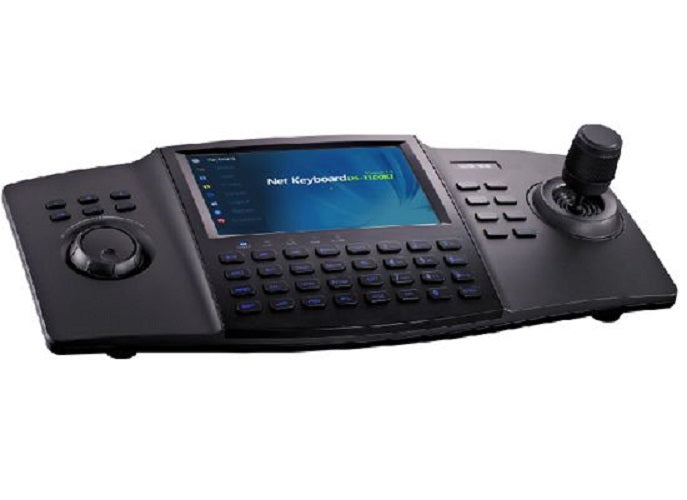
Hikvision DS-1100KI Security Keyboard with Joystick, 7" TFT Touch Screen to control PTZ, DVRs, NVRs (EXPORT)
$1,396.50 AUD
Tax included.
Shipping calculated at checkout.
In stock - Ready to ship
Free shipping on orders over $200. Usually ships within 1 business day when available.
Quick Buying Summary
The DS-1100KI delivers hands-on PTZ and recorder control for security operators managing medium to large surveillance installations. Its 7" TFT touchscreen and 3-axis joystick combine to give operators a single, ergonomic workstation for live monitoring, playback, and camera positioning across up to 256 devices per user. Supports up to 15 simultaneous operators and connects via IP, RS-232, or RS-485.
Why This Model
- 3-axis joystick: Gives operators fluid, precise PTZ camera control without relying on on-screen buttons, reducing response time when tracking movement across a site.
- Multi-user, multi-device support: Up to 15 operators can each manage up to 256 devices simultaneously, making this suitable for control rooms with shared monitoring responsibilities.
- Flexible connectivity: Gigabit Ethernet, RS-232, RS-485, and USB 2.0 interfaces mean it integrates into both IP-based and legacy analogue surveillance infrastructure without additional adaptors.
7" TFT Touch Screen
3-Axis Joystick
256 Devices Per User
15 Simultaneous Operators
Gigabit Ethernet
RS-232 & RS-485
Audio In/Out
Accessories
Select options before adding this product to cart.
Need help choosing?
Click to ask a question - same day response (~2 hours during business hours)
Free shipping
Enjoy free shipping when your order exceeds $200.
Fast dispatch
Orders are dispatched within the next business day.
Best local support in Aus
We back all products with manufacturer warranty support.
Official Australian stock
Genuine products with local warranty support.
Product Overview
Model: DS-1100KI-EXPORT
Who This Is For
When centralised PTZ and recorder control is the priority for a professional monitoring operation, the Hikvision DS-1100KI Security Keyboard is the kind of dedicated hardware that replaces mouse-and-screen workflows with a purpose-built tactile interface. It suits control room operators, CCTV installers commissioning larger Hikvision IP systems, and security managers who need multiple operators - up to 15 simultaneously - managing devices across a network from a single ergonomic station. The 7-inch TFT touchscreen and 3-axis joystick make it practical for sustained shift-based use where software-only interfaces slow operators down. With support for up to 256 devices per operator, RS-232, RS-485, and Gigabit Ethernet connectivity, and IP-based control architecture, the DS-1100KI fits into installations ranging from multi-building commercial sites to transport hubs where PTZ positioning and live view switching need to happen quickly and without fumbling through menus.
What This Controller Actually Does
3-Axis Joystick PTZ Control
The 3-axis joystick gives operators direct physical control over PTZ camera pan, tilt, and zoom movements. This eliminates the lag and imprecision of on-screen software controls, allowing smooth real-time tracking of movement across large monitored areas during live incidents.
7" TFT Touchscreen Interface
The 7-inch TFT LCD touchscreen runs at 800x480 resolution and provides a local preview of connected camera feeds. Operators can switch cameras, adjust settings, and navigate device lists directly on the screen without a separate monitor or PC, keeping the workstation compact.
Multi-Operator Device Management
Up to 15 operators can be configured, each with access to up to 256 devices. This supports shift-based control room environments where different staff members require different access levels, allowing responsibility to be delegated without sharing a single login credential.
IP, RS-232, and RS-485 Connectivity
The DS-1100KI includes a Gigabit Ethernet port for IP-based control alongside RS-232 and RS-485 serial ports. This flexibility means it integrates with both current IP infrastructure and legacy analogue or serial-connected devices within the same installation.
Local Video Capture to USB
The USB 2.0 port supports video capture directly to a USB flash drive. This lets operators clip and export footage at the control station without accessing the NVR storage interface, which is useful during incident response when footage needs to be isolated quickly.
Audio Input and Output
A single 3.5mm audio channel supports both input and output at the keyboard station. This allows operators to monitor audio from connected cameras or devices and respond over the same interface, supporting two-way communication where the connected cameras carry that function.
Who Buys This Model
- Control Room Operators at Commercial Sites: Facilities with multiple PTZ cameras across a large footprint - car parks, retail centres, transport terminals - where joystick control dramatically speeds up real-time camera repositioning compared to software-only interfaces.
- CCTV Installers Commissioning Hikvision IP Systems: Installers who need a hardware controller to hand over to end-client staff, giving operators a dedicated device rather than relying on client workstations running VMS software.
- Security Managers Running Shift-Based Monitoring: Operations requiring up to 15 user accounts with individual access permissions, allowing different staff to manage their assigned device groups without shared credentials or unrestricted system access.
- Sites with Mixed Legacy and IP Infrastructure: Installations that include both IP network cameras and older RS-485 or RS-232 connected devices, where a single controller with all 3 interface types removes the need for separate control hardware.
Honest Assessment
The DS-1100KI does a specific job well: it puts physical PTZ joystick control, live view, and multi-user device management into a compact, dedicated unit that removes the dependence on a PC-based VMS for day-to-day operator tasks. The Gigabit Ethernet port, combined with RS-232 and RS-485, makes it genuinely versatile across mixed installations. The 15-operator, 256-devices-per-operator architecture is practical for medium-to-large professional deployments. Local USB video capture is a genuine operational convenience during incidents. What this will not do is replace a full VMS for advanced analytics review, complex event management, or multi-wall video display across a large control room. It is also not suited to installations with no PTZ cameras - the joystick is the core value here, and that value disappears without PTZ hardware to drive. Available through Security Australia, this keyboard suits professional operators who want physical hardware control alongside their existing Hikvision IP infrastructure.
Before You Buy
Power Note: The DS-1100KI requires a 12VDC power supply and draws up to 15W. Confirm a 12VDC adapter or regulated supply is available at the control desk - this unit does not accept PoE and will not power from a network switch port. Factor the power source into your desk layout before installation.
Compatibility Note: This keyboard uses IP-based control as its primary communication mode. Confirm that your DVRs, NVRs, and PTZ cameras are Hikvision IP-compatible and accessible on the same network segment. RS-485 and RS-232 ports extend compatibility to legacy devices, but IP connectivity is required for the keyboard's full feature set including live view on the built-in 7-inch screen.
Quick Fit Check
- Good match if: Your site has multiple PTZ cameras that operators need to control in real time - the 3-axis joystick and dedicated touchscreen make repositioning faster and more intuitive than any software-based alternative on a shared workstation.
- Good match if: You are running a shift-based control room where different staff need separate user accounts with defined access to specific devices - the 15-operator, 256-device-per-operator configuration handles this without a full VMS licence.
- You may need a different model if: Your operation requires advanced multi-monitor video wall control, complex event-triggered workflows, or deep analytics review - a dedicated VMS server and client software setup will serve those requirements better than a standalone hardware keyboard.
Key Features & Technical Specifications
Model
DS-1100KI (Export)
Control Mode
IP-based
LCD Screen
7" TFT LCD with touch, 800x480 resolution
Joystick
3-axis joystick for PTZ control
Live View Resolution
Up to 1080p
Video Decoding
1-channel local video decoding
Operators Supported
Up to 15 simultaneous operators
Devices per Operator
Up to 256 devices
Audio
1-ch audio input/output, 3.5mm connector (2.0Vp-p, 1kO)
Network Interface
1x RJ45 10M/100M/1000M adaptive Ethernet
Serial Interfaces
1x RS-232, 1x RS-485
USB
1x USB 2.0 (video capture to flash drive, firmware upgrade)
Power Supply
12VDC
Power Consumption
15W maximum
Operating Temperature
-10°C to +55°C
Dimensions
110mm (H) x 193mm (W) x 435mm (D)
Weight
2 kg
Real-World Scenarios
How It Compares
- Choose this if: Your control room needs a dedicated hardware PTZ joystick with a built-in screen and multi-operator user management, without depending on a PC running VMS software for day-to-day camera control.
- You may need a different model if: Your operation requires video wall management across multiple displays, advanced analytics dashboards, or deep event-based workflow management - a full VMS server and client software platform will deliver those capabilities where a standalone keyboard cannot.
- Pairs well with: Hikvision IP PTZ cameras, Hikvision NVRs, and Hikvision DVRs - the keyboard is designed around Hikvision's IP control architecture and performs best within an established Hikvision system.
Common Questions
-
Does the DS-1100KI work with non-Hikvision PTZ cameras?
It depends on the protocol. The DS-1100KI is designed primarily for Hikvision IP-based devices, but its RS-485 port supports common PTZ serial protocols which may be compatible with third-party cameras. However, full feature functionality - live view on the built-in screen, user management, and device configuration - is confirmed for Hikvision devices. Confirm protocol compatibility with any third-party hardware before purchasing. -
Will this keyboard work for a single-operator small business setup?
Yes, though it is designed for larger deployments. A single operator can absolutely use the DS-1100KI - the 15-operator capacity is a ceiling, not a requirement. For a small business with 1 or 2 PTZ cameras and one operator, the keyboard functions exactly the same. The question is whether the hardware investment is justified for that scale, or whether software-based PTZ control within your NVR interface would suffice. -
Does the 3-axis joystick control zoom as well as pan and tilt?
Yes. The 3-axis joystick covers pan, tilt, and zoom on compatible PTZ cameras. This means an operator can reposition the camera angle and pull focus in or out using the same physical controller without switching to the touchscreen, keeping response time minimal during live monitoring. -
Does the built-in screen replace the need for a separate monitor at the operator desk?
For single-channel live preview, yes. The DS-1100KI's 7-inch 800x480 TFT touchscreen supports 1-channel local video decoding, so an operator can view one camera feed directly on the keyboard screen without a separate monitor. For multi-channel live view across multiple screens, additional display hardware connected to your NVR or VMS is still required. -
What are the RS-485 and RS-232 ports used for on this keyboard?
Both serial ports extend connectivity to devices that do not communicate over IP. RS-485 is commonly used for legacy PTZ cameras operating on serial bus protocols, while RS-232 is typically used for direct serial connections to older DVRs or matrix controllers. If your site has a mix of modern IP devices and older serial-connected hardware, these ports allow the DS-1100KI to control both categories from the same unit. -
How does the 15-operator, 256-device configuration work in practice?
Each of the 15 operators is set up as a separate user account on the keyboard, and each account can have access to its own list of up to 256 devices. In practice, this means a large site with multiple security zones can assign specific camera groups to specific operators - a warehouse guard sees loading dock cameras, a lobby guard sees entry cameras - without either user accessing the other's device group. Access levels and permissions are configured through the keyboard's touchscreen interface. -
Can the DS-1100KI control PTZ preset positions, or only live directional movement?
The DS-1100KI supports PTZ control through IP-based communication with compatible Hikvision PTZ cameras. Preset management - setting, calling, and patrolling preset positions - is part of the standard Hikvision PTZ control function set that this keyboard interfaces with. Confirm specific preset functionality with your PTZ camera model, as the keyboard's execution of those commands depends on the connected camera's preset capabilities. The team at Security Australia can help verify compatibility for specific camera models before you commit to a purchase.
Downloads & Resources
No downloads available for this product.
What This Product Does
The DS-1100KI delivers hands-on PTZ and recorder control for security operators managing medium to large surveillance installations. Its 7" TFT touchscreen and 3-axis joystick combine to give operators a single, ergonomic workstation for live monitoring, playback, and camera positioning across up to 256 devices per user. Supports up to 15 simultaneous operators and connects via IP, RS-232, or RS-485.
Why This Model
- 3-axis joystick: Gives operators fluid, precise PTZ camera control without relying on on-screen buttons, reducing response time when tracking movement across a site.
- Multi-user, multi-device support: Up to 15 operators can each manage up to 256 devices simultaneously, making this suitable for control rooms with shared monitoring responsibilities.
- Flexible connectivity: Gigabit Ethernet, RS-232, RS-485, and USB 2.0 interfaces mean it integrates into both IP-based and legacy analogue surveillance infrastructure without additional adaptors.
7" TFT Touch Screen
3-Axis Joystick
256 Devices Per User
15 Simultaneous Operators
Gigabit Ethernet
RS-232 & RS-485
Audio In/Out
Not sure if this suits your site?
Ask our team before ordering. We can help confirm lens choice, recorder compatibility, mounting accessories and project quantities.
Downloads
Videos
Get Product Help
Ask our team before ordering. We can help confirm lens choice, recorder compatibility, mounting accessories and project quantities.
Shipping & Warranty
3 Years Manufacturer Warranty
All IP cameras and recording devices (NVR’s/DVR’s) are covered by a 3 year back-to-base manufacturer warranty.
Our warranty is limited to the replacement of faulty items or parts and does not include damage due to incorrect fitting of parts or accessories, or damage due to mishandling the equipment once out of the box. All faults are sent to the manufacturer for inspection and diagnosis before a replacement is sent out.
Read more about the Terms & Conditions here – https://www.securityaustralia.com.au/terms-and-conditions/
Free Delivery* & Despatch Time
*Just spend over $200 to activate Fast Free Shipping!
Despatch Times: Products are despatched on the same day if the order was placed before 11am on any weekday, Monday - Friday. All other orders are processed and despatched within 24 hours or next business day.
Order Confirmation: Once you place an order, you will receive a confirmation email. This indicates that your order has been received in our system and is now being processed for dispatch. If your item is back-ordered or unavailable, we will notify you via email, and if we do not receive a response, we will attempt to contact you by phone as soon as possible. We value your time and strive to be prompt. If your item(s) are available for immediate shipment (within 2 days), we will process the charges and prepare the order for shipping.
Shipping Times: General shipping times for StarTrack, TNT and Allied couriers are between 1-3 working days from despatch. Longer delivery times may be caused by your package being held at your local courier depot that is beyond our control. Please contact us or the local post depot for confirmation.
Tracking Numbers: all tracking numbers will be emailed to you by our warehouse processing team within the day, after your order is despatched to our local courier.

Get expert advice
Tell us what you need help with and our team will send practical product advice straight to your inbox.
Hikvision DS-1100KI Security Keyboard with Joystick, 7" TFT Touch Screen to control PTZ, DVRs, NVRs (EXPORT)
$1,396.50 AUD