





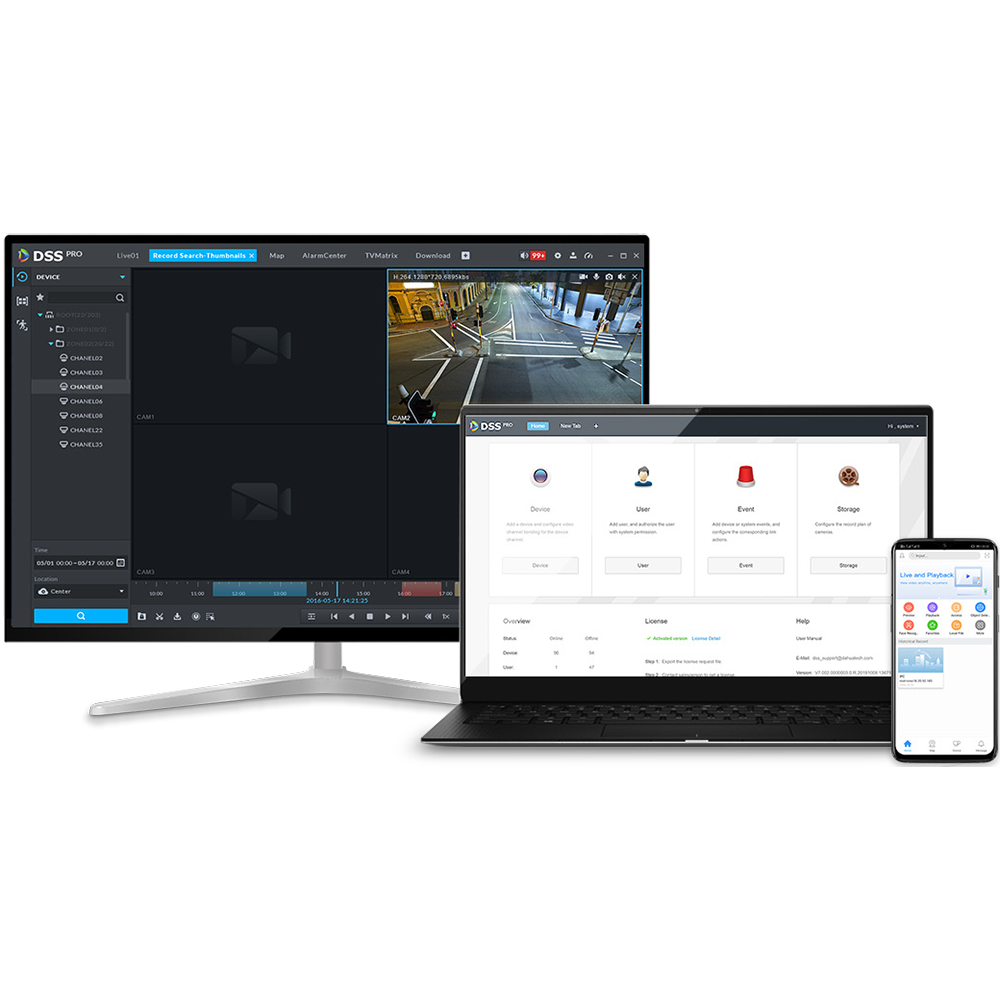
Dahua DSS Pro Video Management System Base License
The Dahua DSS Pro VMS Base License delivers centralised video management for installers and integrators building scalable surveillance systems up to 512 channels. It consolidates live view, playback, event search, access control, and video intercom into a single Windows-based client. This is a software license only - installation on compatible Windows hardware is required.
Why This Model
- 512-channel capacity: Supports up to 512 cameras in a single instance, making this suitable for multi-site deployments that would outgrow entry-level VMS options.
- Unified platform management: Access control, video intercom, facial recognition, and alarm management all run through one client, reducing the number of separate interfaces operators need to manage.
- ONVIF and RTSP support: Broad protocol compatibility means the system is not locked to Dahua hardware, giving integrators flexibility when working with mixed-brand installations.
Need help choosing?
Click to ask a question - same day response (~2 hours during business hours)
Product Overview
Model: Dahua DSS Pro Video Management System Base License
Who This Is For
Property managers specifying a centralised surveillance platform across multiple sites will find the Dahua DSS Pro Base License a practical starting point for building a scalable VMS infrastructure. This is software-based video management designed for operators who need to consolidate device control, live monitoring, event handling, and access control into a single client interface - without relying on a proprietary hardware recorder. DSS Pro Base License supports up to 512 channels at resolutions up to 8MP, runs on Windows 10 and Windows Server 2016 and 2019, and integrates with ONVIF-compatible devices alongside native Dahua hardware. It suits IT-managed security environments, multi-site operators, system integrators building enterprise installations, and security teams who need configurable user roles, video wall layouts, and smart search across large camera counts from one unified dashboard.
What This Product Actually Does
Up to 512 Channel Management
A single DSS Pro Base License instance can manage up to 512 camera channels at up to 8MP resolution. That covers everything from a mid-sized retail group with multiple branches to a larger industrial site with dense camera coverage - all managed from one client without needing separate recorder-by-recorder logins.
Unified Device Initialisation and Control
DSS Pro handles device discovery, initialisation, and configuration from within the platform. New cameras and recorders can be brought online and assigned to operators without switching between manufacturer tools, which matters when commissioning larger installations where time-on-site has a direct cost.
Access Control and Intercom Integration
The platform integrates Dahua access control and video intercom systems alongside the camera feed. Door events, visitor calls, and entry logs can be viewed and managed within the same client used for live video - reducing the number of separate interfaces operators need to monitor simultaneously.
Configurable Video Wall Layouts
Video wall schemes can be defined and saved within DSS Pro, allowing control room operators to switch between pre-set display configurations covering different sites, zones, or incident types. This is more efficient than manually rearranging tiles during an active event.
Smart Event Search and Facial Recognition
Recorded footage can be searched by time, date, and detected events. Facial recognition and search functions are available on live view for quick identification - useful for loss prevention teams or operators who need to locate a person of interest across recordings without scrubbing through hours of footage manually.
Fisheye Dewarping on Live View
DSS Pro processes fisheye camera streams and presents dewarped views directly in the live monitoring interface. Operators get usable rectangular views from 360-degree cameras without needing a separate dewarping tool or compatible NVR - the software handles it client-side.
Who Buys This Model
- Security System Integrators: Building multi-site enterprise installations who need a single management layer across large camera counts and mixed Dahua device types including cameras, NVRs, access control, and intercoms.
- IT-Managed Security Environments: Organisations running surveillance on a Windows Server infrastructure who want a VMS that installs on their existing server hardware and supports standard protocols including ONVIF and RTSP.
- Retail and Commercial Multi-Site Operators: Businesses with 10 or more locations who want centralised visibility across sites, configurable user permissions per location, and event-driven search rather than manual footage review.
- Control Room Operators: Facilities requiring a video wall display with pre-set layout schemes that can be recalled instantly during incidents, rather than building a camera grid from scratch each shift.
- Loss Prevention Teams: Operations that need facial recognition search and smart event retrieval on live and recorded footage to reduce investigation time without deploying additional standalone software.
Honest Assessment
DSS Pro Base License does the work of a centralised VMS well within Dahua ecosystems. The 512-channel ceiling, 8MP recording support, integrated access control and intercom management, and configurable video wall layouts make it a capable platform for medium-to-large installations. Smart event search and on-client fisheye dewarping reduce the need for additional software layers, and ONVIF compatibility gives it meaningful flexibility beyond native Dahua devices. The facial recognition and search capability on live view is a genuine operational advantage for loss prevention use cases.
Where it has limits: this is the Base License, which means expanded functionality - such as additional channel counts beyond 512, advanced AI analytics modules, or additional client seats - may require supplementary licensing. It also runs on Windows only, so Linux-based server environments are not supported. If your installation requires deep third-party VMS integration or hardware-agnostic deployment across non-Dahua ecosystems at scale, a higher-tier or purpose-built enterprise VMS may be worth comparing. Available through Security Australia, it suits integrators and operators already working within or transitioning to a Dahua device environment.
Before You Buy
Installer Note: DSS Pro Base License is a software install - confirm your host machine meets the Windows 10 or Windows Server 2016/2019 requirement before deployment. For installations approaching or exceeding 512 channels, verify whether additional channel licenses are required under the DSS Pro licensing structure, as the Base License defines the channel ceiling for that instance. If you are integrating non-Dahua ONVIF devices, test protocol compatibility during commissioning rather than assuming full feature parity with native Dahua channels.
Licensing Note: This is the Base License entry point for DSS Pro. If your project requires video wall output servers, additional operator client seats, or expanded AI analytics beyond the base feature set, review the full DSS Pro licensing structure for any add-on modules needed before finalising your bill of materials.
Quick Fit Check
- Good match if: You are managing a Dahua-based installation with up to 512 channels across one or multiple sites and need centralised live monitoring, playback, event search, and access control in a single Windows-based client.
- Good match if: Your operation includes fisheye cameras or facial recognition requirements and you want those capabilities handled within the VMS client rather than relying on camera-side or NVR-side processing.
- You may need a different model if: Your project demands a Linux-compatible VMS, requires deep integration with non-Dahua ecosystems at enterprise scale, or needs channel counts and AI analytics modules that exceed what the Base License tier provides - reviewing the full DSS Pro module range on securityaustralia.com.au would be the next step.
Key Features & Technical Specifications
Real-World Scenarios
How It Compares
- Choose this if: You need a software-based VMS that manages up to 512 channels across Dahua cameras, NVRs, access control, and intercoms from a single Windows client - particularly where video wall output, fisheye dewarping, and facial recognition search are required without additional software.
- You may need a different model if: Your installation requires Linux server compatibility, a hardware-agnostic enterprise VMS with deep third-party integration, or channel counts and AI analytics modules that exceed the Base License tier - the full DSS Pro module range on securityaustralia.com.au covers expanded licensing options.
- Pairs well with: Dahua IP cameras, Dahua NVRs, Dahua access control hardware, and Dahua video intercom systems for full integration within the DSS Pro management environment.
Common Questions
-
Does DSS Pro Base License work with non-Dahua cameras?
Yes, with limitations. DSS Pro supports ONVIF, RTSP, TCP/IP, and HTTP protocols, meaning compatible third-party cameras can be added to the platform. However, full feature parity with native Dahua devices is not guaranteed - advanced functions such as facial recognition search, event-linked access control, and fisheye dewarping are optimised for Dahua hardware. ONVIF devices should be tested during commissioning to confirm which features are available for each third-party model. -
Will this VMS run on our existing Windows Server infrastructure?
Yes. DSS Pro Base License is compatible with Windows Server 2016 and Windows Server 2019, as well as Windows 10. It can be deployed on an existing server without requiring dedicated Dahua hardware, which suits organisations that prefer to run surveillance management on their own IT-managed infrastructure rather than a proprietary appliance. -
How many cameras can one DSS Pro Base License instance manage?
Up to 512 channels at resolutions up to 8MP. This covers the majority of medium-to-large commercial installations within a single license instance. Installations that require more than 512 channels would need to review whether additional channel licensing or a multi-server DSS Pro deployment is the appropriate path - the licensing structure should be confirmed before finalising the project design. -
Does DSS Pro support multiple user roles with different access levels?
Yes. The platform supports multiple user roles and configurable permissions, allowing different operators to be granted access to specific cameras, sites, or functions. This is particularly relevant for multi-site deployments where site managers should only see their own location, while central security teams retain full system access. -
How does the facial recognition search work within DSS Pro - is it live-only or does it cover recordings?
Both. DSS Pro provides facial recognition and search capability on live view and on recorded footage. In practice, this means an operator can either identify a face in a live camera feed or run a search across stored recordings to locate instances where a specific face appeared. The function works within the client without requiring a separate facial recognition server, though performance will depend on the AI capabilities of the connected Dahua camera hardware feeding the stream. -
What is the difference between managing cameras through DSS Pro versus managing them through individual Dahua NVRs?
Managing cameras through individual NVRs means operators log into separate recorders per location and have no unified view across sites. DSS Pro centralises all devices - cameras, NVRs, access control, and intercoms - into a single client interface. Event search, alarm management, video wall control, and user permissions are all handled from one platform rather than replicated across each NVR. For installations with more than one site or more than a handful of NVRs, the operational difference is significant - particularly during incidents when speed of access to footage matters. -
Does the Base License include all DSS Pro features, or are there additional modules required?
The Base License covers the core platform - up to 512 channels, live monitoring, playback, event search, alarm management, access control integration, video wall layout, fisheye dewarping, facial recognition on live view, and user management. Some advanced or expanded functions within the broader DSS Pro product family - such as additional AI analytics modules, expanded video wall output servers, or increased client seat counts - may require add-on licensing beyond the Base License. Reviewing the full DSS Pro licensing structure with a systems integrator before project sign-off is recommended for complex deployments. The full range is available through Security Australia. -
Can DSS Pro handle live playback directly from cameras rather than requiring footage to be retrieved from an NVR?
Yes. DSS Pro supports live video playback directly from edge devices - meaning footage stored on camera SD cards or edge storage can be retrieved within the client without routing the request through an NVR. This is useful in installations where edge recording is used as a backup or primary storage method, and where retrieving footage quickly without NVR access is operationally important.
Downloads & Resources
No downloads available for this product.
What This Product Does
The Dahua DSS Pro VMS Base License delivers centralised video management for installers and integrators building scalable surveillance systems up to 512 channels. It consolidates live view, playback, event search, access control, and video intercom into a single Windows-based client. This is a software license only - installation on compatible Windows hardware is required.
Why This Model
- 512-channel capacity: Supports up to 512 cameras in a single instance, making this suitable for multi-site deployments that would outgrow entry-level VMS options.
- Unified platform management: Access control, video intercom, facial recognition, and alarm management all run through one client, reducing the number of separate interfaces operators need to manage.
- ONVIF and RTSP support: Broad protocol compatibility means the system is not locked to Dahua hardware, giving integrators flexibility when working with mixed-brand installations.
Not sure if this suits your site?
Ask our team before ordering. We can help confirm lens choice, recorder compatibility, mounting accessories and project quantities.
Downloads
Get Product Help
Ask our team before ordering. We can help confirm lens choice, recorder compatibility, mounting accessories and project quantities.
Shipping & Warranty
3 Years Manufacturer Warranty
All IP cameras and recording devices (NVR’s/DVR’s) are covered by a 3 year back-to-base manufacturer warranty.
Our warranty is limited to the replacement of faulty items or parts and does not include damage due to incorrect fitting of parts or accessories, or damage due to mishandling the equipment once out of the box. All faults are sent to the manufacturer for inspection and diagnosis before a replacement is sent out.
Read more about the Terms & Conditions here – https://www.securityaustralia.com.au/terms-and-conditions/
Free Delivery* & Despatch Time
*Just spend over $200 to activate Fast Free Shipping!
Despatch Times: Products are despatched on the same day if the order was placed before 11am on any weekday, Monday - Friday. All other orders are processed and despatched within 24 hours or next business day.
Order Confirmation: Once you place an order, you will receive a confirmation email. This indicates that your order has been received in our system and is now being processed for dispatch. If your item is back-ordered or unavailable, we will notify you via email, and if we do not receive a response, we will attempt to contact you by phone as soon as possible. We value your time and strive to be prompt. If your item(s) are available for immediate shipment (within 2 days), we will process the charges and prepare the order for shipping.
Shipping Times: General shipping times for StarTrack, TNT and Allied couriers are between 1-3 working days from despatch. Longer delivery times may be caused by your package being held at your local courier depot that is beyond our control. Please contact us or the local post depot for confirmation.
Tracking Numbers: all tracking numbers will be emailed to you by our warehouse processing team within the day, after your order is despatched to our local courier.

Get expert advice
Tell us what you need help with and our team will send practical product advice straight to your inbox.
Dahua DSS Pro Video Management System Base License