






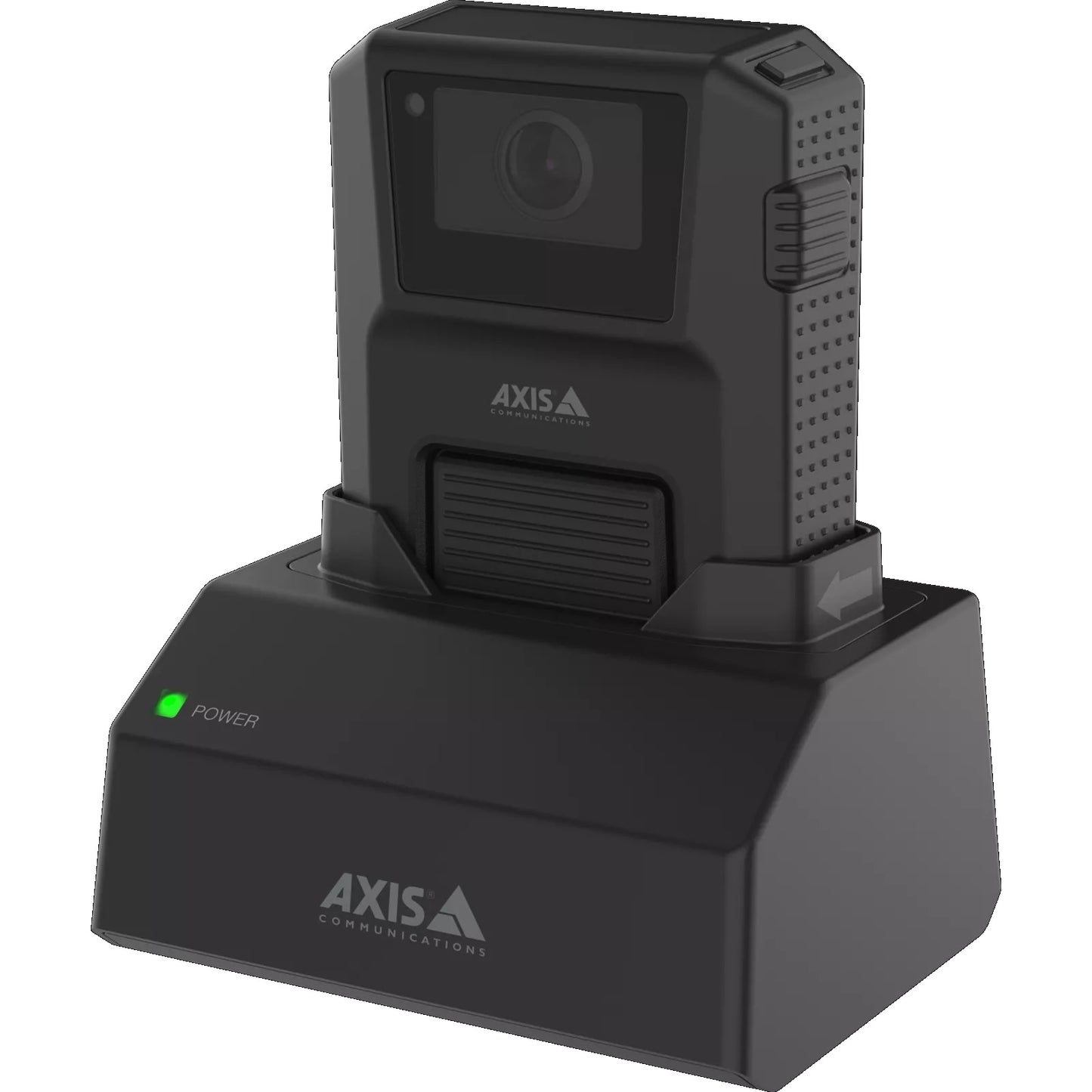
AXIS W700 Mk II Docking Station 1-Bay with Fast Charging & Secure Offloading
When fast charging and secure evidence offloading from a single bay is the requirement, the AXIS W700 Mk II Docking Station delivers a streamlined solution for organisations managing body-worn camera programmes. Designed to charge the AXIS W100 Body Worn Camera while simultaneously transferring footage to a connected system, it keeps operational downtime to a minimum. Compatible with Axis body worn ecosystem components.
Why This Model
- Fast charging: Cameras return to full charge faster between shifts, reducing the number of spare units needed to maintain continuous deployment.
- Secure offloading: Footage transfers automatically on docking, removing the need for manual file handling and reducing the risk of evidence tampering or loss.
- Single-bay compact form: A 1-bay footprint suits smaller teams or staged rollouts where desk space and budget are considerations.
Need help choosing?
Click to ask a question - same day response (~2 hours during business hours)
Product Overview
Model: W700
Who This Is For
When fast crew turnaround and audit-ready footage management are the priority, the AXIS W700 Mk II Docking Station is built for the operational realities of body-worn camera deployments. Security managers running shift-based teams - whether in retail loss prevention, healthcare security, corrections, or facility patrol - need cameras charged and footage offloaded before the next shift starts. The W700 Mk II handles both in a single dock, pulling recorded footage off the camera securely and returning it to full charge without manual file transfers or unsecured USB connections. Designed as part of the AXIS body-worn ecosystem, this 1-bay unit suits smaller teams or deployments where individual officer docking is the preferred workflow, keeping chain-of-custody intact and reducing the administrative burden on supervisors managing evidence.
What This Product Actually Does
Fast Charging
The Mk II generation is designed to return a depleted body-worn camera to operational charge quickly, reducing downtime between shifts. Officers dock the camera at end of shift and it is ready for the next deployment without waiting through a slow overnight charge cycle.
Secure Footage Offloading
When a camera is docked, recorded footage is automatically transferred to the connected system without manual intervention. This removes the risk of unsecured file transfers and maintains chain-of-custody integrity from camera to storage without officers needing to handle files themselves.
1-Bay Single-Officer Docking
The single-bay form factor suits smaller teams, individual supervisor stations, or deployments where each officer has their own dedicated dock. It keeps camera assignment straightforward and avoids the complexity of managing shared multi-bay units across a small roster.
AXIS Ecosystem Integration
The W700 Mk II is built to work within the AXIS body-worn camera platform, meaning docking, offloading, and camera status reporting tie into the broader AXIS management environment rather than operating as a standalone charging unit disconnected from your recording infrastructure.
Mk II Generation
The second-generation designation indicates a refined hardware revision over the original W700, addressing performance and compatibility improvements for current AXIS body-worn camera models. Deploying Mk II ensures compatibility with the latest firmware and ecosystem updates from AXIS.
Who Buys This Model
- Retail Loss Prevention Teams: Smaller LP teams where each officer docks their own camera at shift end, with footage securely transferred to the back-office system without a supervisor needing to manually collect recordings.
- Healthcare Security Departments: Hospital and aged care security teams operating body-worn cameras who need fast charging turnaround between shifts and a chain-of-custody process that meets incident documentation standards.
- Corporate Security Managers Scaling Incrementally: Organisations starting with a small body-worn camera deployment who want 1-bay docks per officer rather than committing to multi-bay infrastructure before headcount is confirmed.
- Patrol and Facilities Security Contractors: Contract security firms managing rotating officer assignments who use individual docking stations to enforce clear camera-to-officer accountability when cameras are assigned per person.
Honest Assessment
The W700 Mk II does two things well: it charges AXIS body-worn cameras faster than a standard USB solution, and it removes the human step from footage offloading - which is where chain-of-custody failures typically happen in body-worn deployments. For teams running shift rotations, that combination has real operational value. The 1-bay format is practical for per-officer assignment models and keeps individual accountability clear. Where it will not serve you is in a high-volume deployment where multiple cameras need to dock simultaneously - that scenario calls for multi-bay docking infrastructure rather than individual units. It is also exclusively designed for the AXIS body-worn ecosystem, so it has no utility outside that platform. If you are evaluating body-worn camera infrastructure, the W700 Mk II is available through Security Australia alongside compatible AXIS body-worn camera models to help you plan the right docking configuration for your team size.
Before You Buy
Deployment Note: The W700 Mk II is a 1-bay unit - if your team has more than a handful of officers docking at the same time (end of a single shift, for example), plan for one dock per camera to avoid queuing. For larger teams sharing a common docking area, multi-bay docking solutions within the AXIS body-worn range will deliver better throughput and simpler cable management than clustering multiple 1-bay units.
Compatibility Note: Confirm that your AXIS body-worn camera model is supported by the W700 Mk II before ordering. The Mk II hardware revision is designed around current-generation AXIS body-worn cameras, and pairing it with older camera models may affect fast-charge and offloading functionality.
Quick Fit Check
- Good match if: You are running an AXIS body-worn camera deployment and need each officer to dock, charge, and securely offload footage independently at their own station without relying on shared infrastructure.
- Good match if: Your team operates shift rotations where fast charging between deployments is operationally necessary and manual file transfer is not an acceptable footage management process.
- You may need a different model if: You have 5 or more officers docking cameras at the end of a single shift - a multi-bay docking station will handle simultaneous charging and offloading more efficiently than multiple 1-bay units.
Key Features & Technical Specifications
Real-World Scenarios
How It Compares
- Choose this if: You are running a per-officer body-worn camera model within the AXIS ecosystem and want each officer to have their own dedicated docking and offloading station with fast charging between shifts.
- You may need a different model if: Your team has more than 4-5 officers docking cameras at the end of a single shift - a multi-bay docking station within the AXIS body-worn range will handle simultaneous docking more efficiently than clustering individual 1-bay units.
- Pairs well with: AXIS body-worn cameras and a compatible AXIS body-worn video management solution to complete the capture, offload, and review workflow.
Common Questions
-
Does the W700 Mk II work with all AXIS body-worn cameras?
Not necessarily all generations - compatibility depends on the specific AXIS body-worn camera model you are deploying. The Mk II designation reflects a revised hardware generation designed around current AXIS body-worn cameras, so confirm compatibility between your camera model and the W700 Mk II before ordering, particularly if you are working with older AXIS body-worn hardware. -
Does footage offload automatically when the camera is docked, or does an officer need to initiate the transfer?
Offloading is automatic on docking. The W700 Mk II is designed to begin secure footage transfer as soon as a compatible camera is placed in the bay, without the officer needing to initiate, approve, or manage the transfer manually. This is a deliberate design choice to remove human error and unsecured file handling from the evidence management chain. -
Will this work as a standalone charger without a network connection?
Charging will function, but secure offloading requires a connection to the AXIS body-worn management system. The W700 Mk II is designed as an integrated docking solution, not a simple USB charger. Using it without the network and management software removes the secure offloading capability that differentiates it from a basic charging dock. -
How many W700 Mk II docks do I need for my team?
One dock per camera in active use is the standard recommendation. Because the W700 Mk II is a 1-bay unit, each camera needs its own dock if you want all cameras charging and offloading simultaneously at shift end. For a team of 6 officers each carrying 1 camera, that means 6 individual docks. If that footprint or cost is a concern, a multi-bay docking station may be a more efficient solution - the team at Security Australia can help you compare options based on your roster size. -
What is the difference between the original W700 and the W700 Mk II?
The Mk II is a second-generation hardware revision. While full specification comparisons between generations require AXIS documentation review, Mk II hardware is generally recommended for new deployments to ensure compatibility with current AXIS body-worn cameras, firmware, and the latest platform updates. If you are expanding an existing W700 deployment, verify inter-generation compatibility with AXIS before mixing dock generations on the same system. -
Is the W700 Mk II suitable for deployments where officers share cameras between shifts?
It can support camera sharing, but per-officer assignment is a cleaner operational model with a 1-bay dock. When cameras are shared, the offloaded footage from multiple officers is associated with a single camera unit, which can complicate individual officer accountability in incident review. If shared camera use is your model, ensure your management software handles officer assignment handover at the point of docking rather than relying on physical camera-to-officer association.
Downloads & Resources
No downloads available for this product.
What This Product Does
When fast charging and secure evidence offloading from a single bay is the requirement, the AXIS W700 Mk II Docking Station delivers a streamlined solution for organisations managing body-worn camera programmes. Designed to charge the AXIS W100 Body Worn Camera while simultaneously transferring footage to a connected system, it keeps operational downtime to a minimum. Compatible with Axis body worn ecosystem components.
Why This Model
- Fast charging: Cameras return to full charge faster between shifts, reducing the number of spare units needed to maintain continuous deployment.
- Secure offloading: Footage transfers automatically on docking, removing the need for manual file handling and reducing the risk of evidence tampering or loss.
- Single-bay compact form: A 1-bay footprint suits smaller teams or staged rollouts where desk space and budget are considerations.
Not sure if this suits your site?
Ask our team before ordering. We can help confirm lens choice, recorder compatibility, mounting accessories and project quantities.
Downloads
Get Product Help
Ask our team before ordering. We can help confirm lens choice, recorder compatibility, mounting accessories and project quantities.
Shipping & Warranty
3 Years Manufacturer Warranty
All IP cameras and recording devices (NVR’s/DVR’s) are covered by a 3 year back-to-base manufacturer warranty.
Our warranty is limited to the replacement of faulty items or parts and does not include damage due to incorrect fitting of parts or accessories, or damage due to mishandling the equipment once out of the box. All faults are sent to the manufacturer for inspection and diagnosis before a replacement is sent out.
Read more about the Terms & Conditions here – https://www.securityaustralia.com.au/terms-and-conditions/
Free Delivery* & Despatch Time
*Just spend over $200 to activate Fast Free Shipping!
Despatch Times: Products are despatched on the same day if the order was placed before 11am on any weekday, Monday - Friday. All other orders are processed and despatched within 24 hours or next business day.
Order Confirmation: Once you place an order, you will receive a confirmation email. This indicates that your order has been received in our system and is now being processed for dispatch. If your item is back-ordered or unavailable, we will notify you via email, and if we do not receive a response, we will attempt to contact you by phone as soon as possible. We value your time and strive to be prompt. If your item(s) are available for immediate shipment (within 2 days), we will process the charges and prepare the order for shipping.
Shipping Times: General shipping times for StarTrack, TNT and Allied couriers are between 1-3 working days from despatch. Longer delivery times may be caused by your package being held at your local courier depot that is beyond our control. Please contact us or the local post depot for confirmation.
Tracking Numbers: all tracking numbers will be emailed to you by our warehouse processing team within the day, after your order is despatched to our local courier.

Get expert advice
Tell us what you need help with and our team will send practical product advice straight to your inbox.

AXIS W700 Mk II Docking Station 1-Bay with Fast Charging & Secure Offloading