




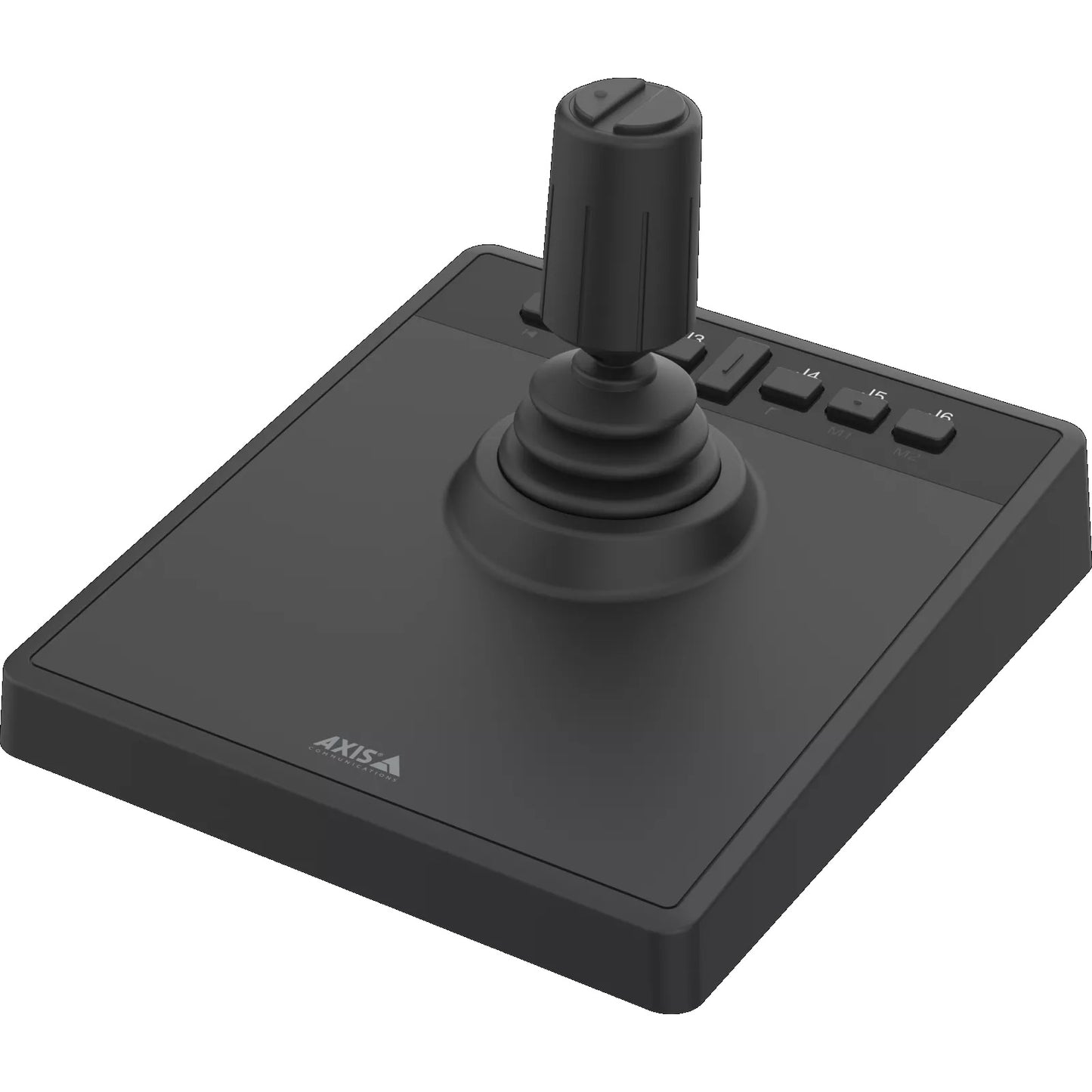
AXIS TU9002 PTZ Joystick Controller | 02475-001
When precise, hands-on control of PTZ cameras is the requirement, the AXIS TU9002 delivers a purpose-built joystick controller designed for operators who need reliable, responsive camera positioning. Compatible with Axis PTZ cameras and management software, it offers smooth 3-axis joystick movement for pan, tilt, and zoom operations. No additional licensing is required for use within supported Axis systems.
Why This Model
- 3-axis joystick control: Simultaneous pan, tilt, and zoom adjustment from a single controller reduces operator response time during live monitoring.
- Native Axis compatibility: Designed to integrate directly with Axis camera management platforms, eliminating the need for third-party drivers or complex configuration.
- Compact desktop form factor: A low-profile, dedicated hardware controller suits control room and monitoring station environments where screen-based PTZ control is impractical.
Need help choosing?
Click to ask a question - same day response (~2 hours during business hours)
Product Overview
Model: AXIS TU9002
Who This Is For
When precise, responsive PTZ camera control from a monitoring workstation is the priority, the AXIS TU9002 PTZ Joystick Controller is the purpose-built input device operators reach for. Designed for security control rooms, reception desks, and monitoring stations running AXIS Camera Station or compatible Axis VMS software, the TU9002 gives operators a dedicated 3-axis joystick for pan, tilt, and zoom - eliminating the imprecision of mouse-based PTZ control during live incidents. It connects via USB and is recognised as a plug-and-play HID device, meaning no driver installation is required on most systems. Installers specifying Axis PTZ camera deployments for retail loss prevention, logistics yards, car parks, or any site where an operator actively tracks subjects in real time will find the TU9002 a practical complement to the camera hardware itself.
What This Controller Actually Does
3-Axis Joystick Control
A single joystick handles pan, tilt, and zoom simultaneously. Operators can smoothly track a moving subject across a wide area without switching between mouse controls or keyboard shortcuts - critical during live incidents where response time matters.
USB Plug-and-Play Connection
The TU9002 connects via standard USB and registers as an HID-compliant device. No driver installation is required on most Windows workstations, meaning it is ready to use at the monitoring station without IT intervention or software configuration.
AXIS Camera Station Integration
Built to work natively within AXIS Camera Station, the joystick maps directly to PTZ camera movement without remapping or calibration. Operators working in an established Axis VMS environment get immediate, consistent response from the moment it is connected.
Compact Desktop Footprint
The TU9002 is designed for standard operator desks, not dedicated control room furniture. Its compact form factor sits alongside a keyboard and monitor without requiring a specialised console, making it practical for small to mid-sized monitoring setups.
Proportional Speed Response
Joystick deflection angle controls camera speed proportionally - push slightly for slow, precise positioning; push further for rapid sweeping movement. This prevents the jerky, overshot movements common with mouse-based PTZ control during live monitoring.
Who Buys This Model
- Control Room Operators: Monitoring staff at logistics yards, shopping centres, or transport hubs who actively track subjects in real time and need fluid, low-fatigue joystick control rather than mouse-based PTZ input.
- Loss Prevention Teams: Retail LP operators using Axis PTZ cameras to follow suspects across a floor or car park, where proportional joystick speed control gives the precision needed to maintain framing on a moving subject.
- Security Integrators Specifying Axis Systems: Installers completing an AXIS Camera Station deployment who need a supported, plug-and-play operator input device to round out the workstation setup without custom configuration.
- Upgrade Buyers Replacing Mouse Control: Sites already running Axis PTZ cameras that are replacing mouse-based PTZ operation after finding it too slow or imprecise during incidents - the TU9002 adds dedicated hardware control without changing any existing software.
Honest Assessment
The AXIS TU9002 does one thing well - it gives operators a physical, proportional joystick for controlling Axis PTZ cameras within AXIS Camera Station. For any monitoring station where an operator actively drives a PTZ camera during live incidents, the improvement over mouse control is immediate and practical. The USB HID connection means no drivers, no setup complexity, and no ongoing software maintenance. It is a compact, purpose-matched input device for the Axis ecosystem. What it will not do is function as a standalone PTZ controller with built-in networking or serial outputs - it depends entirely on the connected workstation and AXIS Camera Station (or compatible Axis-supported VMS software) to relay commands to cameras. It is also not a full-featured control keyboard with LCD screen, preset recall buttons, or multi-camera switching built in. Sites needing that level of standalone operator control should look at more capable PTZ keyboard units available through Security Australia.
Before You Buy
Compatibility Note: The TU9002 is designed to operate within AXIS Camera Station and Axis-supported VMS environments. Before specifying this controller, confirm that the monitoring workstation is running a compatible version of AXIS Camera Station and that the PTZ cameras on the system are Axis models with full AXIS Camera Station PTZ integration. Third-party VMS platforms may not recognise the joystick natively, and functionality will depend on whether that VMS supports HID joystick input.
Single Camera vs Multi-Camera Control: The TU9002 controls the PTZ camera that is currently selected within AXIS Camera Station. It does not include a dedicated camera selection dial or physical preset recall buttons. Operators switching frequently between multiple PTZ cameras in a large system will still need to select each camera via the VMS interface before using the joystick - factor this into your operator workflow planning.
Quick Fit Check
- Good match if: You are running AXIS Camera Station with one or more Axis PTZ cameras and want to give a monitoring operator a dedicated physical joystick for precise, proportional pan, tilt, and zoom control.
- Good match if: Your workstation setup has limited desk space and you need a compact plug-and-play USB controller that requires no driver installation or complex configuration to get operational.
- You may need a different model if: Your operation requires a standalone PTZ keyboard with built-in screen, independent network or serial connectivity, preset recall buttons, and multi-camera switching without relying on a VMS workstation - a dedicated PTZ keyboard controller would be more suitable for that workflow.
Key Features & Technical Specifications
Real-World Scenarios
How It Compares
- Choose this if: You are running AXIS Camera Station and need a compact, plug-and-play USB joystick that gives operators immediate, proportional PTZ control without any driver installation or complex configuration.
- You may need a different model if: Your operation requires a standalone PTZ keyboard controller with independent network connectivity, a built-in display, dedicated preset recall keys, or the ability to control cameras without an active VMS workstation - a full PTZ keyboard unit is the more suitable product type for that requirement.
- Pairs well with: Axis PTZ dome or speed dome cameras connected to an AXIS Camera Station workstation setup.
Common Questions
-
Does the TU9002 work with non-Axis cameras or third-party VMS platforms?
Not reliably. The TU9002 is designed specifically for use within AXIS Camera Station and the Axis ecosystem. While it registers as an HID-compliant USB device - which some third-party VMS platforms can detect - native joystick mapping, proportional speed response, and full PTZ command integration are confirmed only within AXIS Camera Station. Using it with a non-Axis VMS may result in limited or no functional PTZ control, depending on whether that platform supports HID joystick input natively. -
Do I need to install drivers to use the TU9002?
No. The TU9002 is an HID-compliant USB device, which means compatible Windows workstations recognise and load it without a separate driver installation. Connect via USB and AXIS Camera Station detects it automatically. This makes it straightforward to deploy at an existing monitoring workstation without requiring IT involvement or a system restart. -
Will this controller let me recall PTZ presets or switch between cameras at the press of a button?
No. The TU9002 is a joystick input device focused on live joystick-driven pan, tilt, and zoom movement. It does not include dedicated preset recall buttons or physical camera selection keys. Preset recall and camera switching are handled through the AXIS Camera Station interface on the workstation screen. If dedicated hardware preset recall or rapid camera switching is a priority for your operator workflow, a full PTZ keyboard controller with programmable keys is the more appropriate product type. -
How does proportional joystick speed control work in practice?
The further the joystick is deflected from centre, the faster the connected PTZ camera moves. A small nudge produces slow, precise repositioning - useful when zoomed in on a subject and fine-tuning framing. A full push produces a rapid sweep - useful when scanning quickly across a wide area. This proportional response is what separates physical joystick control from mouse-based PTZ control, where speed is often fixed or inconsistent, leading to overshot movements during live monitoring. -
Can one TU9002 control multiple PTZ cameras in AXIS Camera Station?
Yes, with a workflow consideration. The TU9002 controls whichever PTZ camera is currently selected and active within AXIS Camera Station. An operator can switch between multiple PTZ cameras by selecting each one in the VMS interface, then use the joystick to drive that camera. There is no hardware camera-select dial built into the TU9002 itself, so camera switching still happens via the workstation screen. -
Does the TU9002 require PoE or external power?
No. The TU9002 is USB-powered and draws power directly from the connected workstation's USB port. No separate power supply, PoE switch, or additional cabling is required. The single USB cable handles both power and data communication between the controller and the workstation. -
What is the difference between the TU9002 and a full PTZ keyboard controller, and which does my site need?
The TU9002 is a workstation-dependent USB joystick - it relies entirely on a connected AXIS Camera Station PC to translate joystick movement into PTZ commands sent over the network. A full PTZ keyboard controller typically includes independent network or serial connectivity, an integrated display, dedicated preset recall keys, and the ability to send PTZ commands directly to cameras or encoders without a VMS workstation in the loop. If your site has a permanent monitoring workstation running AXIS Camera Station and operators primarily need smooth live joystick tracking, the TU9002 is the right fit. If you need a standalone unit that functions independently of a PC - for a smaller control point or a backup control position - a dedicated PTZ keyboard is more appropriate. The full range of PTZ control options is available through Security Australia.
Downloads & Resources
No downloads available for this product.
What This Product Does
When precise, hands-on control of PTZ cameras is the requirement, the AXIS TU9002 delivers a purpose-built joystick controller designed for operators who need reliable, responsive camera positioning. Compatible with Axis PTZ cameras and management software, it offers smooth 3-axis joystick movement for pan, tilt, and zoom operations. No additional licensing is required for use within supported Axis systems.
Why This Model
- 3-axis joystick control: Simultaneous pan, tilt, and zoom adjustment from a single controller reduces operator response time during live monitoring.
- Native Axis compatibility: Designed to integrate directly with Axis camera management platforms, eliminating the need for third-party drivers or complex configuration.
- Compact desktop form factor: A low-profile, dedicated hardware controller suits control room and monitoring station environments where screen-based PTZ control is impractical.
Not sure if this suits your site?
Ask our team before ordering. We can help confirm lens choice, recorder compatibility, mounting accessories and project quantities.
Get Product Help
Ask our team before ordering. We can help confirm lens choice, recorder compatibility, mounting accessories and project quantities.
Shipping & Warranty
3 Years Manufacturer Warranty
All IP cameras and recording devices (NVR’s/DVR’s) are covered by a 3 year back-to-base manufacturer warranty.
Our warranty is limited to the replacement of faulty items or parts and does not include damage due to incorrect fitting of parts or accessories, or damage due to mishandling the equipment once out of the box. All faults are sent to the manufacturer for inspection and diagnosis before a replacement is sent out.
Read more about the Terms & Conditions here – https://www.securityaustralia.com.au/terms-and-conditions/
Free Delivery* & Despatch Time
*Just spend over $200 to activate Fast Free Shipping!
Despatch Times: Products are despatched on the same day if the order was placed before 11am on any weekday, Monday - Friday. All other orders are processed and despatched within 24 hours or next business day.
Order Confirmation: Once you place an order, you will receive a confirmation email. This indicates that your order has been received in our system and is now being processed for dispatch. If your item is back-ordered or unavailable, we will notify you via email, and if we do not receive a response, we will attempt to contact you by phone as soon as possible. We value your time and strive to be prompt. If your item(s) are available for immediate shipment (within 2 days), we will process the charges and prepare the order for shipping.
Shipping Times: General shipping times for StarTrack, TNT and Allied couriers are between 1-3 working days from despatch. Longer delivery times may be caused by your package being held at your local courier depot that is beyond our control. Please contact us or the local post depot for confirmation.
Tracking Numbers: all tracking numbers will be emailed to you by our warehouse processing team within the day, after your order is despatched to our local courier.

Get expert advice
Tell us what you need help with and our team will send practical product advice straight to your inbox.
AXIS TU9002 PTZ Joystick Controller | 02475-001