





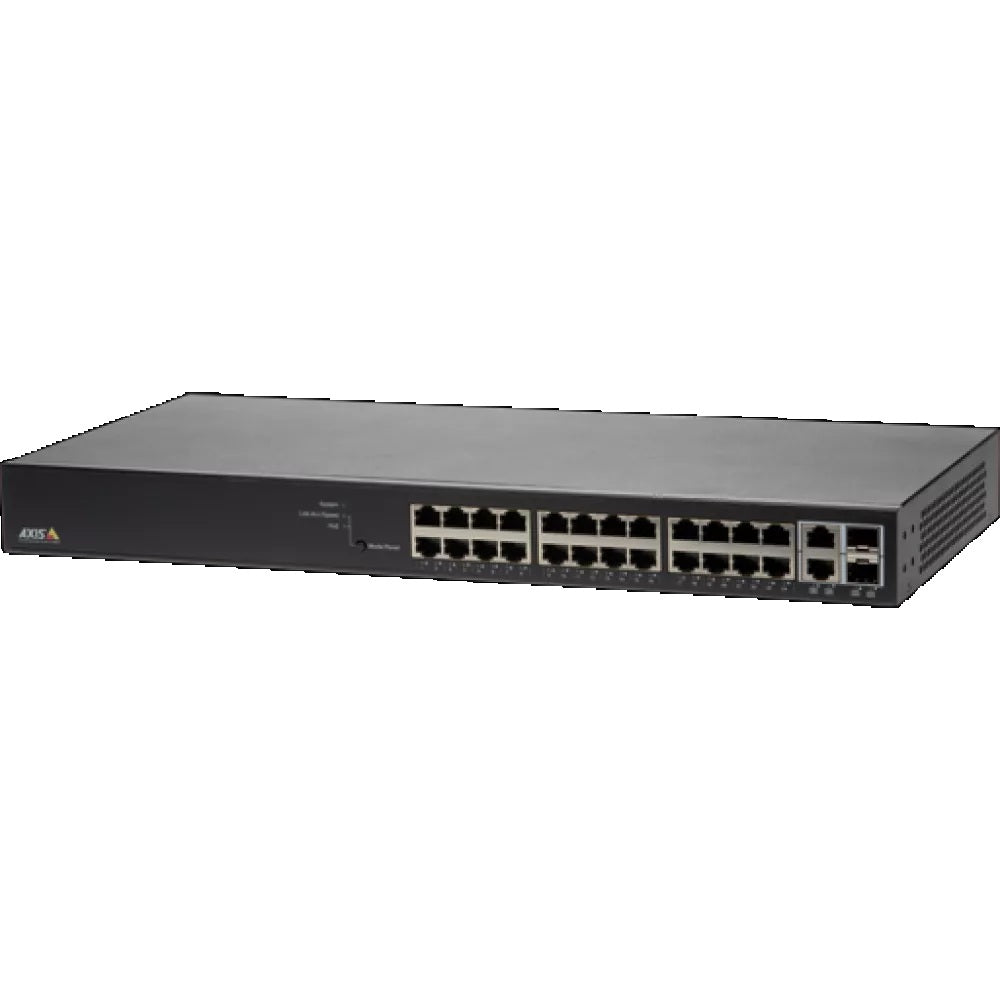
AXIS T8524 PoE+ Network Switch with 24 Ports, Surveillance GUI & VLAN Support
The AXIS T8524 delivers managed PoE+ switching for installers and integrators building scalable IP surveillance networks. Designed specifically for surveillance deployments, it offers a purpose-built GUI that simplifies camera management and VLAN configuration without requiring advanced IT knowledge. Note: this is a network switch only - cameras and recording equipment are sold separately.
Why This Model
- Surveillance-optimised GUI: The dedicated management interface is built around camera networks, making VLAN setup and port management accessible to installers who aren't network specialists.
- 24-port PoE+ capacity: With 24 PoE+ ports, the T8524 can power and connect a large number of cameras and access control devices from a single switch, reducing cabling complexity across larger sites.
- VLAN support: Built-in VLAN capability allows installers to segment surveillance traffic from other network activity, improving both security and reliability across mixed-use installations.
Need help choosing?
Click to ask a question - same day response (~2 hours during business hours)
Product Overview
Model: T8524
Who This Is For
Property managers specifying IP surveillance infrastructure across multi-camera sites need a switch purpose-built for the task - not a generic IT switch adapted to the job. The AXIS T8524 PoE+ Network Switch is designed specifically for surveillance network deployments, offering 24 PoE+ ports, a simplified surveillance-oriented management GUI, and VLAN support in a single managed unit. It suits integrators and facilities teams commissioning medium to large camera networks where power delivery, network segmentation, and simplified management matter more than enterprise IT feature sets. Organisations running Axis camera systems will find the T8524 integrates cleanly into their existing infrastructure. It is equally relevant on mixed-brand IP camera networks where PoE+ power budget and VLAN isolation are the primary infrastructure requirements.
What This Switch Actually Does
24 PoE+ Ports for Camera Power
All 24 ports deliver PoE+ (IEEE 802.3at), meaning each camera, access point, or device draws both data and power through a single Cat cable. No separate power supplies or local power runs are needed at each camera position, which significantly simplifies cabling on larger installations.
Surveillance-Optimised Management GUI
The T8524 uses a purpose-built surveillance management interface rather than a generic IT switch GUI. This means technicians without deep networking backgrounds can configure and monitor the switch in the context of a camera network, reducing setup time and configuration errors on-site.
VLAN Support for Network Segmentation
VLAN support allows the surveillance network to be logically separated from general office or corporate traffic on the same physical infrastructure. This protects video traffic from congestion caused by other network activity and supports security best-practice by isolating camera data from other systems.
Managed Switch Functionality
As a fully managed switch, the T8524 allows port-level configuration, traffic monitoring, and network control. Integrators can manage bandwidth allocation per port, monitor device status, and troubleshoot connectivity issues remotely - capabilities unmanaged switches cannot provide on a professional surveillance site.
Designed for Axis Ecosystem Integration
The T8524 is built by Axis to complement their camera and NVR product lines. Sites already running Axis cameras or AXIS Camera Station benefit from consistent vendor support, compatibility assurance, and the ability to manage network and camera infrastructure through a unified support channel.
Who Buys This Model
- Security Integrators: Commissioning 10-24 camera deployments at commercial sites where a single managed PoE+ switch eliminates individual camera power adapters and simplifies structured cabling.
- Facilities Managers at Multi-Tenancy Buildings: Specifying surveillance infrastructure that can be VLAN-segmented to isolate camera traffic from tenant networks on a shared physical backbone.
- IT Teams Supporting Axis Camera Networks: Replacing unmanaged switches with a managed unit that provides port-level visibility, bandwidth controls, and a GUI aligned to surveillance rather than general IT network management.
- Education and Healthcare Facilities: Deploying large camera counts across a campus or building where central PoE+ switching and network segmentation from sensitive data systems are both mandatory requirements.
Honest Assessment
The AXIS T8524 does exactly what a mid-to-large IP camera deployment needs from its switching layer: 24 PoE+ ports, managed controls, VLAN segmentation, and a GUI that does not require a network engineer to operate. For integrators building out Axis camera sites, the vendor consistency and surveillance-specific management interface are genuine practical advantages over adapting a generic enterprise switch to the same task. Where the T8524 has limits: if your site requires more than 24 camera connections from a single switch, you will need to plan for stacking or additional switching infrastructure. It is also not the right choice for sites requiring only 8 or 16 connections, where a smaller PoE+ switch would be more cost-appropriate. Available through Security Australia, the T8524 suits organised, scalable surveillance infrastructure builds rather than small standalone installations.
Before You Buy
PoE Budget Planning: Before specifying the T8524, calculate the total PoE draw of your planned camera and device mix. PoE+ devices can draw up to 30W per port, and the switch has a finite total power budget across all 24 ports simultaneously. If you are connecting a high proportion of PTZ cameras or multi-sensor devices that each draw near maximum PoE+ wattage, verify your total load against the switch's rated PoE budget to avoid under-powering devices at full network load.
Uplink Planning: The T8524 requires uplink ports to connect to your NVR, server, or wider network. Confirm your uplink configuration and available ports before installation to avoid a site visit where the switch is cabled to cameras but has no path to the recording system or network core.
Quick Fit Check
- Good match if: You are deploying between 10 and 24 IP cameras and want a single managed PoE+ switch with a surveillance-specific GUI that does not demand IT-level configuration expertise on site.
- Good match if: Your site requires network segmentation via VLAN to isolate camera traffic from corporate or tenant data networks on a shared physical infrastructure.
- You may need a different model if: Your camera count is under 10 - a smaller PoE+ managed switch will be more appropriately sized and more cost-effective for the installation; browse the switching and accessories range on securityaustralia.com.au for alternatives.
Key Features & Technical Specifications
Real-World Scenarios
How It Compares
- Choose this if: You need a managed PoE+ switch with 24 ports, a surveillance-specific management GUI, and VLAN support - particularly on sites running Axis cameras where vendor consistency matters.
- You may need a different model if: Your installation has fewer than 10 cameras - a smaller PoE+ managed switch will be better sized for the job; the switching and accessories range at securityaustralia.com.au includes smaller port-count options suited to compact deployments.
- Pairs well with: Axis IP cameras (any PoE or PoE+ model), Axis NVRs and recording servers, and Cat6 structured cabling for full PoE+ performance at standard surveillance cable run distances.
Common Questions
-
Will this switch power all 24 cameras simultaneously at full PoE+ load?
Not necessarily at full 30W per port across all 24 simultaneously - the switch has a finite total PoE power budget. Most IP cameras draw well under 30W, so in practice the majority of deployments will not hit the ceiling. However, if your design includes a high proportion of PTZ cameras, multi-sensor units, or other high-draw PoE+ devices, calculate your total load against the rated PoE budget before finalising the switch selection. -
Does this switch support IEEE 802.3at PoE+?
Yes. All 24 ports on the T8524 support IEEE 802.3at (PoE+), delivering up to 30W per port. This covers the power requirements of the majority of IP cameras, including models that exceed the 15.4W limit of standard 802.3af PoE. Cameras requiring 802.3bt (PoE++) at 60W or 90W are not supported. -
Do I need IT networking experience to configure the T8524?
No - not for standard surveillance deployments. The T8524 includes a surveillance-optimised web GUI designed to make camera network setup and monitoring accessible without requiring command-line networking knowledge. Advanced features like VLAN configuration will benefit from some familiarity with managed switch concepts, but routine setup tasks are streamlined for the surveillance installer rather than the enterprise network engineer. -
Will this switch work with non-Axis IP cameras?
Yes. The T8524 is a standards-based managed switch and will power and connect any PoE or PoE+ device compliant with IEEE 802.3af or 802.3at, regardless of brand. The surveillance GUI and Axis ecosystem integration are advantages that benefit Axis installations most directly, but the switching and PoE functions operate correctly with third-party IP cameras on mixed-brand networks. -
How does VLAN support actually help a surveillance installation?
VLAN support allows the camera network to be logically separated from other network traffic - such as corporate data, guest Wi-Fi, or tenant systems - even when all devices share the same physical switch and cabling. This means camera video streams are not affected by congestion from other network activity, and camera devices are not reachable from other VLANs without deliberate routing, which aligns with network security best practice for surveillance systems. The T8524 stocked by Security Australia supports VLAN configuration through its web management interface. -
Does this switch work with AXIS Camera Station?
Yes. The T8524 connects Axis cameras to the network and NVR infrastructure that AXIS Camera Station relies on, and its Axis ecosystem origin means it is designed to work consistently within that environment. The switch itself is a network infrastructure device - AXIS Camera Station communicates with cameras through it, but the switch does not require any specific VMS software to operate.
Downloads & Resources
No downloads available for this product.
What This Product Does
The AXIS T8524 delivers managed PoE+ switching for installers and integrators building scalable IP surveillance networks. Designed specifically for surveillance deployments, it offers a purpose-built GUI that simplifies camera management and VLAN configuration without requiring advanced IT knowledge. Note: this is a network switch only - cameras and recording equipment are sold separately.
Why This Model
- Surveillance-optimised GUI: The dedicated management interface is built around camera networks, making VLAN setup and port management accessible to installers who aren't network specialists.
- 24-port PoE+ capacity: With 24 PoE+ ports, the T8524 can power and connect a large number of cameras and access control devices from a single switch, reducing cabling complexity across larger sites.
- VLAN support: Built-in VLAN capability allows installers to segment surveillance traffic from other network activity, improving both security and reliability across mixed-use installations.
Not sure if this suits your site?
Ask our team before ordering. We can help confirm lens choice, recorder compatibility, mounting accessories and project quantities.
Downloads
Get Product Help
Ask our team before ordering. We can help confirm lens choice, recorder compatibility, mounting accessories and project quantities.
Shipping & Warranty
3 Years Manufacturer Warranty
All IP cameras and recording devices (NVR’s/DVR’s) are covered by a 3 year back-to-base manufacturer warranty.
Our warranty is limited to the replacement of faulty items or parts and does not include damage due to incorrect fitting of parts or accessories, or damage due to mishandling the equipment once out of the box. All faults are sent to the manufacturer for inspection and diagnosis before a replacement is sent out.
Read more about the Terms & Conditions here – https://www.securityaustralia.com.au/terms-and-conditions/
Free Delivery* & Despatch Time
*Just spend over $200 to activate Fast Free Shipping!
Despatch Times: Products are despatched on the same day if the order was placed before 11am on any weekday, Monday - Friday. All other orders are processed and despatched within 24 hours or next business day.
Order Confirmation: Once you place an order, you will receive a confirmation email. This indicates that your order has been received in our system and is now being processed for dispatch. If your item is back-ordered or unavailable, we will notify you via email, and if we do not receive a response, we will attempt to contact you by phone as soon as possible. We value your time and strive to be prompt. If your item(s) are available for immediate shipment (within 2 days), we will process the charges and prepare the order for shipping.
Shipping Times: General shipping times for StarTrack, TNT and Allied couriers are between 1-3 working days from despatch. Longer delivery times may be caused by your package being held at your local courier depot that is beyond our control. Please contact us or the local post depot for confirmation.
Tracking Numbers: all tracking numbers will be emailed to you by our warehouse processing team within the day, after your order is despatched to our local courier.

Get expert advice
Tell us what you need help with and our team will send practical product advice straight to your inbox.
AXIS T8524 PoE+ Network Switch with 24 Ports, Surveillance GUI & VLAN Support