





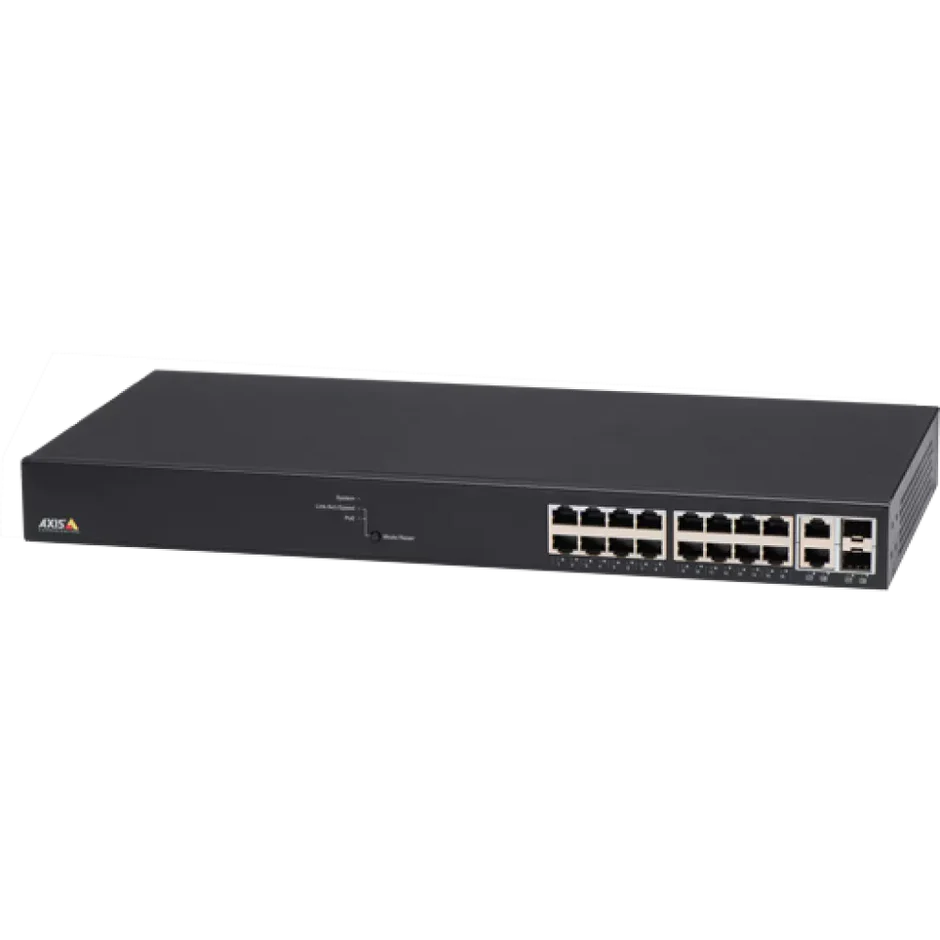
AXIS T8516 PoE+ Network Switch with 16 Ports, Surveillance GUI & VLAN Support
Built as a managed PoE+ network switch for IP surveillance deployments, the AXIS T8516 provides 16 ports to power and connect cameras, intercoms, and other PoE devices across a single installation. Designed with a surveillance-focused GUI, it simplifies network configuration without requiring IT expertise. VLAN support adds network segmentation for tighter security across larger installations.
Why This Model
- Surveillance-optimised interface: The dedicated surveillance GUI allows installers to configure and manage the switch without advanced IT networking knowledge, reducing setup time on site.
- 16-port PoE+ capacity: With 16 powered ports, a single switch can support an entire camera system - eliminating the need for separate power adapters or injectors at each device.
- VLAN support: Network segmentation keeps surveillance traffic isolated from other business systems, improving both security and network performance across larger sites.
Need help choosing?
Click to ask a question - same day response (~2 hours during business hours)
Product Overview
Model: T8516
Who This Is For
For installers and IT managers who need a managed PoE+ switch purpose-built for IP surveillance networks, the AXIS T8516 sits at the backbone of multi-camera deployments where power delivery, network segmentation, and device management cannot be left to a generic unmanaged switch. With 16 PoE+ ports and a surveillance-oriented web GUI, it suits commercial installations where cameras, intercoms, and access control readers all draw power and data from a single infrastructure layer. VLAN support makes it particularly relevant for installations where surveillance traffic needs to be isolated from the corporate LAN - a common requirement in schools, warehouses, medium-sized retail premises, and multi-tenancy buildings. If you are specifying a system that goes beyond 4 or 8 cameras and requires both orderly power management and network control, the T8516 is the switching layer worth evaluating.
What This Switch Actually Does
16-Port PoE+ Power Delivery
Each port supports IEEE 802.3at PoE+, meaning cameras, intercoms, and access readers that require up to 30W per device can all be powered directly from the switch without separate power supplies at each camera position. This significantly reduces installation time and cabling complexity on larger jobs.
Surveillance-Optimised GUI
The web interface is designed around the workflow of surveillance installers rather than network engineers. Device discovery, port status, and PoE power monitoring are presented in a straightforward layout, reducing configuration time on-site and making post-install checks faster for technicians who are not dedicated IT staff.
VLAN Network Segmentation
VLAN support allows surveillance traffic to be separated from general business or tenant network traffic on the same physical infrastructure. This is a practical requirement in commercial environments where the IT team requires network isolation for security cameras, and it avoids the need to run entirely separate physical cabling for the surveillance network.
Axis Ecosystem Integration
The T8516 is designed to work with AXIS Camera Station and compatible Axis network devices. LLDP-based device discovery means connected Axis cameras and intercoms are automatically identified in the management interface, giving installers a clear view of what is connected to each port without manual logging.
QoS Traffic Prioritisation
Quality of Service settings let you prioritise video stream traffic over other data types on the network. In mixed-use environments where the switch carries both surveillance and other IP traffic, QoS helps ensure camera feeds reach the NVR without latency caused by competing network activity.
Who Buys This Model
- Security Installers on Commercial Projects: Technicians specifying the network layer for 8-16 camera installations where powering each camera individually via injectors would be impractical and messy.
- IT Managers in Schools and Government Buildings: Sites where surveillance must sit on a dedicated VLAN, separated from staff and student networks, while sharing existing physical cabling infrastructure.
- Warehouse and Logistics Operators: Facilities running Axis cameras alongside door controllers and intercoms, where a single managed PoE+ switch handles all powered IP devices from one central rack position.
- Multi-Tenancy Property Managers: Buildings where surveillance infrastructure is shared across floors or zones, and network segmentation per zone is a compliance or insurance requirement.
Honest Assessment
The AXIS T8516 does one thing particularly well: it removes the friction between surveillance hardware and network infrastructure. The surveillance GUI means installers without deep networking backgrounds can configure VLANs and monitor PoE budgets without referencing dense switch documentation. The 16 PoE+ ports give enough capacity for a substantial single-site deployment, and the Axis ecosystem integration via LLDP makes device identification straightforward. What it will not do is replace a full enterprise-managed switch where advanced routing, 802.1X port authentication, or deep SNMP monitoring are mandatory. If your site's IT team requires features beyond surveillance-focused management, a more feature-complete managed switch from the broader market may be needed. For surveillance-specific deployments using Axis equipment - available through Security Australia - the T8516 hits a practical middle ground between an unmanaged consumer switch and an unnecessarily complex enterprise unit.
Before You Buy
PoE Budget Planning: Before committing to the T8516, total the PoE wattage draw of every device you plan to connect. High-power cameras with heaters, PTZ units, or multi-sensor cameras can consume significantly more than a standard fixed camera. Confirm the switch's total PoE power budget against your device list before installation - exceeding the budget will cause the switch to deny power to lower-priority ports.
Uplink Planning: The T8516 connects to your upstream router or core switch via its uplink ports. Confirm the uplink port type and speed match your existing network infrastructure before deployment. Running 16 cameras simultaneously generates substantial bandwidth - ensure your uplink capacity and NVR network interface are rated accordingly.
Quick Fit Check
- Good match if: You are deploying 8-16 Axis IP cameras and need a single managed switch to power and network all devices from a rack or comms cabinet without individual PoE injectors at each camera run.
- Good match if: Your installation requires VLAN separation between the surveillance network and the client's existing business LAN, and you need a GUI that a surveillance technician - not a network engineer - can configure on-site.
- You may need a different model if: Your deployment requires more than 16 powered device ports - a higher-port-count managed PoE+ switch would be a better fit for large-scale installations.
Key Features & Technical Specifications
Real-World Scenarios
How It Compares
- Choose this if: You need a managed PoE+ switch with a GUI designed for surveillance workflows, VLAN support, and Axis device compatibility - without the complexity of a full enterprise switch configuration.
- You may need a different model if: Your installation requires more than 16 PoE+ ports, advanced routing features, or 802.1X port-based authentication - a higher-specification enterprise managed switch would be the appropriate product type.
- Pairs well with: An Axis NVR or AXIS Camera Station server as the recording platform, and Axis PoE+ cameras or intercoms as the connected devices.
Common Questions
-
Will the T8516 work with non-Axis cameras and PoE devices?
Yes. Any device that complies with IEEE 802.3af or IEEE 802.3at PoE standards will draw power and connect normally through the T8516. The LLDP-based automatic device identification and the surveillance GUI are optimised for Axis equipment, so non-Axis devices will still receive power and network connectivity but will not appear with the same level of automatic detail in the management interface. -
Does this switch require IT expertise to configure VLANs?
No, not for standard surveillance deployments. The surveillance-optimised GUI is designed to make VLAN setup accessible to security installers who are not dedicated network engineers. Basic VLAN separation between the surveillance network and a business LAN can be configured through the web interface without command-line access or advanced networking knowledge. -
How do I know if my cameras will exceed the switch's PoE power budget?
Before installation, list every device you plan to connect and note its maximum PoE draw in watts. Add these figures together and compare the total against the T8516's rated total PoE budget. High-power devices such as PTZ cameras with heaters, multi-sensor cameras, or intercoms with built-in speakers can consume considerably more than a standard fixed dome. If your total approaches or exceeds the budget, the switch will use port priority to determine which devices receive power - lower-priority ports will be denied power first. Plan your layout accordingly, placing the most critical devices on higher-priority ports. -
Does this switch support remote management?
Yes. The web-based management GUI is accessible over the network, meaning an administrator can check port status, PoE consumption, and connected device information remotely without being physically at the switch. This is particularly useful for installers providing ongoing support across multiple sites, or for IT managers monitoring a surveillance network alongside other infrastructure. Security Australia stocks the T8516 as part of the broader Axis network infrastructure range. -
Will this switch work with AXIS Camera Station?
Yes. The T8516 is designed to integrate with the Axis ecosystem including AXIS Camera Station. Connected Axis cameras and devices are discoverable through LLDP, which assists with initial system setup and ongoing network visibility when used alongside Axis recording software. -
Does the T8516 need to be rack-mounted, or can it be installed in a comms cabinet?
The T8516 is rack-mountable, making it suited to server rooms and standard 19-inch comms cabinets. This form factor is practical for commercial installations where the switch needs to sit alongside an NVR or server in a structured cabling environment. Confirm your cabinet has adequate rack space and airflow clearance before installation. -
Does the switch support QoS to prioritise camera video traffic?
Yes. QoS is supported, allowing video stream traffic to be given priority over other data types passing through the switch. In installations where the T8516 carries both surveillance traffic and other IP data on the same network segment, QoS configuration helps prevent camera feeds from being delayed by competing network activity during peak usage periods.
Downloads & Resources
No downloads available for this product.
What This Product Does
Built as a managed PoE+ network switch for IP surveillance deployments, the AXIS T8516 provides 16 ports to power and connect cameras, intercoms, and other PoE devices across a single installation. Designed with a surveillance-focused GUI, it simplifies network configuration without requiring IT expertise. VLAN support adds network segmentation for tighter security across larger installations.
Why This Model
- Surveillance-optimised interface: The dedicated surveillance GUI allows installers to configure and manage the switch without advanced IT networking knowledge, reducing setup time on site.
- 16-port PoE+ capacity: With 16 powered ports, a single switch can support an entire camera system - eliminating the need for separate power adapters or injectors at each device.
- VLAN support: Network segmentation keeps surveillance traffic isolated from other business systems, improving both security and network performance across larger sites.
Not sure if this suits your site?
Ask our team before ordering. We can help confirm lens choice, recorder compatibility, mounting accessories and project quantities.
Downloads
Get Product Help
Ask our team before ordering. We can help confirm lens choice, recorder compatibility, mounting accessories and project quantities.
Shipping & Warranty
3 Years Manufacturer Warranty
All IP cameras and recording devices (NVR’s/DVR’s) are covered by a 3 year back-to-base manufacturer warranty.
Our warranty is limited to the replacement of faulty items or parts and does not include damage due to incorrect fitting of parts or accessories, or damage due to mishandling the equipment once out of the box. All faults are sent to the manufacturer for inspection and diagnosis before a replacement is sent out.
Read more about the Terms & Conditions here – https://www.securityaustralia.com.au/terms-and-conditions/
Free Delivery* & Despatch Time
*Just spend over $200 to activate Fast Free Shipping!
Despatch Times: Products are despatched on the same day if the order was placed before 11am on any weekday, Monday - Friday. All other orders are processed and despatched within 24 hours or next business day.
Order Confirmation: Once you place an order, you will receive a confirmation email. This indicates that your order has been received in our system and is now being processed for dispatch. If your item is back-ordered or unavailable, we will notify you via email, and if we do not receive a response, we will attempt to contact you by phone as soon as possible. We value your time and strive to be prompt. If your item(s) are available for immediate shipment (within 2 days), we will process the charges and prepare the order for shipping.
Shipping Times: General shipping times for StarTrack, TNT and Allied couriers are between 1-3 working days from despatch. Longer delivery times may be caused by your package being held at your local courier depot that is beyond our control. Please contact us or the local post depot for confirmation.
Tracking Numbers: all tracking numbers will be emailed to you by our warehouse processing team within the day, after your order is despatched to our local courier.

Get expert advice
Tell us what you need help with and our team will send practical product advice straight to your inbox.
AXIS T8516 PoE+ Network Switch with 16 Ports, Surveillance GUI & VLAN Support