





AXIS T6101 Mk II Audio and I/O Interface | Add Audio & I/O to Axis Cameras
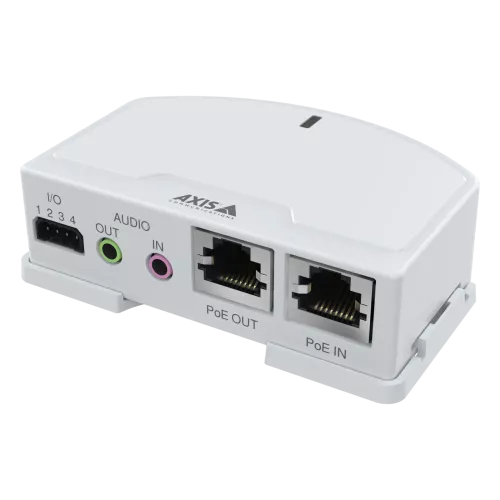
When adding audio and I/O capability to an existing Axis camera installation is the requirement, the AXIS T6101 Mk II is the interface unit designed for the job. It connects directly to Axis network cameras via USB, enabling line-in/line-out audio and I/O port functionality without replacing the camera itself. A practical upgrade path for installers looking to expand site capability on compatible Axis models.
Why This Model
- Non-invasive audio upgrade: Connects via USB to compatible Axis cameras, so you gain audio and I/O capability without swapping out hardware or running new cable infrastructure.
- Line-in and line-out audio: Supports external microphone and speaker connections, allowing two-way audio to be added to cameras that lack built-in audio hardware.
- I/O port expansion: Adds input/output ports for connecting door contacts, alarms, or other external devices, extending the triggering and automation capability of your existing Axis camera.
Need help choosing?
Click to ask a question - same day response (~2 hours during business hours)
Product Overview
Model: T6101
Who This Is For
When retrofitting audio and I/O capability to an existing Axis camera installation is the priority, the AXIS T6101 Mk II Audio and I/O Interface gives installers a clean, manufacturer-engineered path to do exactly that. Rather than replacing a camera that lacks a built-in microphone, speaker output, or digital I/O ports, integrators can attach the T6101 Mk II to a compatible Axis unit and immediately unlock line-level audio input, audio output, and configurable I/O connections. This suits commercial deployments where access control triggers, door contact monitoring, or two-way audio announcements need to be layered onto an existing fixed camera without a full hardware swap. System integrators specifying Axis-based solutions for retail, office, or light industrial environments will find this interface a practical addition when the camera model chosen for its image quality simply does not carry the I/O or audio connectivity the brief requires.
What This Interface Actually Does
Adds Line-Level Audio Input
A 3.5mm line-in connection lets you attach an external microphone or audio source to a compatible Axis camera that has no built-in microphone. Audio is then handled and streamed through the camera's own software, keeping your VMS workflow consistent.
Adds Line-Level Audio Output
The 3.5mm line-out port connects to an external speaker or amplifier, enabling audio announcements or two-way communication through a camera that would otherwise have no speaker output - useful for reception areas, access points, and monitored entrances.
4x Configurable I/O Ports
Four digital I/O connections can be mapped to door contacts, PIR sensors, relay outputs, or alarm triggers - all managed through the host Axis camera's event engine. This lets a single camera handle sensor integration without a separate I/O expander or controller.
Camera-Powered Operation
The T6101 Mk II draws power directly from the host Axis camera via the camera's interface connector, removing the need for a separate power supply at the mounting point. This keeps wiring tight and the installation profile compact.
Native Axis Integration
Because the T6101 Mk II is an Axis-manufactured accessory, audio and I/O functions appear natively inside AXIS Camera Management and AXIS OS. No third-party drivers or firmware workarounds are required - configuration is handled inside the same interface used to manage the camera itself.
Who Buys This Model
- System Integrators: Specifying Axis cameras that deliver the required image quality but lack onboard I/O or audio ports - the T6101 Mk II fills that gap without changing the camera model or disrupting the overall system design.
- Retail and Office IT Managers: Adding door contact or PIR sensor triggers to existing Axis camera positions, using the 4 configurable I/O ports to feed events directly into the site's VMS or access control platform.
- Commercial Installers: Working on reception, lobby, or entry-point installations where two-way audio announcements are required through a camera that has no built-in speaker - connecting an external amplifier and microphone via the line-in and line-out ports.
- Upgrade-Focused End Users: Owners of compatible Axis cameras who want to add audio monitoring or alarm sensor inputs without replacing functional hardware mid-lifecycle.
Honest Assessment
The T6101 Mk II does one thing well: it extends the capability of a compatible Axis camera by adding audio I/O and digital I/O without any additional power cabling. The native integration into AXIS OS means audio levels, I/O mapping, and event rules are all configured in the same familiar interface - there is no separate management layer to maintain. For installers who have already committed to a specific Axis camera model and need to retrofit connectivity, this is a straightforward hardware solution. What it will not do is work with non-Axis cameras, and it is not a standalone audio device - it has no processing or recording capability of its own. If the camera itself is being reconsidered and a model with built-in audio and I/O is available that meets the imaging requirement, that may be a simpler path. The T6101 Mk II is stocked by Security Australia for installers who need it as a deliberate part of their Axis system design.
Before You Buy
Compatibility Check: The T6101 Mk II connects to the host camera via a specific Axis multi-connector interface. Confirm your Axis camera model is listed as compatible before ordering - not all Axis cameras expose the required connector. Check the Axis compatibility tool on the Axis website using your camera's model number before specifying this accessory on a job.
External Audio Equipment: The T6101 Mk II provides line-level audio in and out - it is not a microphone or speaker itself. You will need to supply an external microphone for audio capture and an external amplified speaker or public address input for audio output. Factor these components and their cabling into your installation plan and budget.
Quick Fit Check
- Good match if: You have a compatible Axis camera already selected for its imaging performance and need to add door contact, PIR, or relay I/O to that position - the 4 configurable I/O ports cover most single-point sensor integration requirements.
- Good match if: Your brief calls for audio announcements or monitoring at a camera position and the chosen Axis model has no onboard audio - the line-in and line-out connections let you attach external microphone and speaker equipment without camera replacement.
- You may need a different model if: Your camera is not from the Axis range or does not expose the required multi-connector interface - in that case, look at I/O expander modules or cameras with built-in audio and I/O that are compatible with your existing system.
Key Features & Technical Specifications
Real-World Scenarios
How It Compares
- Choose this if: You have a compatible Axis camera already specified or installed and need to add audio connectivity and digital I/O at that position without replacing the camera or running separate power cabling.
- You may need a different model if: Your deployment requires audio or I/O integration across a non-Axis camera platform - in that case, a standalone network audio device or a dedicated I/O module designed for your VMS ecosystem will be a more suitable product type.
- Pairs well with: Compatible Axis fixed dome or box cameras that expose the multi-connector interface, combined with an external line-level microphone and an amplified speaker or PA input for full audio deployment.
Common Questions
-
Will this work with any Axis camera I already have installed?
No - only specific Axis camera models that expose the required multi-connector interface are compatible with the T6101 Mk II. Not all Axis cameras carry this connector. Before purchasing, check your camera's model number against the official Axis compatibility list on the Axis website to confirm the interface is present on your unit. -
Does this interface need its own power supply or network connection?
No. The T6101 Mk II draws power directly from the host Axis camera via the camera's multi-connector interface. It also has no independent network connection - all data, audio streams, and I/O events pass through the host camera's existing network link. No additional PoE port, power adapter, or switch port is required for the interface itself. -
Does the T6101 Mk II include a microphone or speaker?
No. The T6101 Mk II provides line-level audio input and line-level audio output connections only - it does not include a microphone, speaker, or amplifier. You will need to supply and connect your own external microphone to the 3.5mm line-in jack and your own external amplified speaker or PA system to the 3.5mm line-out jack to achieve functional two-way audio. -
How many I/O devices can I connect, and what types does it support?
The T6101 Mk II provides 4 configurable I/O ports. Each port can be configured as either an input or an output depending on your requirement. Common input uses include door contacts, PIR sensors, and push buttons. Common output uses include relay-controlled locks, gate releases, and alarm sirens. Configuration is handled inside AXIS OS on the host camera, and events can be tied to recording rules, alerts, and output triggers through the camera's standard event engine. -
Will the audio and I/O functions appear in my VMS alongside the camera?
Yes. Because the T6101 Mk II is an Axis-manufactured accessory that integrates natively with AXIS OS, the audio streams and I/O states are presented through the host camera's network interface. Most ONVIF-compatible VMS platforms that already handle your Axis cameras will recognise the audio channel and I/O ports without additional configuration, though specific VMS support should be confirmed for your platform. The interface is available through Security Australia as part of the broader Axis accessories range. -
Can I use this to retrofit audio to multiple cameras on one site?
Yes, provided each camera is a compatible Axis model. Each T6101 Mk II interfaces with a single host camera - one unit is required per camera position where audio or I/O connectivity is needed. There is no limit on how many units can be deployed across a single site, and each is managed independently through its respective host camera's AXIS OS interface.
Downloads & Resources
No downloads available for this product.
What This Product Does
When adding audio and I/O capability to an existing Axis camera installation is the requirement, the AXIS T6101 Mk II is the interface unit designed for the job. It connects directly to Axis network cameras via USB, enabling line-in/line-out audio and I/O port functionality without replacing the camera itself. A practical upgrade path for installers looking to expand site capability on compatible Axis models.
Why This Model
- Non-invasive audio upgrade: Connects via USB to compatible Axis cameras, so you gain audio and I/O capability without swapping out hardware or running new cable infrastructure.
- Line-in and line-out audio: Supports external microphone and speaker connections, allowing two-way audio to be added to cameras that lack built-in audio hardware.
- I/O port expansion: Adds input/output ports for connecting door contacts, alarms, or other external devices, extending the triggering and automation capability of your existing Axis camera.
Not sure if this suits your site?
Ask our team before ordering. We can help confirm lens choice, recorder compatibility, mounting accessories and project quantities.
Get Product Help
Ask our team before ordering. We can help confirm lens choice, recorder compatibility, mounting accessories and project quantities.
Shipping & Warranty
3 Years Manufacturer Warranty
All IP cameras and recording devices (NVR’s/DVR’s) are covered by a 3 year back-to-base manufacturer warranty.
Our warranty is limited to the replacement of faulty items or parts and does not include damage due to incorrect fitting of parts or accessories, or damage due to mishandling the equipment once out of the box. All faults are sent to the manufacturer for inspection and diagnosis before a replacement is sent out.
Read more about the Terms & Conditions here – https://www.securityaustralia.com.au/terms-and-conditions/
Free Delivery* & Despatch Time
*Just spend over $200 to activate Fast Free Shipping!
Despatch Times: Products are despatched on the same day if the order was placed before 11am on any weekday, Monday - Friday. All other orders are processed and despatched within 24 hours or next business day.
Order Confirmation: Once you place an order, you will receive a confirmation email. This indicates that your order has been received in our system and is now being processed for dispatch. If your item is back-ordered or unavailable, we will notify you via email, and if we do not receive a response, we will attempt to contact you by phone as soon as possible. We value your time and strive to be prompt. If your item(s) are available for immediate shipment (within 2 days), we will process the charges and prepare the order for shipping.
Shipping Times: General shipping times for StarTrack, TNT and Allied couriers are between 1-3 working days from despatch. Longer delivery times may be caused by your package being held at your local courier depot that is beyond our control. Please contact us or the local post depot for confirmation.
Tracking Numbers: all tracking numbers will be emailed to you by our warehouse processing team within the day, after your order is despatched to our local courier.

Get expert advice
Tell us what you need help with and our team will send practical product advice straight to your inbox.
AXIS T6101 Mk II Audio and I/O Interface | Add Audio & I/O to Axis Cameras