






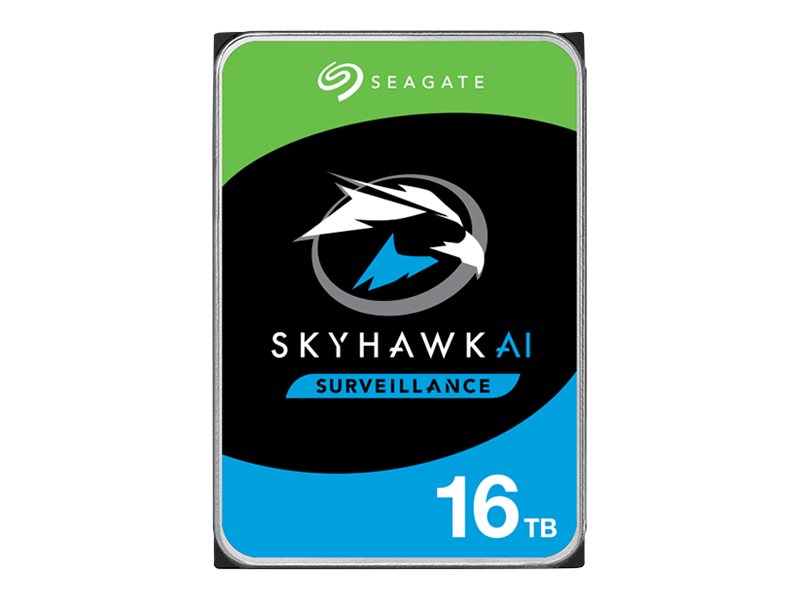
16TB HDD - Surveillance Hard Drive for DVRs & NVR
The 16TB Surveillance Hard Drive delivers purpose-built storage reliability for DVR and NVR systems running continuous 24/7 recording workloads. Designed specifically for surveillance applications rather than general desktop use, it handles the constant read/write cycles that standard HDDs are not rated for. Compatible with major DVR and NVR brands, it suits installers upgrading storage capacity on existing systems.
Why This Model
- Surveillance-rated workload: Built for always-on recording environments, meaning it handles the constant write cycles of multi-channel CCTV systems without the early failure rates of standard desktop drives.
- 16TB capacity: Stores significantly more footage before overwriting begins, reducing how often older recordings are lost - critical for sites with compliance or incident review requirements.
- Broad compatibility: Suits most major DVR and NVR recorders, making it a straightforward upgrade or replacement for installers expanding storage on existing systems.
Need help choosing?
Click to ask a question - same day response (~2 hours during business hours)
Product Overview
Model: HDD-16TB
Who This Is For
When storage capacity is the deciding factor in how far back your footage history goes, the 16TB Surveillance Hard Drive is the logical choice for installers and system owners who are either commissioning a new NVR or DVR build, or upgrading an existing recorder that has outgrown its current drive. Designed specifically for continuous 24/7 write cycles rather than the stop-start workloads of desktop or gaming drives, this drive suits multi-camera installations where high-resolution streams are being recorded around the clock. Commercial premises with 8 or more channels, warehouse and logistics sites running full-time recording, and residential properties with high-density camera counts all benefit from the headroom a 16TB drive provides. If you are specifying a recorder and want to avoid swapping drives again within a year or two, this is the capacity tier worth planning into the build from day one.
What This Drive Actually Does
Continuous Write Optimisation
Surveillance drives are built for the sustained, sequential write patterns that security recorders produce. Unlike standard desktop drives, they handle writing from multiple simultaneous camera streams without the performance degradation or premature failure that comes from using the wrong drive type in a recorder.
16TB Capacity for Extended Retention
16TB gives installations with multiple high-resolution cameras weeks rather than days of recorded history before overwriting begins. For a site running 8 cameras at 4MP with motion-triggered recording, this translates to substantially longer lookback periods compared to 4TB or 8TB drives.
DVR and NVR Compatibility
Formatted and rated for use in both DVR and NVR recorders, this drive works across analogue and IP camera systems. Before installing, confirm your recorder's maximum supported drive capacity in the unit's documentation, as some older models have per-bay limits below 16TB.
Reduces Drive Swap Frequency
Fitting the highest practical capacity drive at installation time reduces how often a site needs drive replacements or additions as camera counts or resolution settings increase. Planning for 16TB upfront is more cost-effective than returning to upgrade a drive that filled up sooner than expected.
Who Buys This Model
- CCTV Installers: Specifying the correct drive type for new NVR and DVR builds where clients expect months of footage retention across 8 to 32 channel systems.
- Commercial Property Managers: Upgrading an existing recorder that is cycling through footage too quickly due to an undersized original drive, particularly on sites with high-resolution cameras running continuous recording.
- Warehouse and Logistics Operators: Running 24/7 multi-camera coverage where a standard consumer drive would fail prematurely under the constant write load that security recording demands.
- IT Managers Overseeing Security Infrastructure: Standardising on a single high-capacity drive across multiple recorder bays to simplify inventory and maximise footage retention without adding additional bays.
Honest Assessment
This drive does exactly what a surveillance-grade HDD should - it handles the continuous, multi-stream write cycles that standard desktop or NAS drives are not rated for. Fitting a proper surveillance drive rather than a generic hard drive is one of the most practical decisions in any recorder build, and the 16TB capacity gives commercial and high-camera-count residential installs genuine footage depth. Available through Security Australia, it suits any recorder with an open 3.5-inch SATA bay and sufficient per-bay capacity support. Where this drive will not help is if your recorder has a per-bay capacity ceiling below 16TB - that is a recorder firmware or hardware limitation, not a drive issue. It is also not a substitute for RAID redundancy on critical sites; a single drive, however large, is still a single point of failure. For mission-critical recording, pair this with a recorder that supports RAID 1 or redundant storage configurations.
Before You Buy
Capacity Compatibility Check: Not all NVRs and DVRs support drives above 8TB or 10TB per bay. Before ordering, open your recorder's official specification sheet or firmware release notes and confirm the maximum single-drive capacity for each HDD bay. On some Hikvision recorders, a firmware update is required before the unit will recognise drives above a certain size - this update should be applied before the drive is installed and formatted.
Power Draw at Startup: Large-capacity surveillance drives draw higher peak current during spin-up than smaller drives. If you are adding a 16TB drive to a multi-bay recorder that is already populated with other drives, confirm the recorder's power supply is rated to handle the combined startup load. This is particularly relevant on older recorders not originally specified for high-capacity drives.
Quick Fit Check
- Good match if: Your NVR or DVR has a 3.5-inch SATA bay available and the recorder's specification confirms support for drives at or above 16TB - this drive will maximise your footage retention in a single installation step.
- Good match if: You are replacing a failed or undersized drive in an existing recorder and want to avoid returning for a capacity upgrade again in the near term - 16TB provides substantial headroom for growing camera counts or resolution upgrades.
- You may need a different model if: Your recorder has a confirmed per-bay capacity limit below 16TB - in that case, an 8TB or 10TB surveillance drive would be the appropriate choice, or you may need to consider a recorder upgrade to take advantage of this capacity tier.
Key Features & Technical Specifications
Real-World Scenarios
How It Compares
- Choose this if: Your recorder supports 16TB per bay and you want to maximise footage retention in a single drive without revisiting the storage configuration as your camera count or resolution increases.
- You may need a different model if: Your recorder's firmware or hardware limits per-bay capacity to 8TB or 10TB - fitting a smaller surveillance drive rated to that limit is the correct path rather than attempting to use a drive the recorder cannot fully address.
- Pairs well with: Any Hikvision or compatible NVR or DVR with an available 3.5-inch SATA bay and confirmed 16TB per-bay support - particularly multi-channel recorders where high camera counts and continuous recording put the most pressure on storage capacity.
Common Questions
-
Will this 16TB drive work in any NVR or DVR?
Not necessarily. While this drive uses a standard 3.5-inch SATA interface found in most recorders, compatibility depends on whether your specific recorder model supports drives up to 16TB per bay. Some recorders - particularly older or entry-level units - have per-bay limits of 6TB, 8TB, or 10TB enforced at the firmware level. Check your recorder's specification sheet before ordering. -
Does this drive work for continuous 24/7 recording?
Yes. This is a surveillance-rated drive designed specifically for continuous 24/7 write operation. Standard desktop or external hard drives are rated for much lower annual workloads and are significantly more likely to fail early when placed inside a security recorder running around the clock. -
How many days of footage will 16TB store?
It depends on your camera count, resolution, frame rate, and whether you use continuous or motion-triggered recording. As a general guide, an 8-camera system recording at 4MP with H.265 compression on motion-triggered mode can typically store 60 or more days on a 16TB drive. Continuous recording at the same resolution will reduce that figure significantly. Most NVR interfaces include a storage calculator to estimate retention for your specific configuration. -
Can I use a regular desktop hard drive instead of this surveillance drive?
Technically a desktop drive will often initialise in a recorder, but it is not recommended. Desktop drives are designed for light daily workloads and are not rated for the sustained sequential write patterns that security recording produces. Using one in a recorder significantly increases the risk of early drive failure, often voiding the drive's warranty. A purpose-built surveillance drive is the correct component for this application. -
Do I need to format the drive before installing it in my recorder?
Yes. When you install the drive and power on the recorder, the unit will prompt you to initialise and format the drive. This process is handled entirely by the recorder's interface - no separate computer or formatting tool is needed. Always allow the recorder to complete this process before beginning recording. The team at Security Australia can advise on this process if you are unsure about the steps for your specific recorder model. -
Will I need a firmware update on my Hikvision recorder to use a 16TB drive?
Possibly. Some Hikvision recorder models require a firmware update before they will recognise drives above 8TB or 10TB. This update should be applied before installing the new drive. Check the Hikvision firmware release notes for your specific recorder model and apply any available updates while the old drive is still in place, before swapping to the 16TB drive.
Downloads & Resources
No downloads available for this product.
What This Product Does
The 16TB Surveillance Hard Drive delivers purpose-built storage reliability for DVR and NVR systems running continuous 24/7 recording workloads. Designed specifically for surveillance applications rather than general desktop use, it handles the constant read/write cycles that standard HDDs are not rated for. Compatible with major DVR and NVR brands, it suits installers upgrading storage capacity on existing systems.
Why This Model
- Surveillance-rated workload: Built for always-on recording environments, meaning it handles the constant write cycles of multi-channel CCTV systems without the early failure rates of standard desktop drives.
- 16TB capacity: Stores significantly more footage before overwriting begins, reducing how often older recordings are lost - critical for sites with compliance or incident review requirements.
- Broad compatibility: Suits most major DVR and NVR recorders, making it a straightforward upgrade or replacement for installers expanding storage on existing systems.
Not sure if this suits your site?
Ask our team before ordering. We can help confirm lens choice, recorder compatibility, mounting accessories and project quantities.
Get Product Help
Ask our team before ordering. We can help confirm lens choice, recorder compatibility, mounting accessories and project quantities.
Shipping & Warranty
3 Years Manufacturer Warranty
All IP cameras and recording devices (NVR’s/DVR’s) are covered by a 3 year back-to-base manufacturer warranty.
Our warranty is limited to the replacement of faulty items or parts and does not include damage due to incorrect fitting of parts or accessories, or damage due to mishandling the equipment once out of the box. All faults are sent to the manufacturer for inspection and diagnosis before a replacement is sent out.
Read more about the Terms & Conditions here – https://www.securityaustralia.com.au/terms-and-conditions/
Free Delivery* & Despatch Time
*Just spend over $200 to activate Fast Free Shipping!
Despatch Times: Products are despatched on the same day if the order was placed before 11am on any weekday, Monday - Friday. All other orders are processed and despatched within 24 hours or next business day.
Order Confirmation: Once you place an order, you will receive a confirmation email. This indicates that your order has been received in our system and is now being processed for dispatch. If your item is back-ordered or unavailable, we will notify you via email, and if we do not receive a response, we will attempt to contact you by phone as soon as possible. We value your time and strive to be prompt. If your item(s) are available for immediate shipment (within 2 days), we will process the charges and prepare the order for shipping.
Shipping Times: General shipping times for StarTrack, TNT and Allied couriers are between 1-3 working days from despatch. Longer delivery times may be caused by your package being held at your local courier depot that is beyond our control. Please contact us or the local post depot for confirmation.
Tracking Numbers: all tracking numbers will be emailed to you by our warehouse processing team within the day, after your order is despatched to our local courier.

Get expert advice
Tell us what you need help with and our team will send practical product advice straight to your inbox.

16TB HDD - Surveillance Hard Drive for DVRs & NVR