


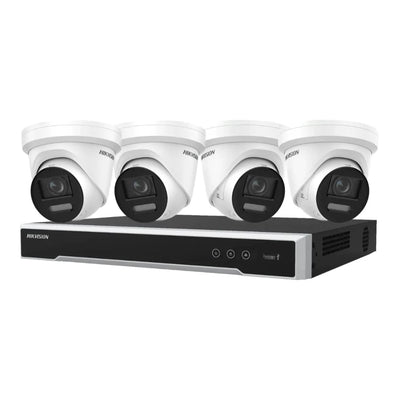



Hikvision NS-0318P-130(B) 16Port 100 Mbps Long-Range PoE Unmanaged Switch with Gigabit Uplink & 250m Extend Mode
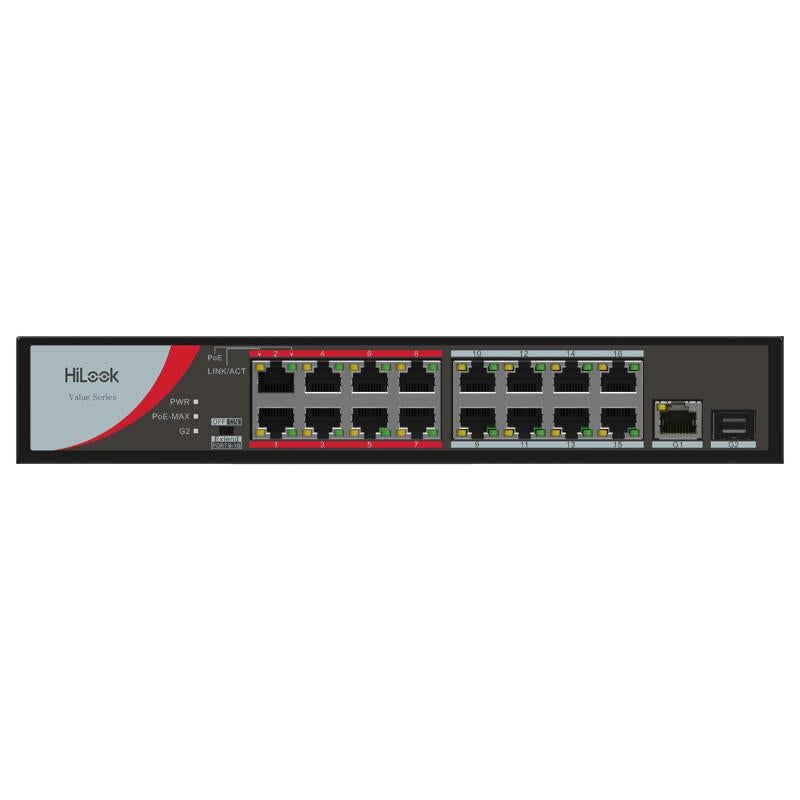
When a long cable run rules out standard PoE switches, the HiLook NS-0318P-130(B) delivers reliable power and data across distances up to 250m in Extend Mode - making it well suited to large yards, warehouses, or perimeter installations where cameras can't be positioned close to the network cabinet. It provides 16 PoE ports plus 2 Gigabit uplink ports in an unmanaged plug-and-play design, so no configuration is required.
Why This Model
- 250m Extend Mode: Pushes PoE and data up to 250m over a single Cat5e/6 cable, removing the need for additional switches or media converters on long perimeter runs.
- 16 PoE ports: Supports a full 16-camera installation from a single unmanaged switch, keeping wiring centralised and infrastructure costs down.
- Plug-and-play operation: No software, login, or VLAN configuration required - power it on and it works, which saves time on straightforward camera installs.
Need help choosing?
Click to ask a question - same day response (~2 hours during business hours)
Product Overview
Model: NS-0318P-130(B)
Who This Is For
When cable run length is the priority and standard PoE switches keep falling short, the Hikvision NS-0318P-130(B) addresses the problem directly. Installers running cameras to distant corners of a car park, along fence lines at industrial sites, or across large warehouse floors often hit the 100-metre Ethernet wall. This 16-port unmanaged PoE switch solves that with a dedicated 250m Extend Mode, pushing data and power to cameras that would otherwise need a mid-span injector or secondary switch. With 16 PoE ports delivering up to 130W across the switch and Gigabit uplink connectivity back to the NVR or core network, it suits security integrators and self-installing business owners who need a straightforward, no-configuration solution for mid-to-large camera deployments where long cable runs are unavoidable.
What This Switch Actually Does
250m Extend Mode
Activating Extend Mode drops port speed to 10 Mbps and reduces PoE output to extend the usable cable run to 250 metres on standard Cat5e or Cat6. Practical for cameras mounted at gatehouse entries, far corners of car parks, or remote outbuildings where re-cabling is not an option.
16 PoE Ports, Single Cable Per Camera
Each of the 16 downstream ports delivers both data and power over a single Cat cable, eliminating the need for separate power supplies at each camera location. This simplifies the installation considerably on multi-camera jobs where running power cabling independently adds labour and cost.
130W Total PoE Budget
The switch manages a shared 130W PoE budget across all active ports. For a deployment of standard IP cameras drawing 6-10W each, this comfortably supports 13 to 16 cameras simultaneously. Plan your camera wattage totals before connecting all ports to avoid the switch throttling power to individual devices.
Gigabit Uplink Port
The Gigabit uplink connects this switch back to your NVR, router, or core network switch at full 1000 Mbps speed. Even with 16 cameras streaming simultaneously, the uplink avoids becoming the bottleneck - important on high-resolution deployments where aggregate bandwidth can add up quickly.
Unmanaged - Zero Configuration
Being unmanaged means there is no login, no VLAN setup, and no firmware interface to navigate. Plug in power, connect cameras, connect the uplink - the switch handles the rest. This suits installers who want a fast, repeatable deployment without network administration overhead on smaller standalone systems.
Watchdog / Auto-Recovery Function
The switch monitors connected PoE devices and can automatically cycle power to a port if a camera becomes unresponsive - the equivalent of remotely rebooting a frozen camera without visiting the site. For cameras mounted at height or in difficult-access locations, this reduces unnecessary callouts.
Who Buys This Model
- Security integrators on commercial sites: Installers fitting 8-16 cameras across warehouses, factories, or retail centres use this switch to centralise PoE and avoid running separate power cabling to each camera position.
- Rural and large-property installers: Properties where cameras cover long driveways, machinery sheds, or distant outbuildings benefit directly from the 250m Extend Mode, avoiding the need for an additional switch or injector mid-run.
- Self-installing business owners building a 16-channel NVR system: Buyers pairing this with a 16-channel NVR and a full set of cameras get a clean, single-switch solution that powers and connects every camera from one centralised location.
- Installers upgrading an existing system: Sites that have outgrown an 8-port switch and need to add cameras without pulling new power cabling use this switch to expand their PoE capacity while reusing existing Cat cable runs.
Honest Assessment
The NS-0318P-130(B) does two things well: it provides 16 ready-to-use PoE ports for camera deployments without any configuration requirement, and it solves the common long-run problem with a 250m Extend Mode that most standard switches do not offer. The Gigabit uplink and built-in PoE watchdog add practical value on real installations. The 130W shared PoE budget is adequate for a full deployment of standard cameras, though anyone mixing in higher-draw devices like PTZ cameras with heaters will need to calculate totals carefully and may find headroom tighter than expected. As an unmanaged switch, it offers no VLAN isolation, no per-port monitoring, and no remote management console - for sites that need network segmentation or detailed traffic control, a managed switch is the more appropriate tool. Available through Security Australia, this model suits straightforward camera-only PoE deployments where simplicity and long-run capability matter more than network management features.
Before You Buy
PoE Budget Planning: Add up the maximum wattage draw of every camera you plan to connect before purchasing. The switch provides a shared 130W across all 16 ports. If your camera list exceeds that total - common when mixing PTZ cameras, cameras with built-in heaters, or IR cameras with high wattage ratings - you will need either a higher-budget switch or a second switch to split the load. Check each camera's PoE consumption figure on its datasheet, not just its standard operating wattage.
Extend Mode Trade-Off: The 250m Extend Mode reduces port speed to 10 Mbps per port while active. For a single-stream fixed camera at standard resolution this is generally sufficient, but it is not suitable for high-bitrate 4K cameras or cameras set to record high frame-rate streams. If you are mixing long-run cameras with high-resolution cameras on the same switch, plan which ports will operate in standard mode and which in Extend Mode before committing cable runs.
Quick Fit Check
- Good match if: You are deploying up to 16 IP cameras from a single central location and want to power and connect all of them over Cat cable without separate power supplies or complex switch configuration.
- Good match if: One or more cameras need to be located more than 100 metres from the switch, and you want to extend those runs to up to 250 metres without installing a secondary switch or mid-span injector mid-run.
- You may need a different model if: Your installation requires VLAN segmentation, per-port bandwidth control, remote switch management, or the ability to isolate camera traffic from other network devices - a managed PoE switch would be the more appropriate product type for those requirements.
Key Features & Technical Specifications
Real-World Scenarios
How It Compares
- Choose this if: You need 16 PoE ports in a single unmanaged switch with the specific ability to extend individual camera runs beyond the standard 100-metre Ethernet limit, without adding configuration complexity.
- You may need a different model if: Your site requires VLAN segmentation, per-port traffic monitoring, bandwidth prioritisation, or remote switch management - a managed PoE switch is the appropriate product type for those requirements and is worth comparing before committing.
- Pairs well with: A 16-channel NVR and a full set of 100 Mbps PoE IP cameras where all cameras will be powered and connected from a single centralised switch location.
Common Questions
-
Does the 250m Extend Mode work automatically or does it need to be manually switched on?
Extend Mode typically needs to be activated, either via a physical DIP switch on the unit or a dedicated button depending on the hardware revision. It is not applied automatically on a per-port basis. Check the physical switch or button on the unit before cabling - running cameras in standard mode on long cable runs will produce a degraded or dropped connection, not a warning light. -
Will this switch work with cameras from brands other than Hikvision?
Yes. The NS-0318P-130(B) uses standard IEEE 802.3af and 802.3at PoE, which is compatible with any compliant IP camera regardless of brand. The PoE watchdog function may be less effective with non-Hikvision devices if it relies on proprietary ping behaviour, but basic power and data delivery will operate normally with any standards-compliant camera. -
Can I connect this switch to a router or existing network alongside other devices?
Yes, via the Gigabit uplink port. However, because this is an unmanaged switch, all camera traffic will share the same network segment as any other devices on that uplink. There is no ability to create VLANs or isolate camera traffic. If network segmentation is a requirement for your site, a managed switch is needed instead. -
What happens if my total camera wattage exceeds the 130W PoE budget?
The switch will prioritise lower-numbered ports and throttle or cut power to higher-numbered ports once the 130W ceiling is reached. Cameras on those ports will lose power and drop off the network. Calculate your camera wattage totals before installing - if your deployment exceeds 130W, either use lower-draw cameras or split the load across 2 switches. The team at Security Australia can assist with PoE budget calculations if needed. -
Will this support 4K or high-bitrate cameras in Extend Mode?
No. Extend Mode drops each port to 10 Mbps, which is insufficient for 4K cameras typically requiring 8-16 Mbps per stream, especially at higher frame rates. Extend Mode is suited to standard-resolution fixed cameras with moderate bitrate settings. If you need long runs for high-resolution cameras, consider managed fibre infrastructure or a shorter cable run at standard 100 Mbps mode instead. -
Does the PoE watchdog require any setup or does it run automatically once connected?
The watchdog function runs automatically on an unmanaged switch - there is no configuration interface to set it up. It monitors connected PoE devices and cycles port power when a device becomes unresponsive for a set period. No user action is required, which is one of the practical advantages of this feature on an unmanaged platform.
Downloads & Resources
No downloads available for this product.
What This Product Does
When a long cable run rules out standard PoE switches, the HiLook NS-0318P-130(B) delivers reliable power and data across distances up to 250m in Extend Mode - making it well suited to large yards, warehouses, or perimeter installations where cameras can't be positioned close to the network cabinet. It provides 16 PoE ports plus 2 Gigabit uplink ports in an unmanaged plug-and-play design, so no configuration is required.
Why This Model
- 250m Extend Mode: Pushes PoE and data up to 250m over a single Cat5e/6 cable, removing the need for additional switches or media converters on long perimeter runs.
- 16 PoE ports: Supports a full 16-camera installation from a single unmanaged switch, keeping wiring centralised and infrastructure costs down.
- Plug-and-play operation: No software, login, or VLAN configuration required - power it on and it works, which saves time on straightforward camera installs.
Not sure if this suits your site?
Ask our team before ordering. We can help confirm lens choice, recorder compatibility, mounting accessories and project quantities.
Downloads
Get Product Help
Ask our team before ordering. We can help confirm lens choice, recorder compatibility, mounting accessories and project quantities.
Shipping & Warranty
3 Years Manufacturer Warranty
All IP cameras and recording devices (NVR’s/DVR’s) are covered by a 3 year back-to-base manufacturer warranty.
Our warranty is limited to the replacement of faulty items or parts and does not include damage due to incorrect fitting of parts or accessories, or damage due to mishandling the equipment once out of the box. All faults are sent to the manufacturer for inspection and diagnosis before a replacement is sent out.
Read more about the Terms & Conditions here – https://www.securityaustralia.com.au/terms-and-conditions/
Free Delivery* & Despatch Time
*Just spend over $200 to activate Fast Free Shipping!
Despatch Times: Products are despatched on the same day if the order was placed before 11am on any weekday, Monday - Friday. All other orders are processed and despatched within 24 hours or next business day.
Order Confirmation: Once you place an order, you will receive a confirmation email. This indicates that your order has been received in our system and is now being processed for dispatch. If your item is back-ordered or unavailable, we will notify you via email, and if we do not receive a response, we will attempt to contact you by phone as soon as possible. We value your time and strive to be prompt. If your item(s) are available for immediate shipment (within 2 days), we will process the charges and prepare the order for shipping.
Shipping Times: General shipping times for StarTrack, TNT and Allied couriers are between 1-3 working days from despatch. Longer delivery times may be caused by your package being held at your local courier depot that is beyond our control. Please contact us or the local post depot for confirmation.
Tracking Numbers: all tracking numbers will be emailed to you by our warehouse processing team within the day, after your order is despatched to our local courier.

Get expert advice
Tell us what you need help with and our team will send practical product advice straight to your inbox.
Hikvision NS-0318P-130(B) 16Port 100 Mbps Long-Range PoE Unmanaged Switch with Gigabit Uplink & 250m Extend Mode