





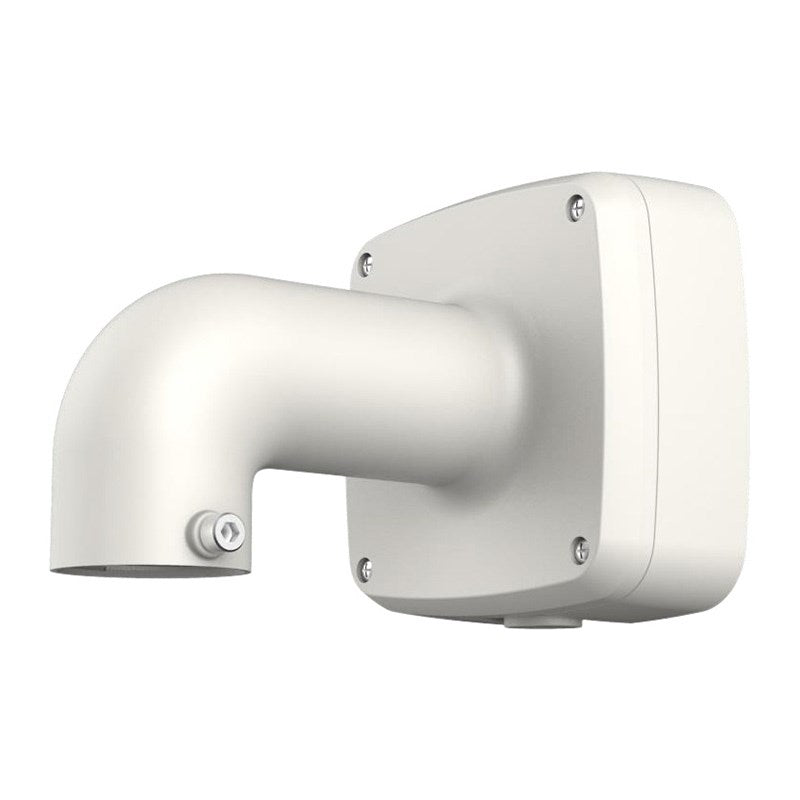
Dahua DHU13789 - PFB302S Wall Bracket with Integrated Junction Box
Why This Model
- Integrated junction box: Cables are routed and concealed within the bracket itself, eliminating the need for a separate back box and giving installations a neat, professional finish.
- Simplified single-unit installation: Combining bracket and junction box into one component reduces parts count and speeds up mounting on walls or ceilings.
- Dahua compatibility: Engineered to pair with Dahua dome and eyeball camera ranges, ensuring correct fit and alignment without modification.
Need help choosing?
Click to ask a question - same day response (~2 hours during business hours)
Product Overview
Model: DH-PFB302S
Who This Is For
For installers who need a clean, professional wall-mount finish without a visible cable entry point, the Dahua PFB302S Wall Bracket with Integrated Junction Box solves a common on-site problem. When surface-run cabling needs to terminate neatly behind a dome or turret camera - whether on rendered brick, tilt-slab concrete, or timber cladding - this bracket combines the mounting base and junction box into a single unit. That removes the need to source a separate back box, reduces parts on the van, and means the finished install looks deliberate rather than patched together. It suits residential eave installations, small commercial fascias, and anywhere the camera cable exits the wall rather than dropping from the ceiling. Tradespeople and security integrators running structured cabling projects will find this bracket particularly useful for maintaining a consistent, tidy appearance across a multi-camera site.
What This Bracket Actually Does
Integrated Junction Box
The bracket body doubles as a cable termination point, so the connection between your wall cable and the camera tail sits enclosed inside the mount. No exposed joins, no separate back box required, and no visible cable loops hanging below the camera.
Wall-Mount Configuration
Designed for direct wall and fascia mounting, this bracket positions a compatible Dahua camera to face outward from a vertical surface. It suits side-wall installations on buildings where ceiling or soffit mounting is not practical or accessible.
Reduces Parts Count
Combining bracket and junction box into one component means fewer separate parts to order, transport, and install. On multi-camera projects this simplifies procurement and keeps installation labour consistent across every camera position.
Professional Finished Appearance
The enclosed design keeps cabling out of sight from the front of the installation. For client-facing sites such as retail shopfronts, offices, or residential builds, this delivers a finish that looks like a purpose-built installation rather than a field adaptation.
Who Buys This Model
- Security Installers on Multi-Camera Projects: Tradespeople who want a consistent mounting solution across every wall-mounted camera position without sourcing separate back boxes for each run.
- Residential Builders and Integrators: Installers fitting Dahua cameras to rendered or brick external walls where surface-run cable needs to terminate cleanly before connecting to the camera.
- Commercial Fit-Out Teams: Contractors on retail, office, or warehouse projects where the client expects a tidy finished result and exposed cabling junctions are not acceptable.
- DIY Installers Upgrading an Existing System: Owners adding a wall-mount position to an existing Dahua setup who want the camera to sit flush and professional against the building exterior.
Honest Assessment
The PFB302S does one job and does it well: it gets a Dahua camera onto a wall surface with cabling contained and the finished result looking intentional. The integrated junction box is a genuine time-saver on installations where you would otherwise need to fit a separate wall plate or surface-mount back box before the bracket goes on. For installers running Cat5e or Cat6 from inside the wall cavity, this is a straightforward, low-fuss solution. What it will not do is suit every camera in the Dahua range - confirm compatibility with your specific camera model before ordering. It is also a wall-mount design only; if you need ceiling, pole, or corner mounting, a different bracket type from the Dahua accessories range stocked by Security Australia will be the better fit. Do not expect it to add any degree of camera angle adjustment beyond what the camera head itself provides.
Before You Buy
Compatibility Check: The PFB302S is designed for specific Dahua camera models - not all Dahua domes and turrets share the same base thread or footprint. Before purchasing, verify the bracket is listed as compatible with your intended camera model. Check the mounting hole pattern and base diameter against your camera's specifications. If your cable exits from the ceiling rather than the wall, a ceiling-mount or flush-mount bracket will serve the installation better.
Quick Fit Check
- Good match if: You are mounting a compatible Dahua camera to a vertical wall surface and want cabling to enter from behind the bracket without a separate junction box.
- Good match if: You are running a multi-camera installation and want a uniform, professional mounting solution that reduces the number of individual components required per camera position.
- You may need a different model if: Your installation calls for ceiling mounting, corner mounting, or pole mounting - in those cases, a purpose-built bracket type from the Dahua accessories range will be more suitable.
Key Features & Technical Specifications
Real-World Scenarios
How It Compares
- Choose this if: Your cable exits from the wall and you want to contain the junction and mount the camera in a single bracket without sourcing a separate back box.
- You may need a different model if: Your installation requires ceiling mounting, corner mounting, or pole mounting - a bracket type designed specifically for those configurations will give a better structural and aesthetic result.
- Pairs well with: Compatible Dahua dome or turret cameras mounted to external or internal wall surfaces on residential and light commercial projects.
Common Questions
-
Does this bracket work with all Dahua cameras?
No. The PFB302S is compatible with selected Dahua dome and turret camera models, not the entire range. Before ordering, confirm that your specific camera model lists the PFB302S as a supported accessory. Mounting thread size and base footprint vary across the Dahua lineup, and using a mismatched bracket can affect both the structural integrity of the mount and the cable routing inside the junction box. -
Do I still need a separate back box or electrical mounting box?
No. The junction box is integrated into the bracket body. The PFB302S is designed to eliminate the need for a separate surface-mount back box by combining both functions into one unit. Your cable enters from the rear through the wall penetration, terminates inside the bracket, and connects to the camera above - all within the one component. -
Will this bracket suit an outdoor installation?
Yes, provided the camera itself is rated for outdoor use. The PFB302S is a mounting and cable management accessory and is commonly used in outdoor wall-mount applications. The enclosed junction box helps protect the cable connection from incidental contact, though the primary weatherproofing of the overall installation comes from the camera's own IP rating rather than the bracket. -
Can I use this bracket on a rendered or tilt-slab concrete wall?
Yes. The PFB302S mounts to any solid vertical surface using the bracket's fixing holes. On rendered or concrete surfaces, use appropriate masonry anchors for the fixing points. Ensure the cable penetration through the wall is sealed after installation to prevent moisture ingress behind the bracket. -
Where can I confirm which Dahua cameras this bracket is compatible with?
The compatibility list for the PFB302S is available through Security Australia's product listing and through the Dahua accessory selector tool on the Dahua Technology website. Cross-reference the camera model's datasheet - it will list supported mounting accessories including specific bracket model numbers. -
Does this bracket provide any angle adjustment for the camera?
No. The PFB302S is a fixed wall-mount bracket. It positions the camera perpendicular to the mounting surface. Any field-of-view adjustment must come from the camera head's own tilt and pan range. If your installation requires a specific downward angle or off-axis view that the camera head alone cannot achieve, a tiltable or articulating bracket type would be more appropriate.
Downloads & Resources
No downloads available for this product.
What This Product Does
Why This Model
- Integrated junction box: Cables are routed and concealed within the bracket itself, eliminating the need for a separate back box and giving installations a neat, professional finish.
- Simplified single-unit installation: Combining bracket and junction box into one component reduces parts count and speeds up mounting on walls or ceilings.
- Dahua compatibility: Engineered to pair with Dahua dome and eyeball camera ranges, ensuring correct fit and alignment without modification.
Not sure if this suits your site?
Ask our team before ordering. We can help confirm lens choice, recorder compatibility, mounting accessories and project quantities.
Downloads
Get Product Help
Ask our team before ordering. We can help confirm lens choice, recorder compatibility, mounting accessories and project quantities.
Shipping & Warranty
3 Years Manufacturer Warranty
All IP cameras and recording devices (NVR’s/DVR’s) are covered by a 3 year back-to-base manufacturer warranty.
Our warranty is limited to the replacement of faulty items or parts and does not include damage due to incorrect fitting of parts or accessories, or damage due to mishandling the equipment once out of the box. All faults are sent to the manufacturer for inspection and diagnosis before a replacement is sent out.
Read more about the Terms & Conditions here – https://www.securityaustralia.com.au/terms-and-conditions/
Free Delivery* & Despatch Time
*Just spend over $200 to activate Fast Free Shipping!
Despatch Times: Products are despatched on the same day if the order was placed before 11am on any weekday, Monday - Friday. All other orders are processed and despatched within 24 hours or next business day.
Order Confirmation: Once you place an order, you will receive a confirmation email. This indicates that your order has been received in our system and is now being processed for dispatch. If your item is back-ordered or unavailable, we will notify you via email, and if we do not receive a response, we will attempt to contact you by phone as soon as possible. We value your time and strive to be prompt. If your item(s) are available for immediate shipment (within 2 days), we will process the charges and prepare the order for shipping.
Shipping Times: General shipping times for StarTrack, TNT and Allied couriers are between 1-3 working days from despatch. Longer delivery times may be caused by your package being held at your local courier depot that is beyond our control. Please contact us or the local post depot for confirmation.
Tracking Numbers: all tracking numbers will be emailed to you by our warehouse processing team within the day, after your order is despatched to our local courier.

Get expert advice
Tell us what you need help with and our team will send practical product advice straight to your inbox.
Dahua DHU13789 - PFB302S Wall Bracket with Integrated Junction Box